
A cold outreach campaign is only as good as the addresses behind it. If the work email is wrong, the message bounces and your sender reputation takes the hit. The prospect you spent time researching never sees a word. Finding a real, current work email, and confirming it will actually deliver, is the quiet first step every reply depends on.
The trouble is that no two email finders return the same result on the same person. The free trial always looks better than the production run. So how do you know which one will actually land the address you need?
We compared 10 of the most widely used email finder tools on find rate, verification quality, coverage, and price. We judged them on the emails they return rather than the accuracy numbers on their homepages. One truth ran through all of it: no single database has everyone's email. The teams that hit the highest deliverability check several sources and verify before they ever hit send.
Here's the shortlist, then a closer look at each tool.
What is an email finder tool?
An email finder tool takes what you know about a person, usually a name and a company or a LinkedIn profile, and returns their work email address. Good ones do two jobs, not one: they find the address, then verify it is deliverable so it does not bounce. The concept that separates the strong tools from the weak is the source behind the match. A tool tied to a single database misses whoever it does not have, while one that checks several sources and confirms the result at the point of use gets far closer to a usable list.
The 10 best email finder tools for 2026
| # | Tool | Best for | Pricing from | G2 rating |
|---|---|---|---|---|
| 1 | Clay | Waterfall email finding plus verification | Free, paid from $185/mo | 4.6/5 |
| 2 | Apollo.io | All-in-one finding and outreach | Free, paid from $49/user/mo | 4.7/5 |
| 3 | RocketReach | Emails and dials across a huge database | Free, paid from $33/user/mo | 4.4/5 |
| 4 | Hunter | Domain search and email verification | Free, paid from $34/mo | 4.4/5 |
| 5 | Snov.io | Finding plus built-in drip campaigns | Free, paid from $39/mo | 4.5/5 |
| 6 | Skrapp.io | LinkedIn email finding for sales teams | Free, paid from $49/mo | 4.4/5 |
| 7 | Prospeo | High-accuracy LinkedIn email finding | Free, paid from $39/mo | 4.6/5 |
| 8 | VoilaNorbert | Simple name-and-domain lookups | Free, paid from $39/mo | 4.6/5 |
| 9 | Findymail | Verified-only emails for outbound | Free trial, paid from $49/mo | 4.9/5 |
| 10 | Dropcontact | GDPR-safe European email finding | Paid from about €24/mo | 4.5/5 |
1. Clay
- Best forteams that want the highest find rate, from a waterfall of 200+ email providers, with verification in the same step
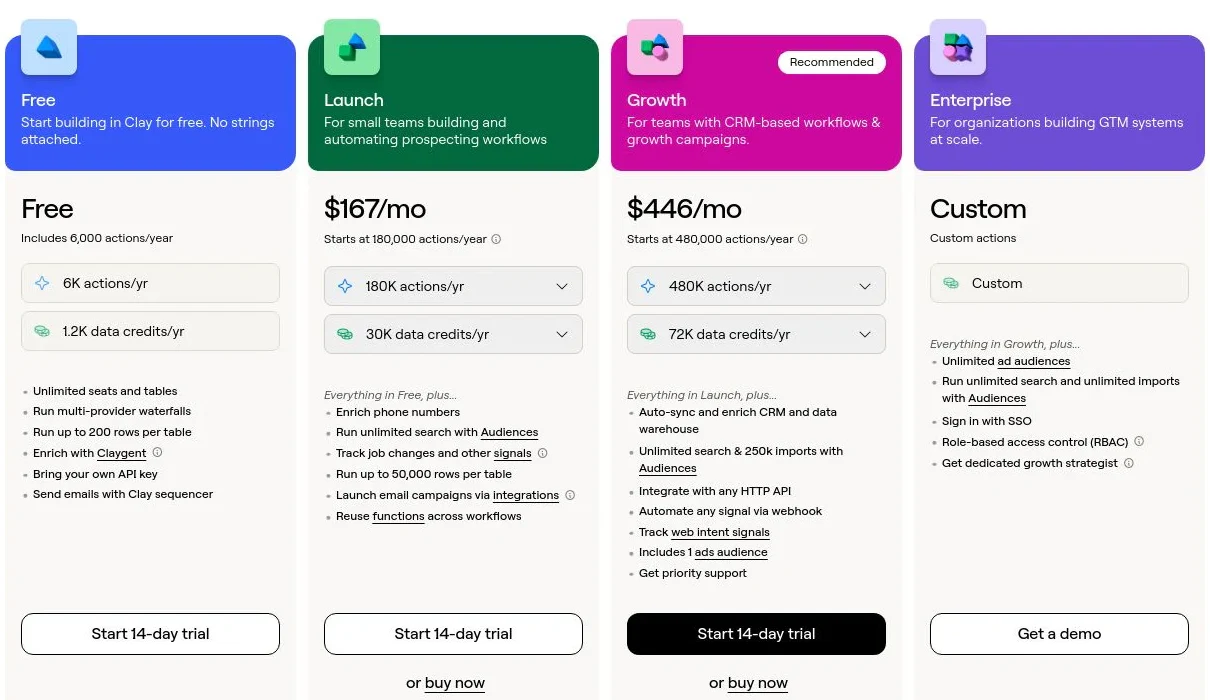
- PricingFree plan, then Launch ($185/mo), Growth ($495/mo), and custom Enterprise
- What we likea waterfall of 200+ email providers finds the address any single finder misses, then verifies it before it reaches your sequence
Full disclosure: Clay is our product, and we put it first. Finding and verifying work emails is one of the most common things teams build on Clay. Here's what it does well and where it doesn't fit.
Clay treats email finding as a waterfall instead of a single lookup. You hand it a name and company (or a LinkedIn URL), and it runs 200+ email providers in sequence, stopping at the first one that returns a match, so a miss with Hunter becomes a hit with the next source and you pay once per found address. Verification runs in the same flow, so catch-all and risky addresses get flagged before they ever hit a send. On top of that, Claygent, an AI research agent, can confirm the person still works there or find the right contact when you only have a company, and Signals catch job changes so your list does not quietly rot. The finished, verified record syncs to Salesforce or HubSpot and re-runs as data changes.
Find the email your finder missed
Run a 200+ source waterfall and verify every address against your own list, free.
What we like about Clay
- Waterfall across 200+ email providers, so you get the best available match and pay once per found address
- Verification runs in the same step, so catch-all and risky emails are flagged before you send
- Claygent confirms a person is still at the company or finds the right contact from just a domain
- Signals catch job changes so a verified list stays verified
- Writes clean, deliverable contacts back to Salesforce and HubSpot and re-runs them as data changes
Where Clay could be better
- You assemble the find-and-verify workflow yourself; there's no single "get this email" button like a one-click extension
- Getting provider order and fallbacks tuned takes a little setup before find rates peak
- Data Credits are usage-based, so a large one-time list build needs a quick spend check
- It's a data layer with a sequencer, not a dedicated deliverability suite for warming inboxes
Why choose Clay? Every other tool queries one email database; Clay runs 200+ in sequence and verifies the winner, so you catch the addresses a single finder would have left blank.
Proof. Rippling reached 2x cold email performance building on Clay.
Clay pricing
- Free: $0/mo with 100 Data Credits, 500 Actions, unlimited seats and tables, multi-provider waterfalls, and Claygent
- Launch: starting at $185/mo with 2,500 Data Credits, 15,000 Actions, phone enrichment, and signal tracking
- Growth: starting at $495/mo with 6,000 Data Credits, 40,000 Actions, CRM auto-sync, and ads-audience pushes
- Enterprise: custom pricing with an annual commitment, 100,000+ Data Credits, unlimited Audiences, API access, SSO, and RBAC
Data Credits pay for the data itself and roll over; Actions pay for the platform work and reset monthly. Bring your own API keys and you skip Data Credits entirely. See Clay's pricing page for the full breakdown.
Clay reviews
- G2: 4.6/5 from 200+ reviews (G2)
2. Apollo.io
- Best forSMB and mid-market teams that want to find emails and send from the same tool
- Pricingfree plan, then paid tiers from $49/user/mo (annual)
- What we likea large contact database with email finding, verification, and sequences in one place
Apollo pairs a big B2B contact database with a sending engine, so you can find an email and start a sequence without switching tools. Its Chrome extension pulls addresses off LinkedIn, and the built-in verifier scores each one before you add it to a campaign, which is why so many founders and small teams treat it as their first outbound stack.
The single-database model is the limit. Apollo returns whatever its own data holds, so find rates and accuracy vary by region and seniority, and because it also sends, deliverability rides on your own list hygiene rather than the tool alone.
What we like about Apollo.io
- Email finding, verification, and outreach sequences in one platform
- Chrome extension grabs emails straight off LinkedIn
- A genuinely usable free tier to test find rates
- Accessible per-seat pricing and solid CRM sync
Where Apollo.io could be better
- One database, so an address it doesn't have is simply a blank
- Find rate and accuracy thin out outside North America and on senior titles
- Deliverability depends on your own sending discipline since Apollo also sends
Why choose Apollo.io? The best value if you want finding, verification, and sending under one login instead of stitching tools together.
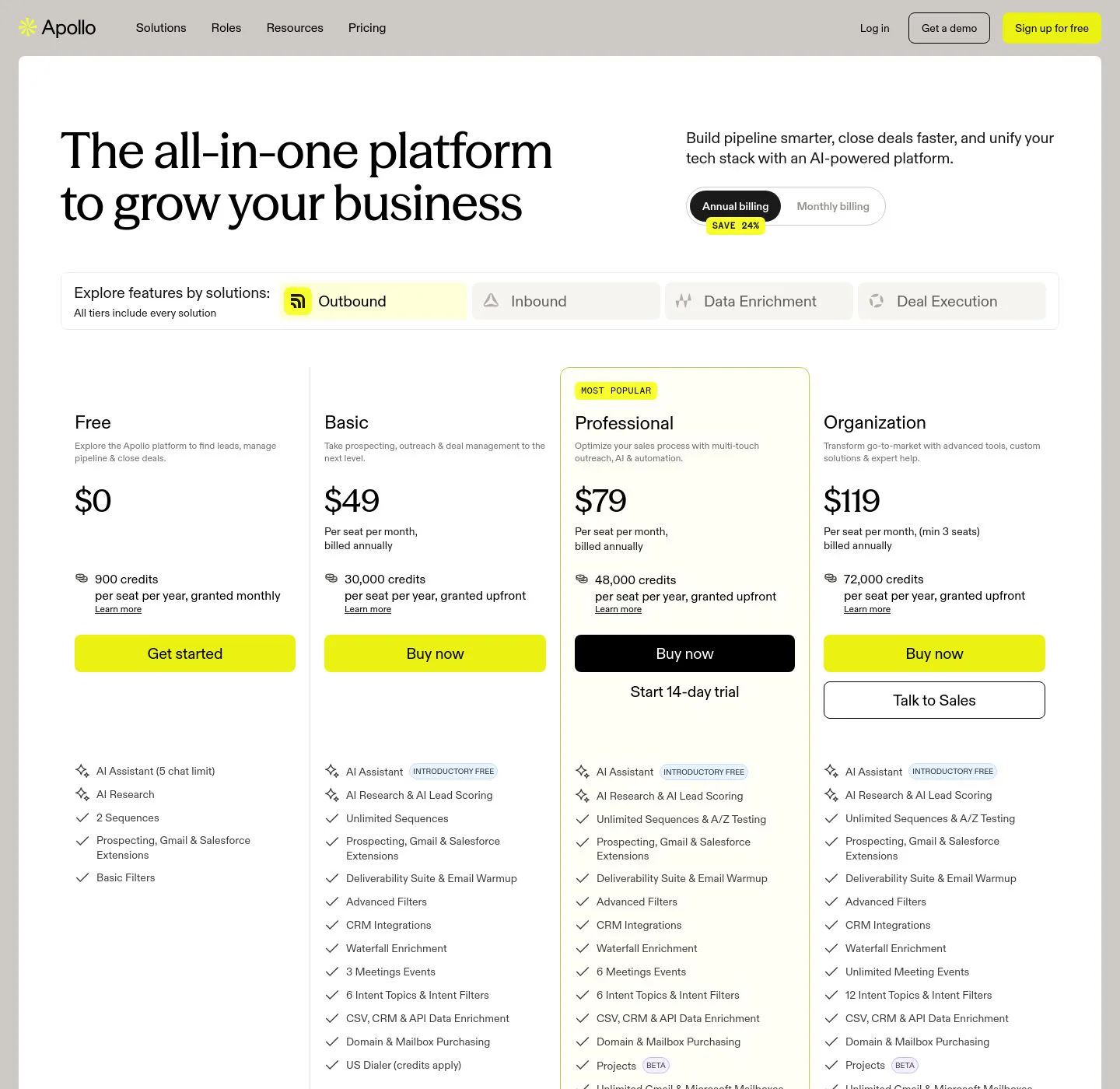
Apollo.io pricing
- Free: $0 with limited credits and core prospecting
- Basic: $49/user/mo (annual) with more credits and sequences
- Professional: $79/user/mo (annual) with advanced features and higher limits
- Organization: $119/user/mo (annual, 3-seat minimum) with the full feature set
Monthly billing runs 15 to 25 percent higher than the annual rates shown. See Apollo's pricing page for current limits.
Apollo.io reviews
- G2: 4.7/5 from 9,000+ reviews (G2)
3. RocketReach
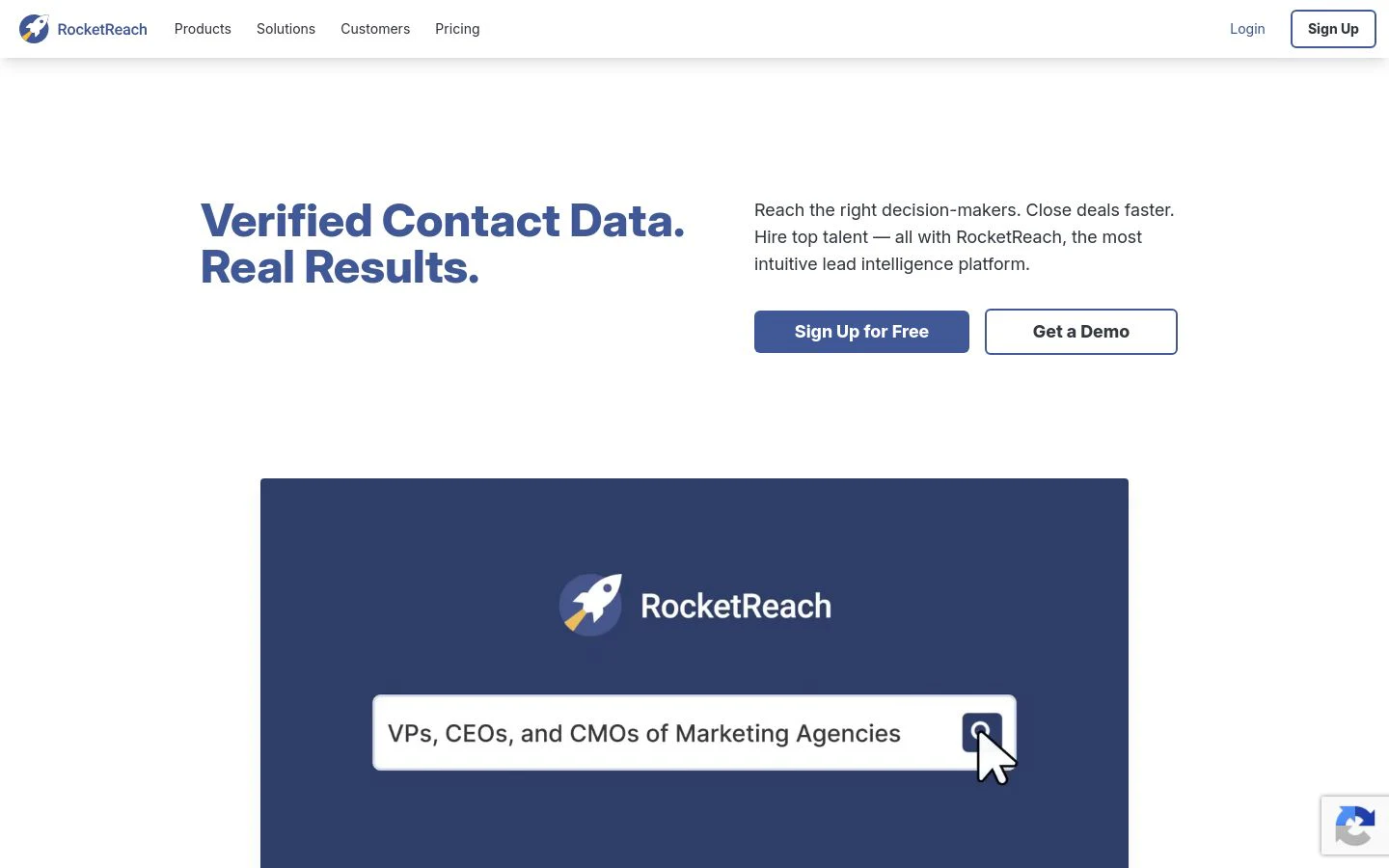
- Best forfinding verified emails and direct dials across a very large contact database
- Pricingfree plan, then paid tiers from $33/user/mo (annual)
- What we likedeep coverage of people and companies with both email and phone in one lookup
RocketReach searches across a database it reports at hundreds of millions of professionals, so it tends to return something on people other finders miss, executives and hard-to-reach titles included. A single lookup can surface a work email, a personal email, and a direct dial, and the Chrome extension plus bulk and API access make it easy to work from LinkedIn or a list.
Because it leans on one large index, quality varies from record to record. Some emails come back current and verified, others are stale, so treat verification as a required second step rather than an assumption.
What we like about RocketReach
- Very broad coverage of people and companies, including senior titles
- Returns email and phone from a single lookup
- Chrome extension, bulk lookups, and API for list work
- CRM integrations to Salesforce, HubSpot, and Outreach on higher tiers
Where RocketReach could be better
- Accuracy varies by record, so verify before you send
- Lookups are annualized, which makes short bursts of use awkward
- Phone data and API sit behind the pricier tiers
Why choose RocketReach? The pick when raw coverage matters most and you need an email or a dial for someone the smaller finders can't reach.
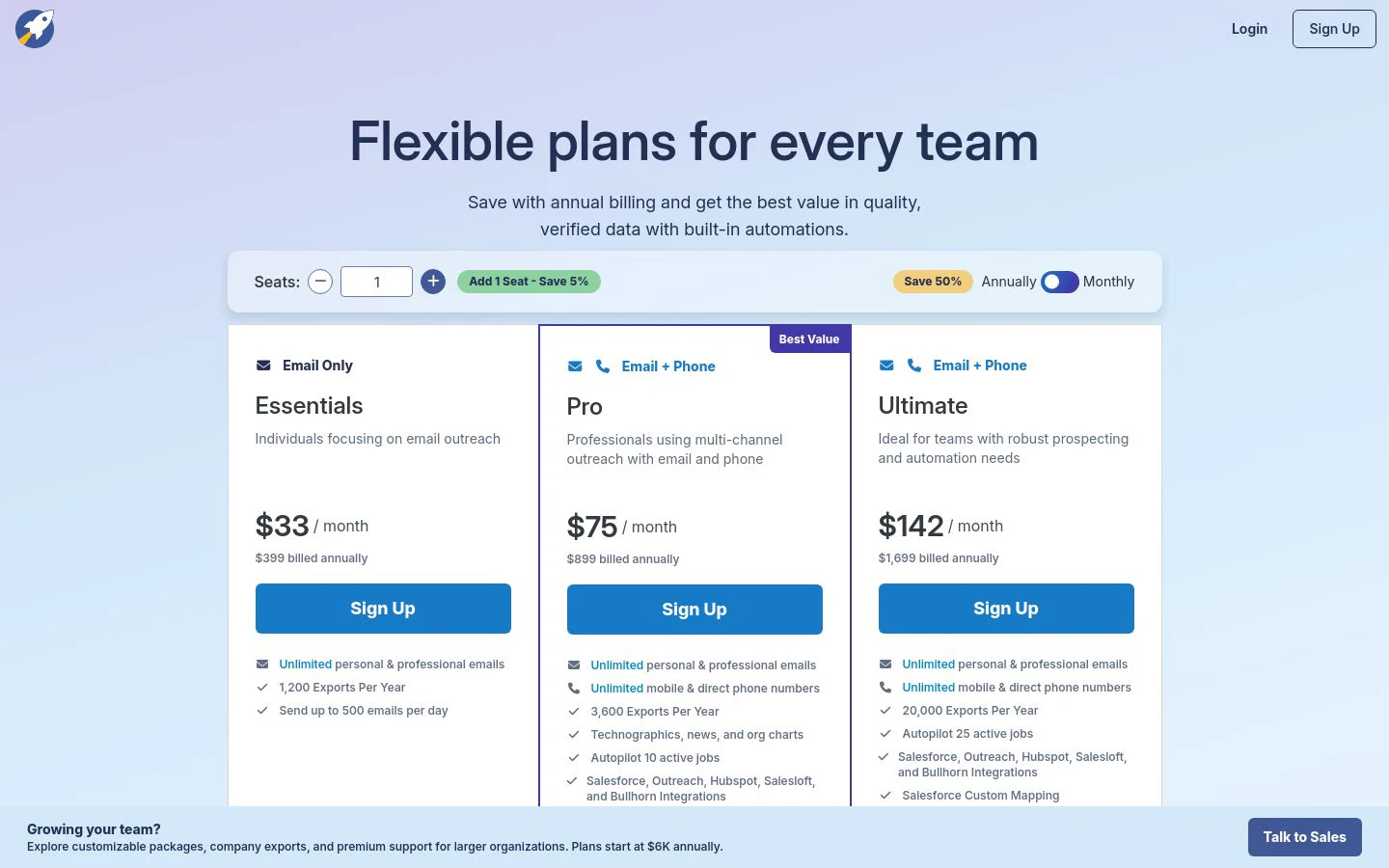
RocketReach pricing
- Free: 5 lookups per month, email only
- Essentials: from $33/user/mo (annual) for 1,200 lookups a year, email only
- Pro: from $83/user/mo (annual) for 3,600 lookups a year, with phone numbers and CRM integrations
- Ultimate: from $207/user/mo (annual) for 10,000 lookups a year, with API access and advanced filters
Paid team plans bill annually, and monthly rates run higher. See RocketReach's pricing page for current lookup limits.
RocketReach reviews
- G2: 4.4/5 from 1,300+ reviews (G2)
4. Hunter
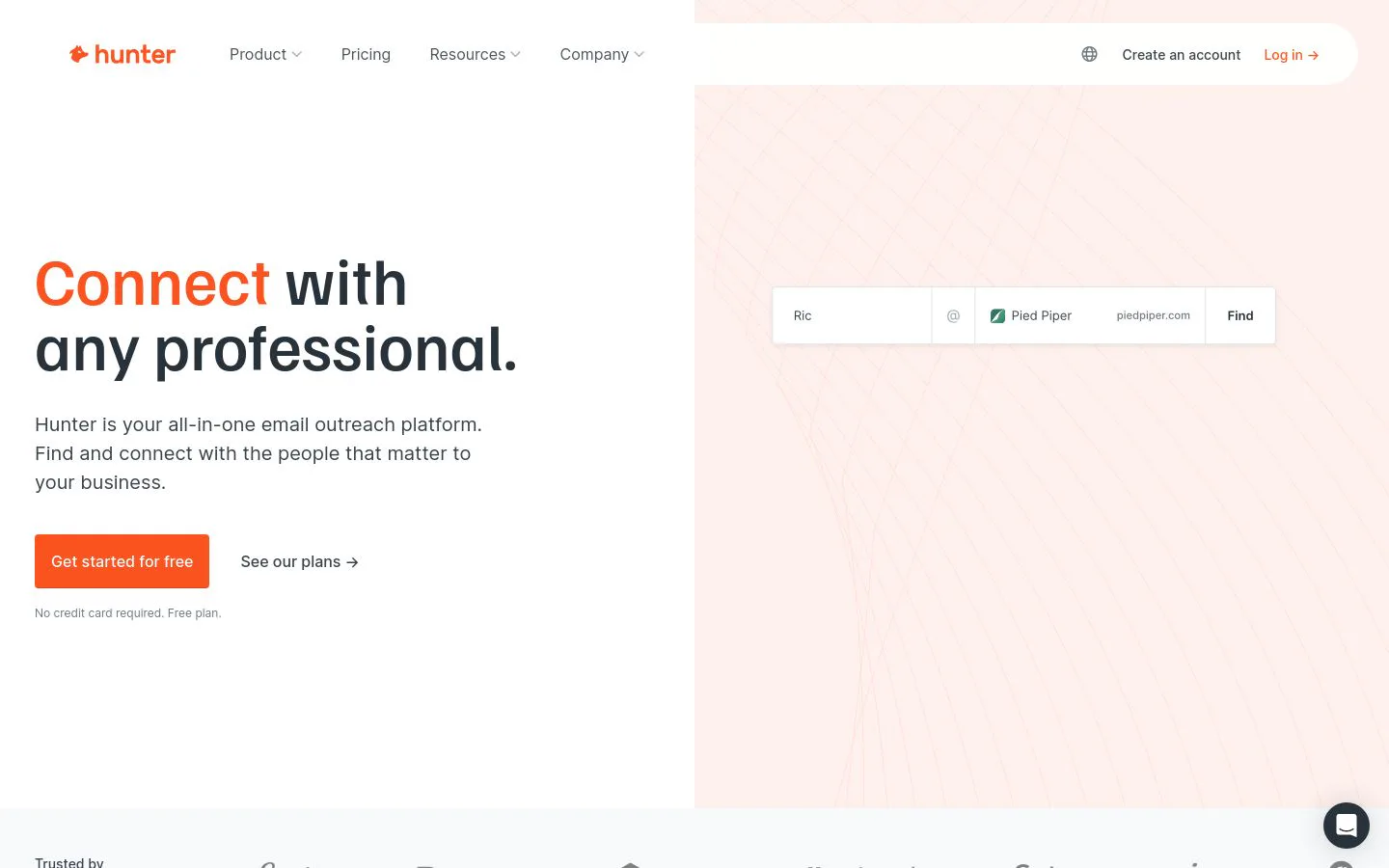
- Best fordomain-based email finding and clean verification at a low price
- Pricingfree plan, then paid tiers from $34/mo (annual)
- What we likeDomain Search maps a company's email pattern, and the verifier keeps bounces down
Hunter is the classic pure-play for email. Its Domain Search lists the addresses tied to a company and shows the pattern behind them, Email Finder returns a specific person's address from a name and domain, and the Email Verifier checks a list for deliverability before you load it into a sequence. It is fast, focused, and priced so a small team can run it without a budget conversation.
That focus is also the ceiling. Hunter works from published, domain-based signals rather than a huge person-level database, so find rates can dip on people whose company hides its email pattern, and it will not hand you a phone number or firmographic detail.
What we like about Hunter
- Domain Search reveals a company's email pattern and known addresses
- Email Finder and a reliable verifier in one clean workflow
- Confidence scores on every address so you can filter before sending
- Unlimited users on every plan and a genuinely useful free tier
Where Hunter could be better
- Domain-pattern approach can miss people at companies with no public pattern
- Email-only, so no direct-dial phone or firmographic data
- Not a prospecting database you can build net-new lists from
Why choose Hunter? The cleanest low-cost option when your job is domain-based finding and verification and you do not need phone or firmographic data.
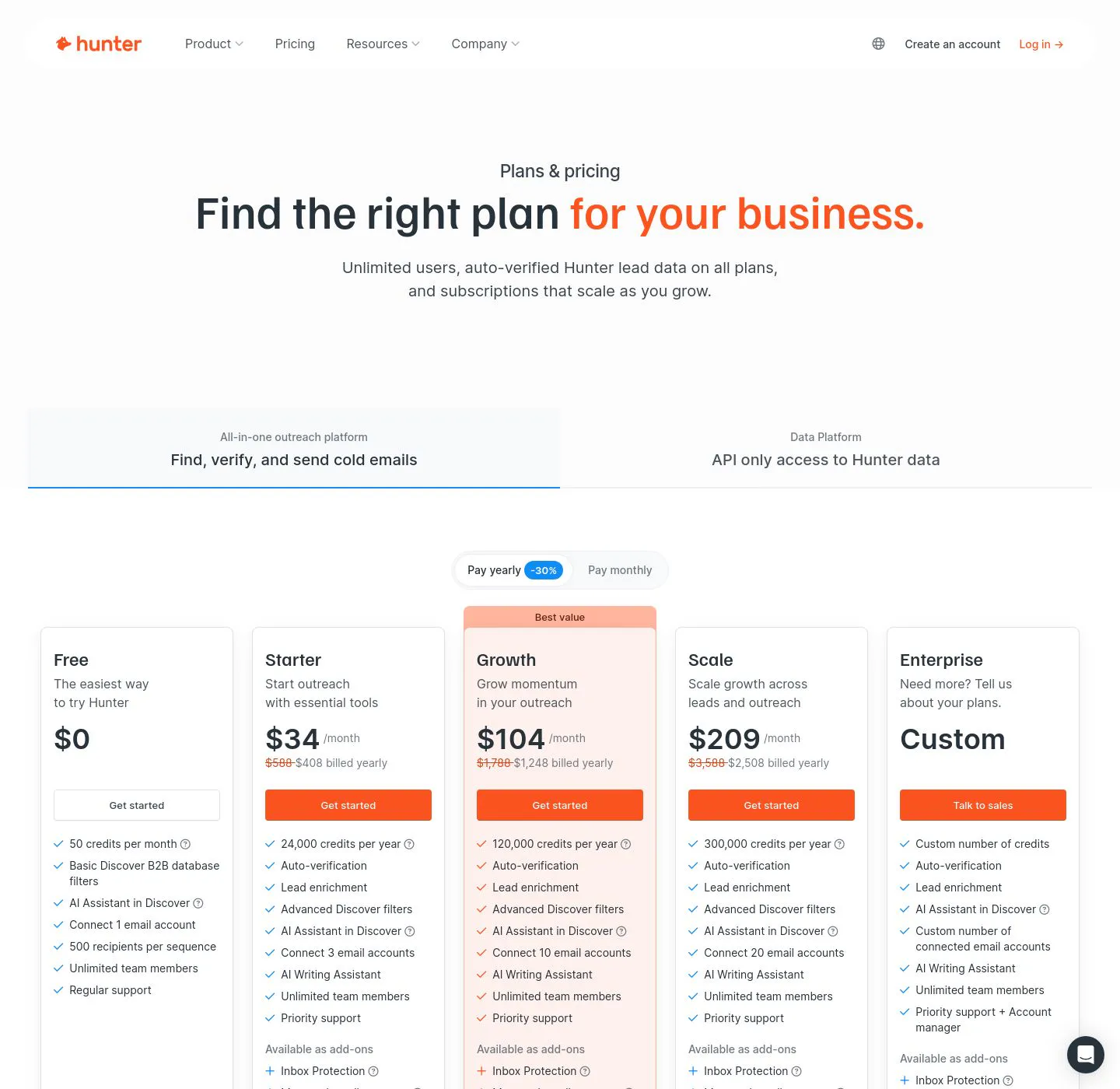
Hunter pricing
- Free: $0/mo with 50 credits
- Starter: $34/mo annual ($49 monthly) with 2,000 credits
- Growth: $104/mo annual ($149 monthly) with 10,000 credits
- Scale: $209/mo annual ($299 monthly) with 25,000 credits
- Enterprise: custom
Finding an email costs one credit and verifying one costs half a credit; every plan includes unlimited users. See Hunter's pricing page for current credits.
Hunter reviews
- G2: 4.4/5 from 650+ reviews (G2)
5. Snov.io

- Best forteams that want to find and verify emails, then run drip campaigns from the same tool
- Pricingfree plan, then paid tiers from $39/mo
- What we likea seven-step verifier plus built-in email sequences and warm-up
Snov.io combines an email finder, a verifier, and a sending platform, which makes it a natural fit for a small outbound team that wants one subscription. You can find addresses by domain, by company, or in bulk, run each through a multi-step verification that trims bounces, then launch drip campaigns with follow-ups and inbox warm-up already attached. The LinkedIn extension pulls contacts as you browse.
The breadth means no single piece is best-in-class. Find rates are solid rather than exceptional, and heavier senders often outgrow the built-in campaign tools, but for the price the all-in-one value is real.
What we like about Snov.io
- Email finder, seven-step verifier, and drip campaigns in one platform
- Bulk search plus a LinkedIn Chrome extension
- Inbox warm-up included to protect deliverability
- Affordable entry price with a free plan to test
Where Snov.io could be better
- Find rates are good but trail the biggest databases on hard-to-reach contacts
- The sending tools are basic next to dedicated sequencers
- Credits cover both finding and verifying, so heavy lists burn through them
Why choose Snov.io? The value pick when you want finding, verification, and light sending bundled at an SMB price.
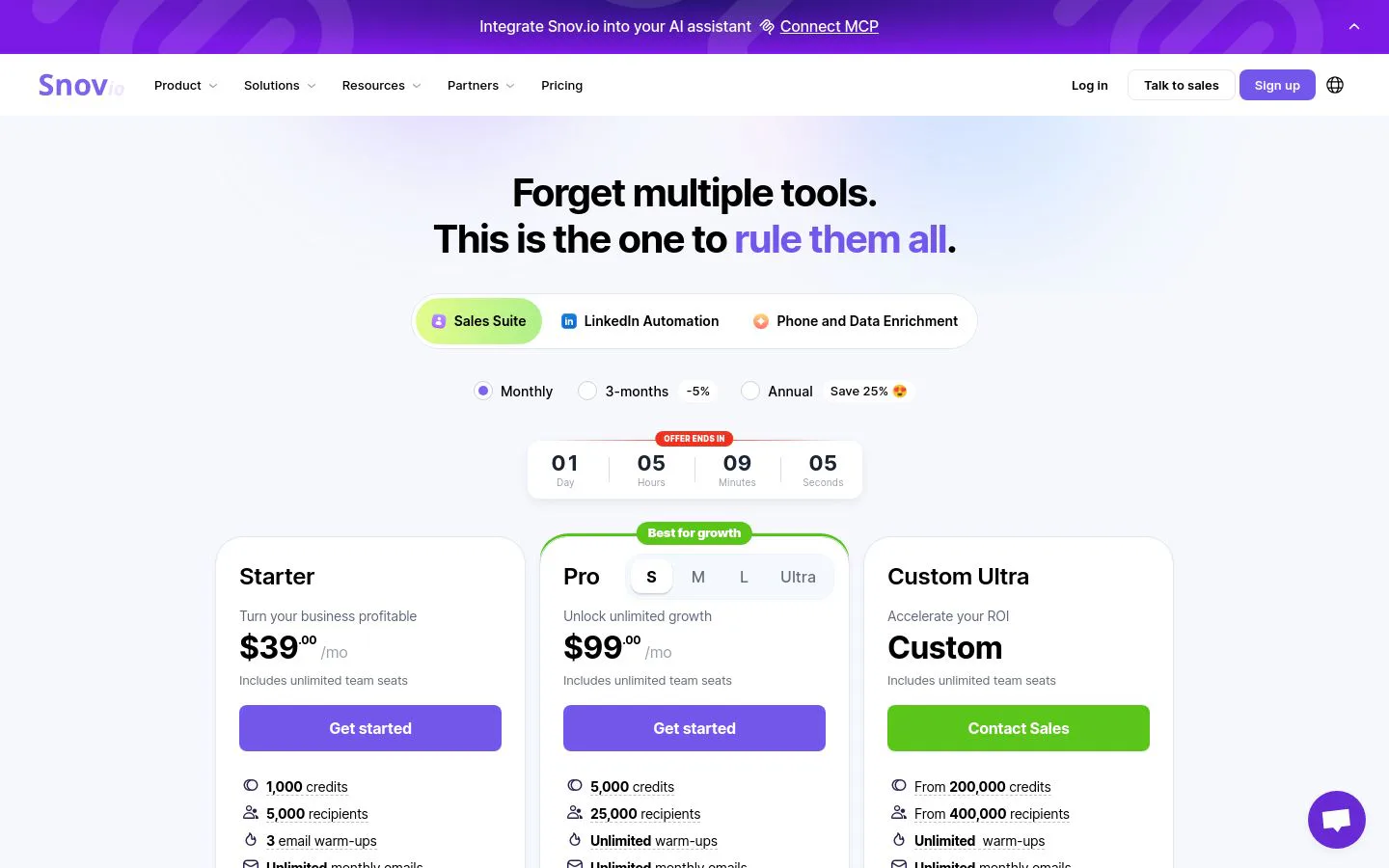
Snov.io pricing
- Free: $0/mo with 50 credits, 100 email recipients, and one warm-up slot
- Starter: $39/mo with 1,000 credits and 5,000 recipients
- Pro: from $99/mo (Pro S, 5,000 credits), scaling to Pro M ($189/mo) and Pro L ($369/mo) with more credits and recipients
- Custom Ultra: custom pricing with unlimited seats, credit rollover, and priority support
LinkedIn automation is an add-on at about $69 per slot per month. See Snov.io's pricing page for current tiers.
Snov.io reviews
- G2: 4.5/5 from 470+ reviews (G2)
6. Skrapp.io

- Best forsales and recruiting teams finding B2B emails straight from LinkedIn
- Pricingfree plan (100 credits/mo), then paid tiers from $49/mo
- What we likea LinkedIn and Sales Navigator extension that builds verified email lists as you browse
Skrapp.io is built around LinkedIn. Its extension sits on profiles and search results so you can collect verified work emails from Sales Navigator lists without leaving the page, and a built-in database and domain search cover the cases where you start from a company instead of a person. It reports strong search-success and verification rates, and it only charges credits for emails that come back valid or catch-all.
It is a focused finder rather than a full platform. The dataset is lighter than the enterprise tools, and accuracy dips at smaller companies and in niche industries, so it is best as a LinkedIn-first list builder rather than your only source of truth.
What we like about Skrapp.io
- LinkedIn and Sales Navigator extension for finding emails as you prospect
- Verification built in, and you only spend credits on valid or catch-all results
- Bulk finding plus a company and domain search
- Credit rollover and a free plan to start
Where Skrapp.io could be better
- Lighter database than the enterprise finders
- Accuracy drops at smaller companies and niche industries
- Best as a LinkedIn-first tool, not a full prospecting platform
Why choose Skrapp.io? The straightforward pick for reps and recruiters who live in LinkedIn and want verified emails without a big platform.
Skrapp.io pricing
- Free: 100 credits per month
- Starter: $49/mo with 1,000 email credits and 2 users
- Seeker: $99/mo with 5,000 credits
- Enterprise: $199/mo with 20,000 credits
- Global: $299/mo with 50,000 credits
One credit equals one email found (valid or catch-all) or one verification, and unused credits roll over. See Skrapp.io's pricing page for current plans.

Skrapp.io reviews
- G2: 4.4/5 from 250+ reviews (G2)
7. Prospeo

- Best forreps who want high-accuracy email finding from LinkedIn and Sales Navigator
- Pricingfree plan (75 credits/mo), then paid tiers from $39/mo
- What we likea clean LinkedIn finder with a high stated accuracy rate and mobile numbers on top
Prospeo is a newer, focused finder that has earned a strong rating for accuracy. It pulls verified work emails off LinkedIn profiles and Sales Navigator lists, offers domain search and bulk export, and can return mobile numbers when you need a phone as well. Reviewers single out the clean interface and the high hit rate on valid addresses, and the API makes it easy to wire into a workflow.
The tradeoffs are the ones you expect from a smaller vendor. The database is narrower than the incumbents, some records come back outdated, and support and billing have drawn occasional complaints, so it rewards a test run on your own list before you commit volume.
What we like about Prospeo
- High stated email accuracy and a clean LinkedIn finder
- Domain search, bulk export, and API access included
- Mobile numbers available alongside emails
- Affordable per-credit pricing as volume grows
Where Prospeo could be better
- Smaller database than the established finders
- Some returned emails can be outdated, so verify before sending
- Support and billing draw occasional complaints
Why choose Prospeo? A sharp, affordable finder for LinkedIn-first reps who care most about a high valid-email rate.
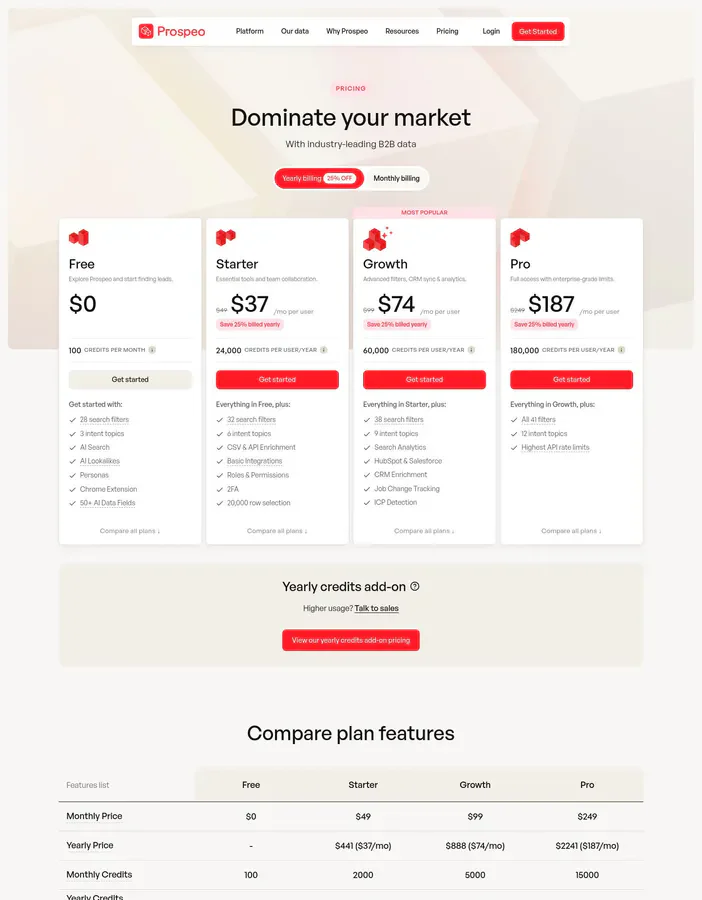
Prospeo pricing
- Free: 75 email credits per month plus 100 Chrome-extension credits
- Basic: $39/mo with 1,000 credits
- Pro: $99/mo with 5,000 credits
- Business: $199/mo with 20,000 credits
- Corporate: $369/mo with 50,000 credits
An email costs one credit and a mobile number costs ten. See Prospeo's pricing page for current tiers.
Prospeo reviews
- G2: 4.6/5 from 120+ reviews (G2)
8. VoilaNorbert

- Best forsimple name-and-domain email lookups with pay-as-you-go verification
- Pricingfree tier (50 credits), then paid tiers from $39/mo
- What we likea no-frills finder with credit rollover and add-on verification and enrichment
VoilaNorbert does one thing plainly: give it a full name and a company domain and it returns the work email, with a high stated accuracy rate on the addresses it finds. Verification and enrichment come as pay-as-you-go add-ons, so you can confirm deliverability or fill in extra fields only when you need them, and unused prospecting credits roll over month to month. Every prospecting tier includes unlimited team members and API access.
The simple model is also its constraint. It expects a name and a domain for each search, so it is not built for discovering people you do not already know, and some users report bounced addresses that make the verification add-on close to mandatory.
What we like about VoilaNorbert
- Straightforward name-and-domain finding with a high stated accuracy rate
- Credit rollover and unlimited team members on paid tiers
- Verification and enrichment available as pay-as-you-go add-ons
- API access included on every prospecting plan
Where VoilaNorbert could be better
- Needs a name and domain per search, so it is not for discovering unknown contacts
- Verification is a separate add-on, not built into every find
- Some users report bounced or outdated addresses
Why choose VoilaNorbert? A simple, credit-rolling finder when you already know who you want and just need the address.
VoilaNorbert pricing
- Free: 50 credits to start
- Valet: $39/mo for prospecting credits
- Butler: $79/mo for roughly four times the leads
- Advisor: $199/mo, and Counselor: $399/mo for higher volumes
- Teams: about $49.91/user/mo
Verification runs about $0.003 per email pay-as-you-go, and enrichment starts around $0.04 per contact. See VoilaNorbert's pricing page for current rates.

VoilaNorbert reviews
- G2: 4.6/5 from 80+ reviews (G2)
9. Findymail
- Best foroutbound teams that want verified-only emails and refuse to pay for bounces
- Pricingfree trial (10 credits), then paid tiers from $49/mo
- What we likeit charges only for verified results and guarantees a low bounce rate
Findymail built its pitch around deliverability. It finds work emails from a name and company or a LinkedIn and Sales Navigator export, verifies every one, and only spends a credit when it returns a result it considers valid, so you are not paying for dead addresses. The company guarantees bounces under five percent, and an independent benchmark measured its hard-bounce rate near one percent, which is why cold-email teams that protect their domains like it.
The focus costs coverage. Its find rate is lower than the broad databases, so a meaningful share of contacts come back empty, and there is no real free tier beyond a small trial, which makes the entry price feel steep for casual use.
What we like about Findymail
- Charges credits only for verified, valid emails
- Guaranteed low bounce rate, ideal for protecting sender reputation
- Finds and exports from LinkedIn and Sales Navigator
- Credits roll over up to twice your monthly allowance
Where Findymail could be better
- Find rate is lower than the big databases, so more contacts come back empty
- No real free tier, just a small trial
- Entry price is higher than several rivals
Why choose Findymail? The pick when a clean bounce rate matters more than raw volume and you only want to pay for emails that land.
Findymail pricing
- Free trial: 10 credits, no card required
- Starter: $49/mo with 1,000 credits
- Scaling: $99/mo with 5,000 credits
- Business: $249/mo, with Business Plus and higher Scale tiers above it
- Enterprise: custom
One email costs one credit and one phone number costs ten; you only pay for verified results. See Findymail's pricing page for current tiers.
Findymail reviews
- G2: 4.9/5 from 50+ reviews (G2)
10. Dropcontact

- Best forEuropean teams that need GDPR-safe email finding without a contact database
- Pricingcredit-based, paid from about €24/mo
- What we likean algorithmic finder that generates and SMTP-verifies emails with a 100% GDPR guarantee
Dropcontact takes a different route than every other tool here. Instead of querying a stored database of people, it generates likely email patterns from a name and company domain, tests them against real mail servers, and returns only the ones that respond, computing each lookup fresh and storing no personal data. That design is what lets it guarantee full GDPR compliance, and it integrates natively with Pipedrive and HubSpot to enrich and de-duplicate records in place.
The no-database approach means it needs a name and a domain to work, so it is an enrichment and verification engine rather than a discovery tool, and coverage is strongest in Europe. Pricing is in euros and credit-based, so US buyers should factor in the currency when comparing dollar plans.
What we like about Dropcontact
- Algorithmic finding with real-time SMTP verification, no stored database
- 100% GDPR-compliant by design, with EU-based processing
- Native Pipedrive and HubSpot enrichment and de-duplication
- Strong coverage for European contacts
Where Dropcontact could be better
- Needs a name and domain, so it enriches rather than discovers new contacts
- Coverage is thinner outside Europe
- Euro, credit-based pricing complicates US comparisons
Why choose Dropcontact? The clear choice for European teams that need compliant email finding computed fresh, with no purchased database behind it.
Dropcontact pricing
- Starter: about €24/mo with 1,000 credits, email finding, verification, and basic CRM integration
- Business: about €79/mo with 5,000 credits, bulk enrichment, and full CRM sync
- Enterprise: custom, with high-volume credits and a dedicated SLA
Each email found or enriched uses one credit, and unused credits can carry forward. See Dropcontact's pricing page for current rates.

Dropcontact reviews
- G2: 4.5/5 from 45+ reviews (G2)
Which email finder tool should you choose?
Match the tool to your situation, not the other way around.
- Highest find rate plus verification in one step: Clay. It's the only option here that runs 200+ email sources in a waterfall and verifies the winner, so you catch the addresses a single finder misses.
- Find and send from one tool: Apollo.io, when you want an all-in-one at an SMB price.
- Broadest coverage and direct dials: RocketReach, for reaching the hard-to-find titles.
- Domain-based finding and clean verification: Hunter.
- Finding plus built-in drip campaigns: Snov.io.
- LinkedIn-first list building: Skrapp.io or Prospeo.
- Simple name-and-domain lookups: VoilaNorbert.
- Verified-only, bounce-safe outbound: Findymail.
- GDPR-safe European finding: Dropcontact.
If you already know who you want and just need the address, a focused finder is the fastest fix. If your real problem is that any single finder keeps returning blanks on the accounts that matter, run several sources in a waterfall and verify before you send.
What is the best free email finder tool?
If you want to test finding and verification without paying, a few free tiers stand out. Hunter's free plan (50 credits a month) is the simplest way to run domain search and verify a short list. Snov.io's free tier bundles finding, verification, and a little sending so you can try outbound end to end. Skrapp gives you 100 credits a month for LinkedIn finding, and Prospeo's 75 monthly credits are enough to gauge its accuracy on your own contacts.
For finding at the highest rate, Clay's free plan is the one that lets you build a real workflow: run a multi-provider waterfall, verify each address, and use Claygent against your own list before you spend a credit. It's the best way to see find rates on your actual accounts, not a vendor's demo list, before committing.
The catch with every free tier is credits. They're built for testing, not production, so use them to check find rate and bounce rate on your own data before you choose.
Where email finding is heading
For years, finding an email meant querying one database and hoping the person was in it. That single-source model is fading. The teams landing the most replies in 2026 are not the ones with the biggest single database, they're the ones treating an address as something to assemble from many sources, verify at the moment of use, and keep fresh as people change jobs, so the send list is clean before it ever reaches a sequence.
Practically, start from your bottleneck rather than the brand name. If you already have the right people and just need addresses, a focused finder with good verification is the quickest win. If the real problem is that no single finder covers your accounts, or that bounces keep tanking your sender reputation, fix the source layer first: run a waterfall and verify, because no dashboard can reach a contact whose email no single provider has.
Whatever you shortlist, run it against your own list before committing a budget, and watch both the find rate and the bounce rate. The demo always looks flawless. Your list is the only one that tells the truth.
Find and verify the emails your finder misses
Start free, run a 200+ source waterfall against your own list, and verify every address before you send.
FAQ
What is an email finder and how does it work?
An email finder takes what you know about a person, usually a name and company or a LinkedIn profile, and returns their work email. It matches that input against one or more data sources, or in some tools generates and tests likely address patterns, then hands back the address it believes is correct. The best tools verify that address before you use it.
How accurate are email finder tools, and how is verification done?
Accuracy varies widely by tool, region, and seniority, and every database decays as people change jobs. Verification checks whether an address is deliverable, usually by pinging the mail server without sending a message, and flags invalid, risky, or catch-all results. Running more than one source and verifying at the point of use is what keeps a list clean.
What is a catch-all email and can tools verify it?
A catch-all domain accepts mail to any address, so a server responds valid even when the specific mailbox does not exist. Most verifiers label these as catch-all or accept-all rather than confirmed, because they cannot be fully validated. Good tools surface that status so you can decide whether to risk the send.
Is it legal to find work emails, and are these tools GDPR compliant?
Finding business contact data for B2B outreach is generally permitted, but rules like GDPR in Europe and CAN-SPAM in the US govern how you store and use it. Tools differ in their posture: Dropcontact, for example, computes each lookup fresh and stores no personal data for a full GDPR guarantee. If you sell into Europe, prioritize a provider with a clear compliance stance.
What's the difference between finding and verifying an email?
Finding returns a candidate address for a person. Verifying confirms that the address is real and will deliver. A tool can find an email that is wrong or outdated, which is why verification is a separate, essential step. The strongest tools do both in one flow so a bad address never reaches your sequence.
Do email finders integrate with LinkedIn and CRMs?
Most do. Tools like Apollo, Skrapp, Prospeo, and Snov.io offer Chrome extensions that find emails directly on LinkedIn and Sales Navigator, and nearly all sync to HubSpot and Salesforce. Clay writes verified contacts back to both CRMs and re-runs them as data changes, while Dropcontact enriches natively inside Pipedrive and HubSpot.
How is email finder pricing usually structured?
Most tools use credits, where one credit finds an email and often less than one verifies it, sold on tiered monthly plans. Some, like Findymail and Skrapp, only charge for verified or valid results. Usage-based platforms like Clay separate the data cost from the platform cost, and quote-based tools sit at the enterprise end.
Which email finder is best for a small team on a budget?
For pure domain-based finding and verification, Hunter is cheap and reliable. For an all-in-one with sending included, Snov.io and Apollo's low tiers are hard to beat. And if you want the highest find rate without paying up front, Clay's free plan lets you build and test a real waterfall-and-verify workflow before spending a credit.