Today, Clay is relaunching our MCP as part of OpenAI’s official sales launch. Install it here.
The old Clay MCP let you run functions your team had already created and shared - it was primarily built for reps. We launched this last year as one of OpenAI’s launch partners for the first MCP app partner listing. We started with this simple use case to match the state of MCP one year ago.
The updated MCP we're launching today is built to match the power OpenAI now supports. It lets you build custom audiences, edit workflows, launch Sequencer campaigns and more, without leaving the chat.
You can verify the work right where you asked for it. Clay shows what it built inside the conversation as artifacts, so you don't have to open Clay to confirm everything is running as you'd expect.
Building GTM plays used to require technical know-how, either in how to use Clay or how to use a CLI. Now, anyone can build a play to grow their pipeline from MCP and confirm visually in-chat that it'll work exactly as they intend.
Just as coding agents have transformed the role of engineering, we see something similar happening for GTM. Less time spent jumping through tools and manually building workflows. More time launching new experiments alongside your agent.
This new MCP is a big step towards that, allowing you to fully live in ChatGPT while accessing all the context, tools, and observability you need to build.

What’s New
Build plays, not just run them
Before, you could only use what your team had already built. Now you describe the outcome you want, and Clay builds it. The audience of prospects, the workflow to enrich and the campaign in Sequencer or a custom Ad Audience.
You can go from an idea to a working playbook in one sitting, without waiting on someone else to build it.
See the work right in the chat
As Clay builds, it shows you what it made inside the conversation. You see search results as a table, a workflow step by step, and a campaign before it goes out.
The usual problem with building through an agent is that you build in one window and check in another. When you can see the work where you asked for it, you can trust it, and you can hand it a full end-to-end play instead of one lookup at a time.
No need to know every Clay feature
Clay ships a lot. In ChatGPT, you say what you want, and Clay picks the right features and the best way to build it.
You get the full power of Clay without learning where every setting lives.
Built for the latest MCP capabilities in ChatGPT
- Interactive previews: ChatGPT shows a search before it runs, refines the filters with you, and displays results, workflows and campaigns right in the chat.
- In the ChatGPT app directory: search for Clay, connect, and you’re running in about 2 minutes.
- Admin controls on both sides: on ChatGPT Business, admins choose whether Clay is enabled for the organization. In Clay, each person only sees the tools their workspace role allows.
Example Prompt: Create New Audiences to Prospect From Chat
From chat, tell Clay what your Ideal Customer Profile is and any enrichments and signals that might make a prospect high intent in a few sentences or bullets. Clay will return all of the results available from your CRM or our audiences data. Then build custom workflows to do things like finding emails, phone numbers, and custom information with Claygent that no other data provider has.
Take this example of an audience generated in chat and the workflow that followed to automatically find company pricing pages of Vice Presidents of Sales that are new in their role.
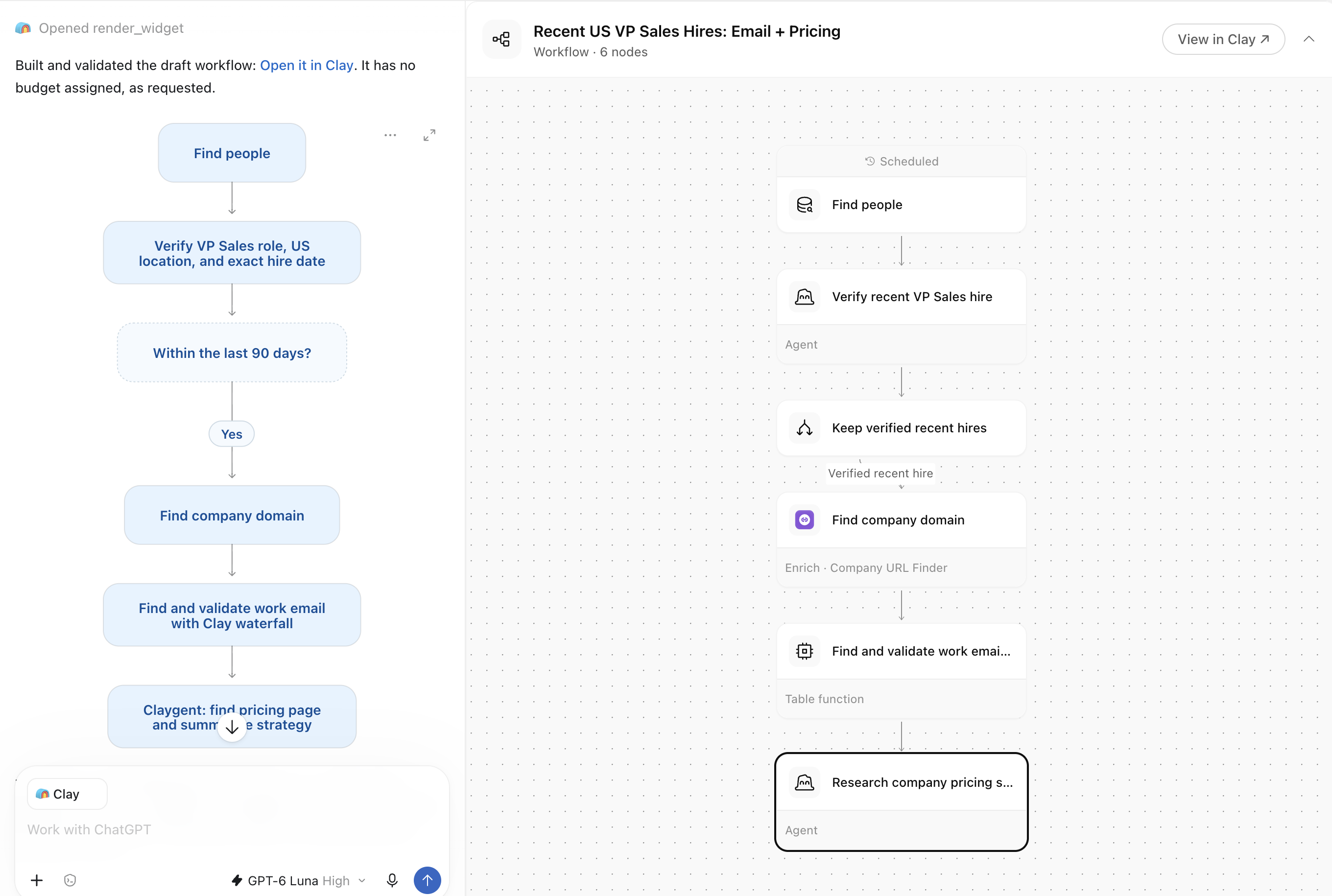
Use ChatGPT to pull data from your own CRM or use our data to find ideal fit customers. Build workflows with any of our 200+ data providers to enrich your data with everything you need and launch a marketing campaign all from one place.
How to start
Easy set up - it takes about 30 seconds:
- Click here or in ChatGPT, open the app directory, search for Clay and click Connect. Note, if you're already a Clay MCP user, you'll need to disable the "Clay for Reps" MCP and install the new Clay MCP from OpenAI's marketplace.
- Sign in to Clay, pick your workspace and click Authorize.
- Start a new chat, turn on Clay and start building.
- We highly recommend you start with a prompt like “Review the work that has already been done in my account to learn how I like to build and create my own personal skill file to learn my Clay preferences.”
You'll need Editor or Admin access in your Clay workspace. On a ChatGPT Business plan, an admin needs to enable Clay for your organization first.
The Clay MCP works on every Clay plan, including free and trial, and uses the same credits and actions as working in the Clay app.
If you’re building in other tools, you can continue to use the Clay CLI as those MCPs will be updated in the coming weeks!