
.png)
A year ago, we had no territories at Clay. Most of our demand was inbound, split between self-serve signups and demo requests. Then we moved upmarket and began building a sales-led motion alongside our product-led one. That meant systematizing how we assigned accounts and giving every rep on our sales team a list of good-fit accounts to prospect.
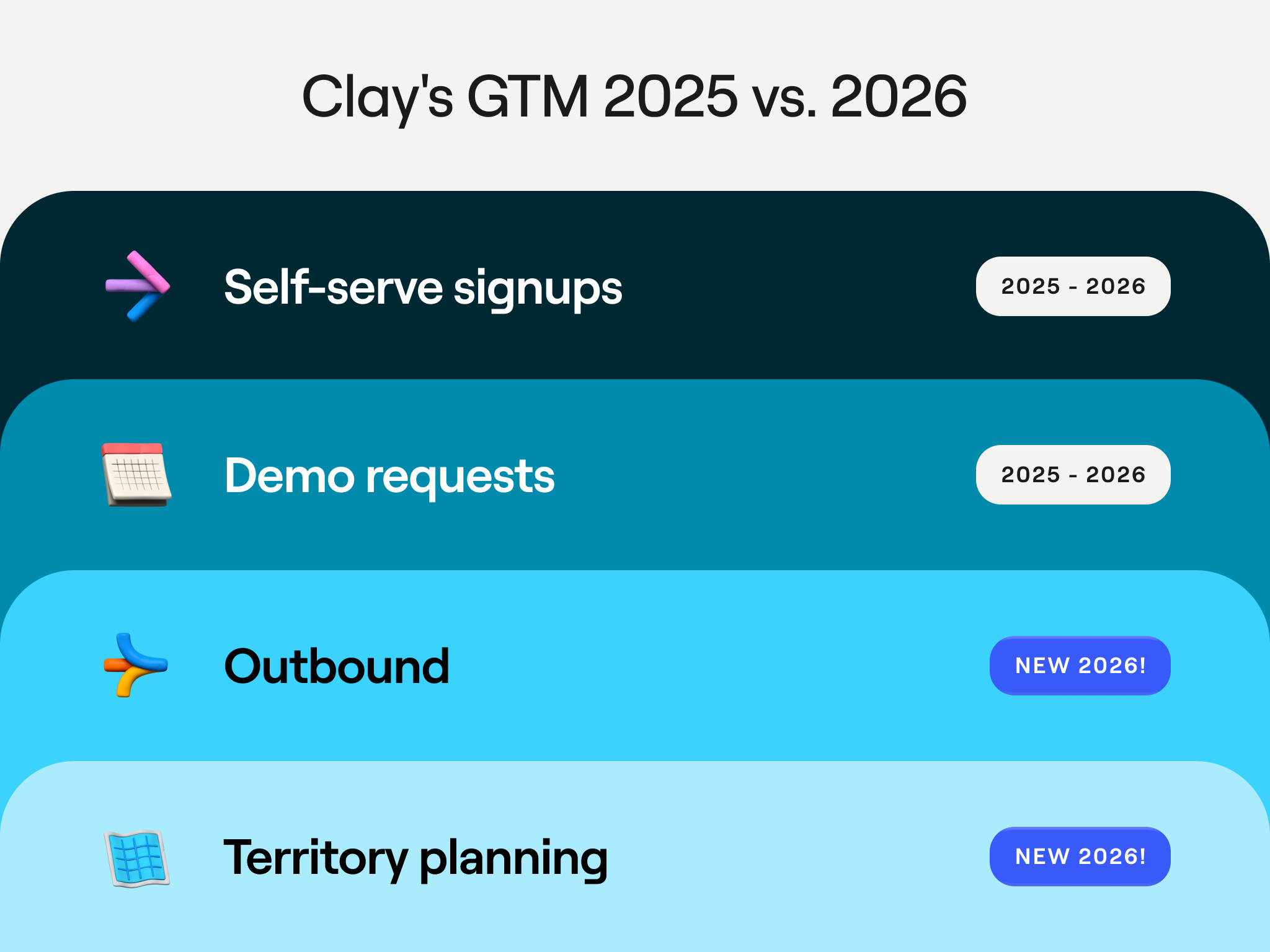
If you’ve ever carved a territory or been handed one, you know it’s one of the trickiest exercises in GTM. Territory planning is the process of deciding which accounts to give your team, with a focus on the ones most likely to buy soon. It’s the full realization of your GTM strategy, where all the thinking about who you sell to—your specific ICP, your segments, which industries you ignore—becomes a list of accounts with a rep’s name next to each one.
Done well, every rep has the best chance of closing the most business for the quarter. But done poorly, the company misses its number. Plus, the damage spreads inside the team: reps who see a colleague handed the warmer book stop trusting the process, start arguing over accounts, and spend energy on fairness disputes (rather than selling). This guide covers how we think about territory planning, how we built our own system for it in Clay, and the best way to start building yours.
Our How Clay Uses Clay livestream on territory planning—featuring Evan Peters, Osman Sheikhnureldin, and Lorcan O’Rourke—shows our entire workflow: scoring accounts in Clay, carving them across reps, and sending the results into Salesforce. Watch the replay for a full demo and all the prompts to get started.
Territory planning matters more (not less) because of AI
Territory planning used to mean splitting accounts by geography or by company size. One rep got the Northeast region, or everything over 350 employees. That made sense when company location, size, and industry were some of the only facts you could reliably get for every account.
But now an AI research agent—like Claygent—can read through a company’s website, job listings, and news to tell you whether its GTM motion is sales-led or product-led, how big its ops team is, and how much of its market is addressable. With so much more to work with, you can get more nuanced about which accounts belong in which territory, finding your own GTM alpha in the process.
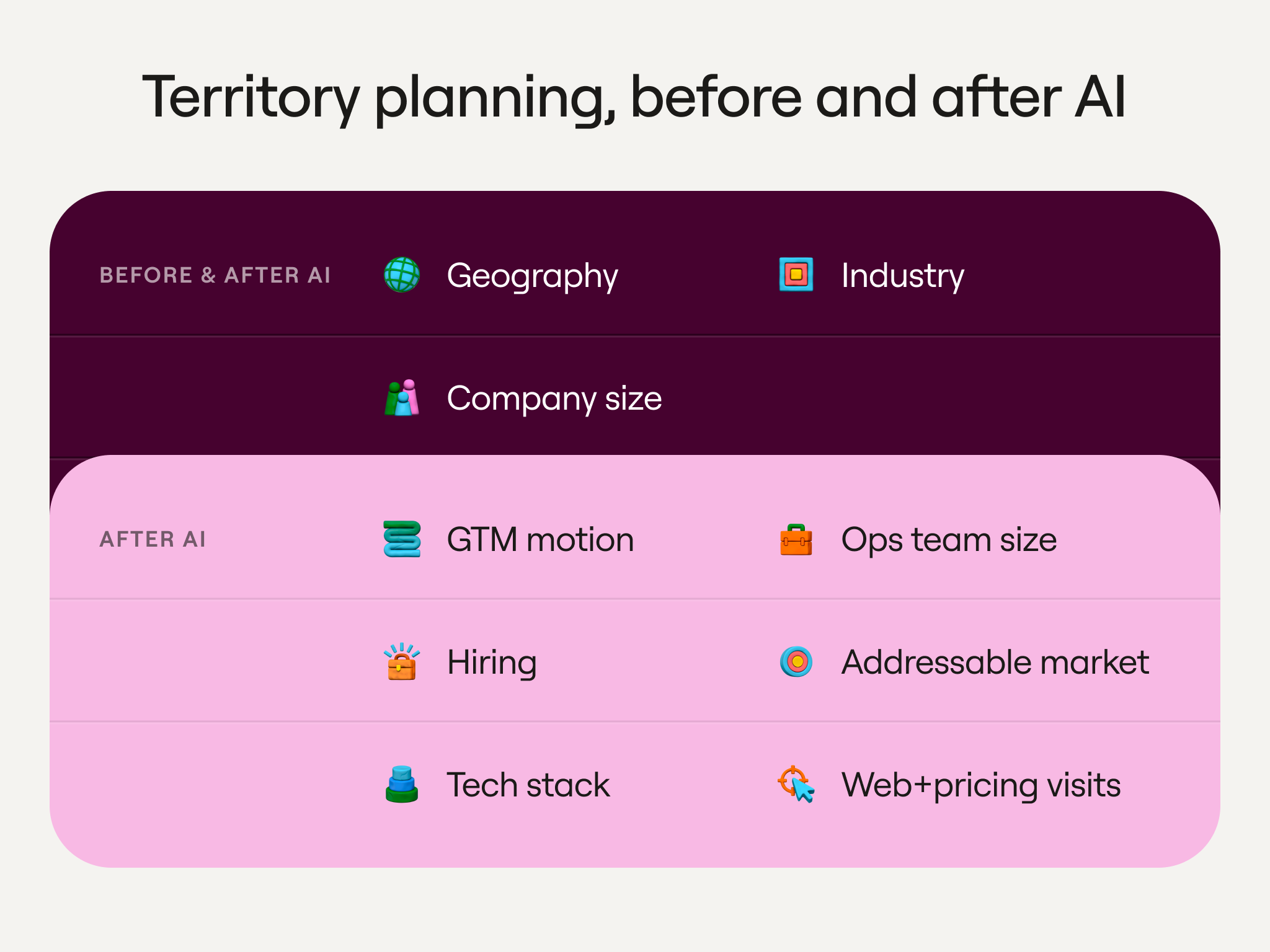
- You can gather more data about accounts, so you can be a lot smarter about which accounts deserve a sales rep’s time.
- With the right data, a cold account can look as ready to buy as an inbound lead. If we can see that a company just hired a head of RevOps or visited our pricing page, we can prioritize that company the way we would an inbound lead.
- With more companies blooming, less of the market will come to you. You will likely need to rely more on outbound, and outbound only works when you’ve deliberately decided which accounts are worth pursuing (and in what order). Territory planning is exactly where that prioritization needs to happen.
Score every account on fit and engagement
A list of accounts that match your ICP isn’t actually a defined territory. Some of those companies are ready to talk to you this quarter, but most aren’t ready to buy. We recommend scoring every account on account fit and engagement:
- Account fit. These account for the slow-changing facts about a company that match your ideal profile, like industry and headcount. For us at Clay, that’s a B2B SaaS company that sells with both a product-led and a sales-led motion, runs a CRM and a data warehouse like Snowflake, has a sales team and a RevOps function, and has grown its headcount over the past twelve months.
- Engagement. This means signals that an account intends to buy sooner rather than later. We watch for website visits to clay.com, topic intent around revenue operations tooling, open SDR and RevOps roles, trial signups, and past closed-lost deals.
.png)
Your specific scoring has to be your own
You can’t simply copy and paste someone else’s scoring model, even one we’re giving to you. You’ll have to base your scoring inputs on the facts that are unique to your customers and your product. What facts show a good fit? What facts show that they’re engaged? Those are questions only you can answer.
For example, here’s a hypothetical of two companies that sell very different products, each scoring one prospect in its own CRM:
Both prospects land at an Account Fit of 91, but the two scores have nothing in common under the hood.
- Company A is measuring how much customer support a prospect does
- Company B is measuring how built out a prospect’s go-to-market team is
Each seller is individually scoring the things that predict a deal for them. Take this same approach for your own territory planning: decide what your best customers have in common, score every account on those factors, and use that score to decide which accounts each rep gets.
How we approach territory planning at Clay
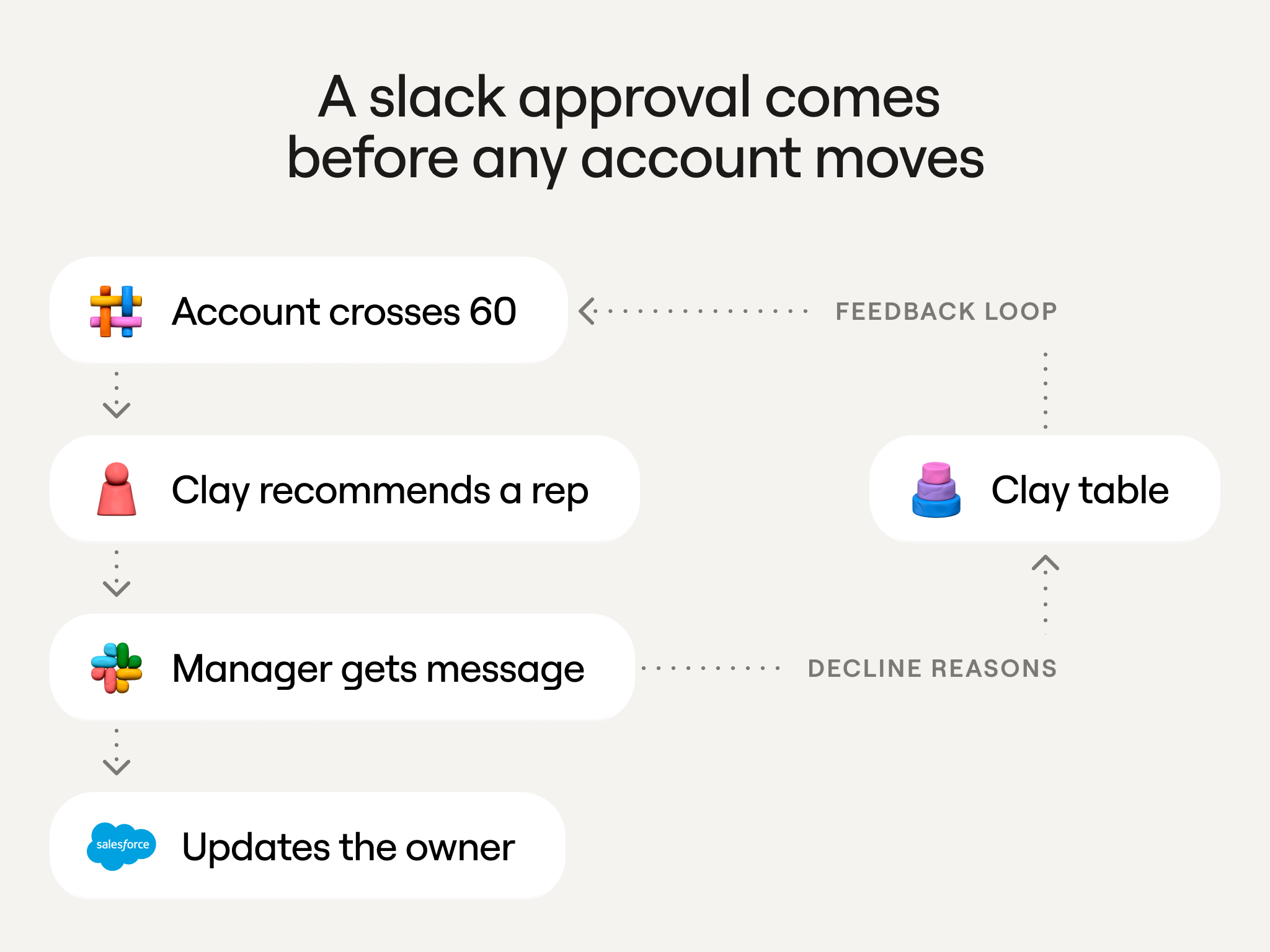
At Clay, an account is carved into a territory when its Account Fit Score reaches above 60, it has no open opportunity, and there’s no assigned rep. That simple combination of rules took us a year (and three different versions of scoring) to arrive at.
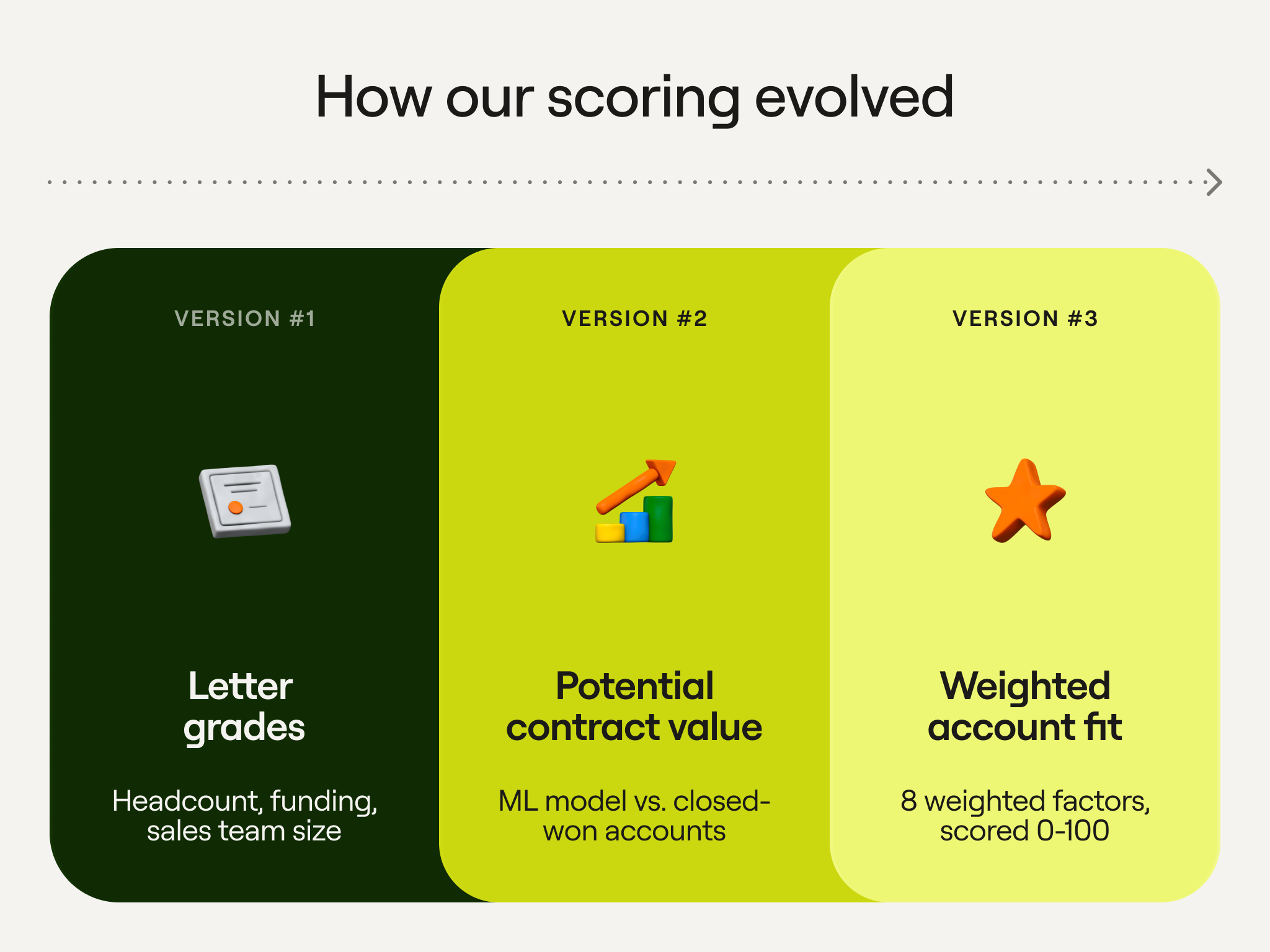
Here are a few different versions we cycled through:
- Version 1: Letter grades. Leads from trials and demos got a grade based on factors like headcount, funding amount, and sales team size.
- Version 2: The potential contract value model. A machine learning model compared new accounts to the ones we previously won. It returned a predicted contract value and assumptions about which factors impacted the score.
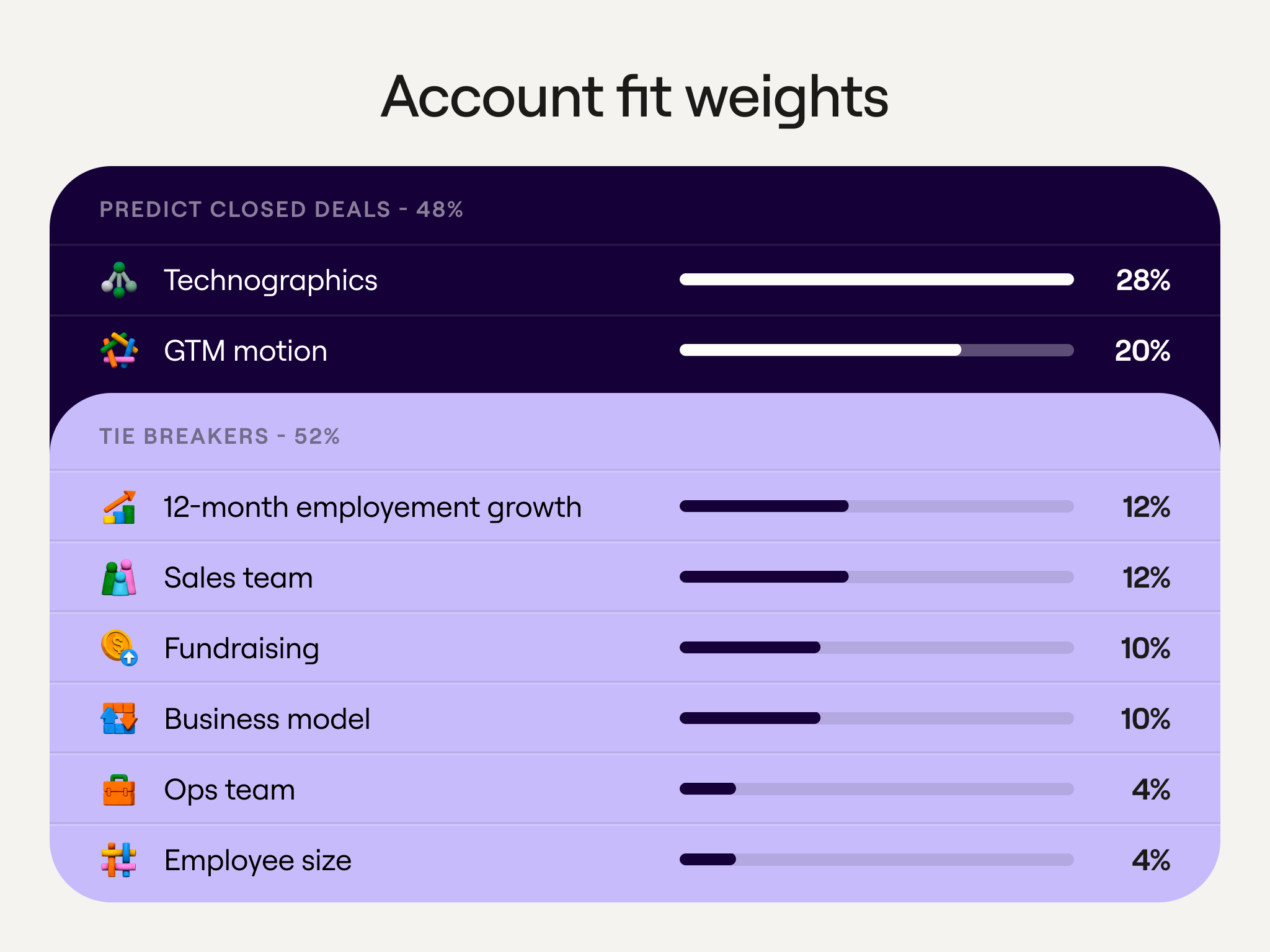
- Version 3: Weighted account fit. This evolved into eight weighted factors (more on that below), scored 0 to 100. We assign this score to books today. The weight of each factor changes as we learn more.
Three things we wanted to get right
Going from no books to defined territories was a seismic shift for sellers used to working whatever came in. Reps are unlikely to trust a score they don’t fully understand, so we set three requirements before choosing any weights:
- Trust. Our score isn’t a black box. Instead, a rep can see exactly how an account was scored and why it belongs to them. The account record in Salesforce shows not only the overall fit score, but the score for each underlying factor, like technographics or sales team size.
- Fairness. Todd Bussler, Clay’s Head of Enterprise Sales, shared how a bad book he was handed at a previous company destroyed his chance at meeting his monthly quota. We wanted to avoid this. Reps in the same segment get comparable books, approved by a manager.
- Learning. When a manager rejects an account the system proposed for their team, they have to give a specific reason. We pore over those reasons and feed them back into how we score in the future.
Three scores on every account
A single number can’t answer everything a rep (or their manager) wants to know about an account. Whether it is worth pursuing at all, whether now is the right time, and how much it could be worth are separate questions that all need an answer. Instead of resolving all of those concerns with one number, we give every account three:
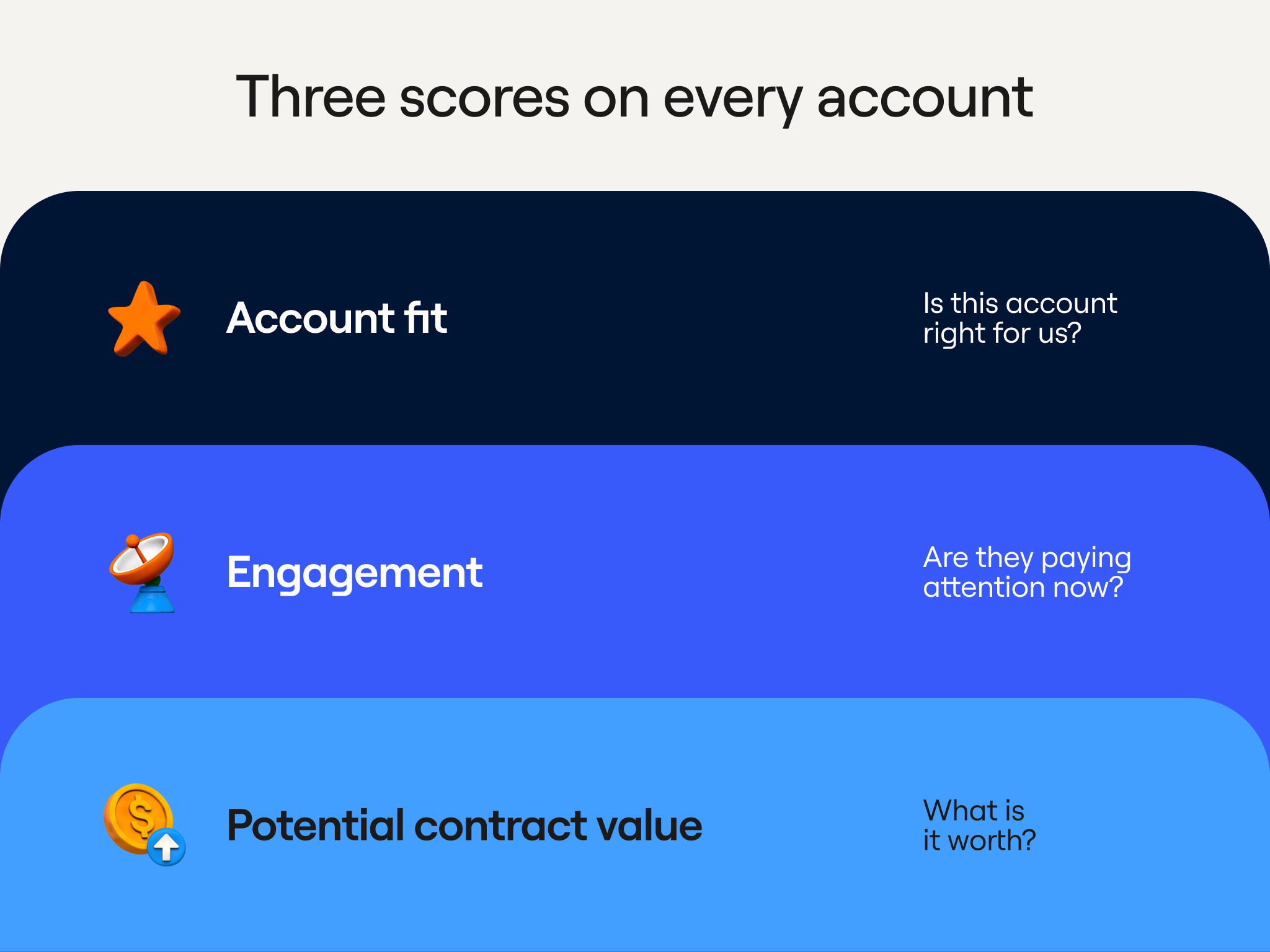
Account Fit (0 to 100). Is this account right for us? We score fit on facts like headcount, tech stack, and location. This is refreshed on a regular schedule and used to decide which accounts go into a territory. Account Fit is a weighted sum of eight factors, each scored 0 to 100. Together, technographics and GTM motion carry nearly half the weight (49%) because we’ve found that they’re the best predictors for closing an account.
Engagement. Are they paying attention to us now? We factor in signals like website visits, public job postings, past closed-lost opportunities, and topic intent. We refresh this score every week, and reps use it to decide which account to prioritize first.
Potential Contract Value. What is this account worth to us in dollars? A model answers this by comparing the account to similar deals we’ve closed in the past.
Segments, exclusions, and eligibility
Beyond the scoring we describe above, we also consider two other factors to decide which rep gets which account (and whether an account belongs in a book at all).
Segments. Every account goes into one of three segments based on company size. That segmentation sets two things: which reps can own the account, and how many accounts each of those reps can hold. Reps who work larger companies hold fewer accounts.
When we refer to size, we mean the parent company’s headcount, not the subsidiary’s. A parent and its subsidiaries always go to the same rep. Fortune 500 companies are not carved as part of this workflow.
Exclusions. Before anything is carved, we remove accounts that might, but aren’t worth pursuing based on our previous experience. That includes: look good on paper but are not worth pursuing:
- Industries outside our ICP, like retail, manufacturing, and pharmaceuticals
- Company types we do not sell to, like agencies, private equity and venture capital firms, and consultancies
- Offshore-majority companies, usually meaning firms headquartered in-region but with most employees elsewhere
A Slack approval is required before an account is officially assigned to a rep
We wanted managers on board with these books, engaging directly with the process. As a result, nothing moves straight to Salesforce without approval from a sales manager. Here’s what that process we’ve built looks like:
- An account crosses 60 on its scheduled re-score.
- Clay recommends a rep, based on segment, region, and book size.
- Sales managers get a Slack message and approve or decline. A decline requires a reason.
- Salesforce updates with the new owner on the record.
Having managers provide their reasoning for declining makes this a self-learning system. Their feedback lands directly in a Clay table, where we look for patterns. For example, managers kept declining companies whose employees were mostly offshore, so we added that as an exclusion.
Our territory planning workflow in Clay
Naturally, our GTM Ops team uses Clay for our territory planning system. Here’s what it accomplishes for us:
- Figures out which accounts we should go after
- Assigns the accounts to the right reps
- Keeps those books up to date with weekly engagement scores
Everything we discussed above—the segments, the scoring factors and weights, the eligibility rule, and the exclusions—is written down in one planning document. We’ve moved that document into Clay’s Knowledge Hub as context, so the Clay Agent building and running these workflows is operating off the same rules.
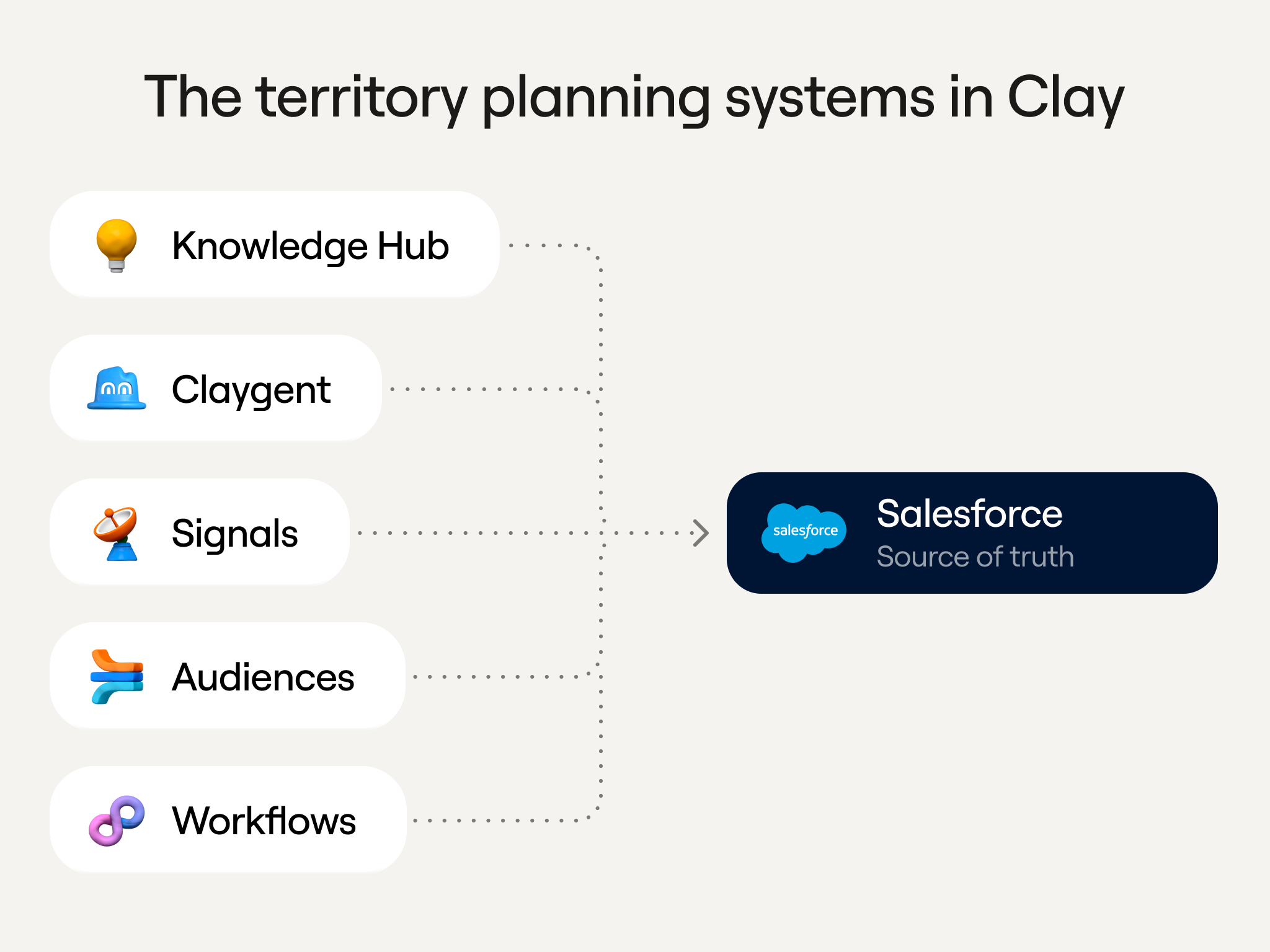
A handful of Clay features, plus Salesforce, are involved in our territory planning system:
- Knowledge Hub holds the context, rules, scoring, and exclusions.
- Clay Agent reads that context and builds and runs the workflows.
- Workflows enrich, score, and write back.
- Audiences store every scored account and express the eligible pool as filters.
- Signals watch those audiences for what changes each week.
- Salesforce holds the owner and scores on the account record and stays the source of truth for reps. Audiences also keeps a copy, allowing the workflow to update quickly when the logic changes.
Stage 1: Score the right accounts
This first stage is for scoring, not assigning. Each account gets a fit score plus a to-the-point explanation on why it scored that way.
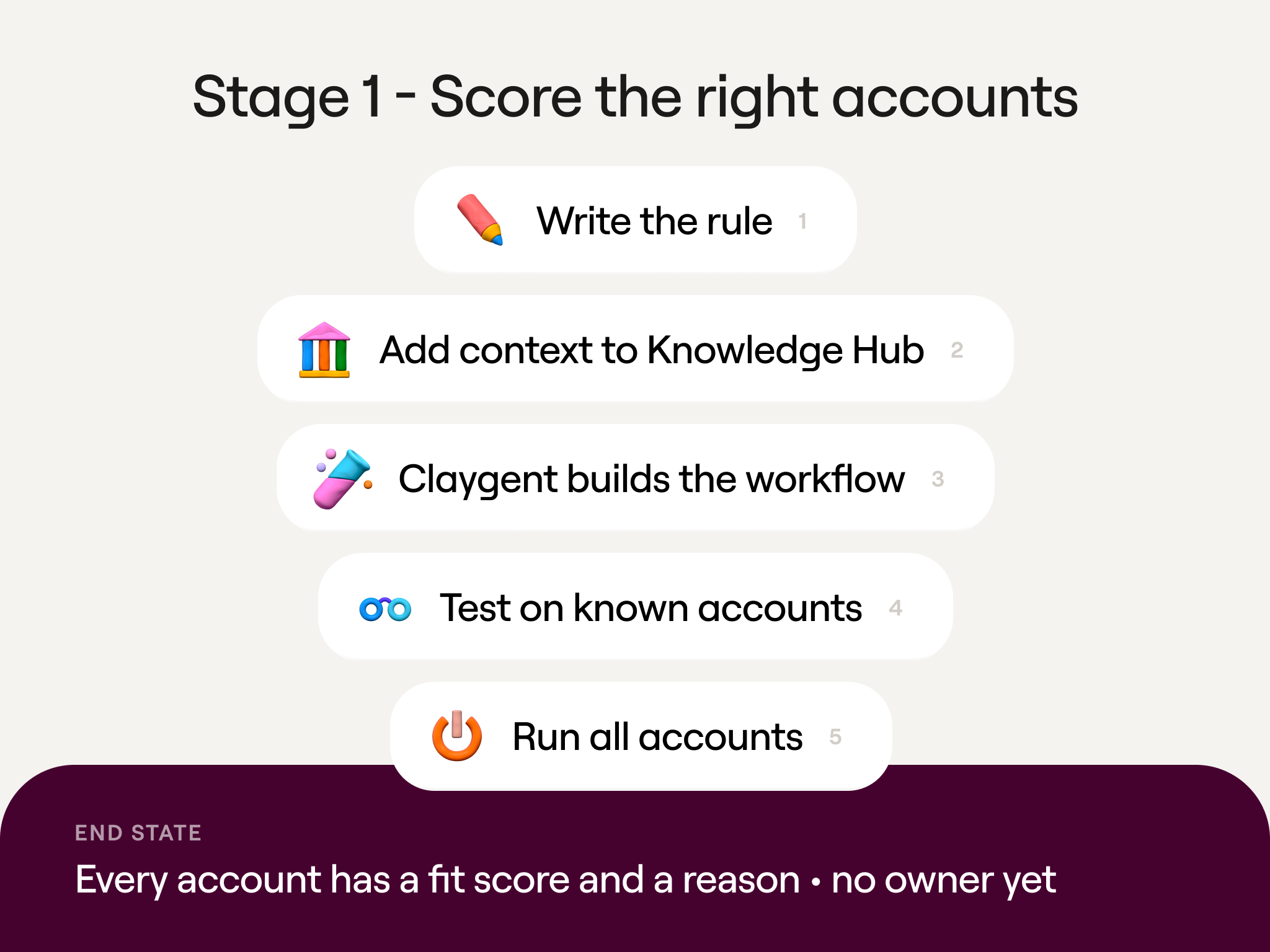
Step 1: Write down your rules first. Before even opening Clay, put everything the agent needs to know in a single document. That includes the rules of engagement, segments, scoring factors and weights, plus eligibility and exclusion criteria. Ours is a Notion doc you can read to inspire your own version.
Step 2: Give Clay all the context. In Knowledge Hub, enter your company domain and drop in that context document. From there, Clay quickly builds out a company description, ICP, personas, and interest signals.
Step 3: Have Clay Agent build the scoring workflow. Open Clay Agent, which will have access to everything in Knowledge Hub, and type this prompt:
“Can you build the territory planning workflow from the Clay Ops Rules in the Knowledge Hub?”
This tells Clay Agent to turn your written rules into a working workflow, choosing the enrichments and scoring logic, too. The result is a workflow titled “Territory Fit Scoring.” For each account that comes in from Salesforce, it:
- Resolves the Ultimate Parent, so a whole hierarchy lands with one rep
- Runs enrichments in parallel, including fundraising, headcount growth, ops and sales headcount, technographics, open SDR roles, and GTM motion
- Applies your weights in a deterministic scoring node
- Writes back the fit score to Audiences and Salesforce
Step 4: Test on accounts you know. Keep a human in the loop here; don’t just send thousands of accounts through and trust the output. In the same Agent conversation, pick a few companies whose fit you already have an opinion on and ask for their scores. Then ask for the breakdown behind each one:
“Can you test the Territory Fit Scoring workflow on Vercel, Notion, and Cockroach Labs and show me the scores?”
“Can you give component scores and any suggested changes?”
The agent returns each company’s score and grade, then breaks each into weighted components.
For example, in our test with demo data, Cockroach Labs scored 69.2 while the other two scored 94.0, with employee growth and technographics pulling it down. If that feels off-kilter, adjust a weight or widen a factor and rerun. Keep iterating on 50 or 60 accounts until the ranking aligns with your own judgment.
Step 5: Run everything. The agent sizes the credit cost first and waits for a yes before running the list. Say “Run through all accounts.” Back in Salesforce, each record now carries:
- The Account Fit Score and grade
- A Fit Score Summary naming the strongest and weakest factors
- Every component score, so a rep can actually see why the account is a high fit
The one thing still missing is an assigned sales rep.
Stage 2: Carve fair territories
This stage decides exactly who gets what. Each eligible account is matched to a sales rep on your team as a proposed owner, and their sales manager reviews it before it’s confirmed in Salesforce.
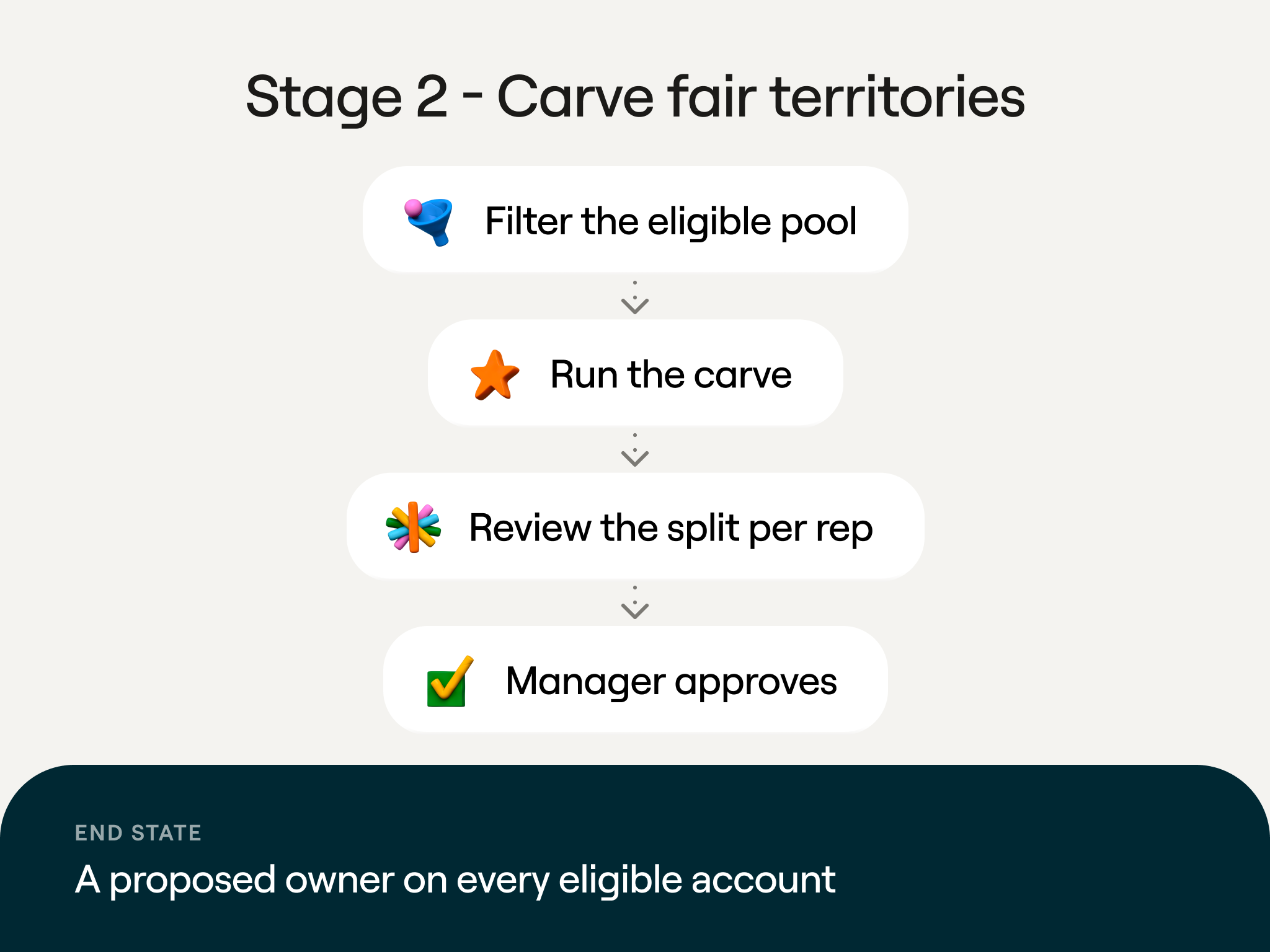
Step 1: Filter to the eligible pool. An Audiences segment called “Eligible for Territory” applies the rules automatically: fit above 60, no open opportunity, no owner. In our demo, that left 50 accounts.
Step 2: Run the carve. Back in Clay Agent, type this prompt:
“Now carve the pool. Run the Territory Carve workflow over every account in the ‘Eligible for Territory’ segment.”
The carve workflow starts with the highest-scoring account and assigns it to a rep, then moves to the next highest. It stops when each rep reaches capacity. Anything left stays in the unowned pool. The rules document provides information on segment, region, and capacity, while Salesforce indicates how full each book already is.
As it runs, accounts leave the eligible segment one by one. Each one gets a Proposed Owner field filled in on its Salesforce record. However, the actual Account Owner stays empty until a manager approves the carve in Slack.
Step 3: Review the split. Once the pool is empty, ask the agent to summarize what it did so you can check the books for balance before anyone sees them:
“Show me the assignments per rep”
The agent lists each rep’s proposed accounts, with hierarchies kept together. You can ask questions, like why something was assigned. You can also pull back an account.
Step 4: Approve. Type “Approve.” Clay writes the owner onto each account, and the Salesforce “Accounts by Owner” report shows the final books by segment and rep. Each account carries its fit score and a specific carve reason.
Stage 3: Keep it current with weekly signals
The first two stages happen once a quarter. But this last one repeats weekly. To help with prioritization, reps get a ranked list of which of their accounts to work on first. Also, accounts that weren’t eligible at carve time get added to a book as soon as they qualify.
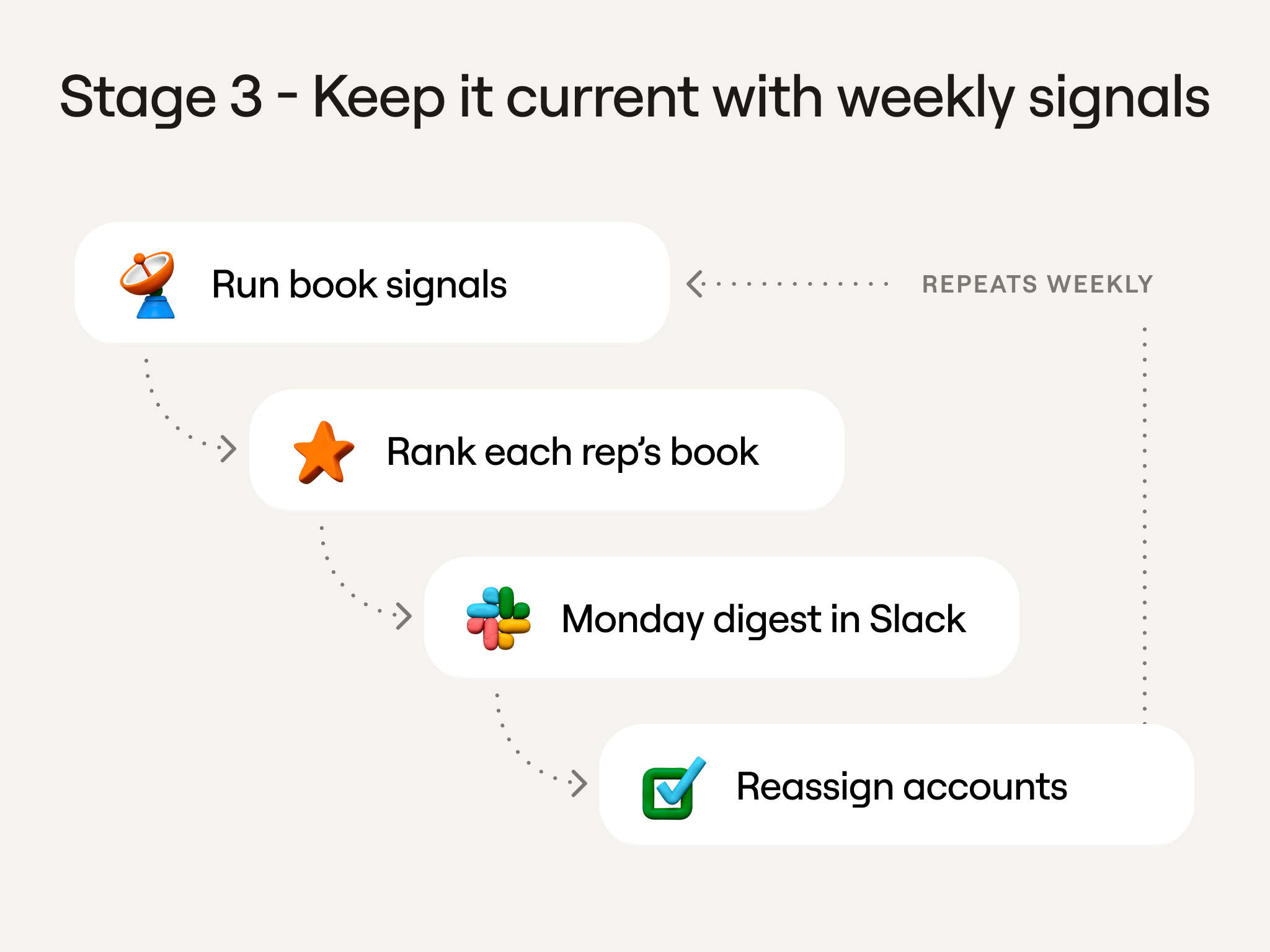
Step 1: Run signals on the books. Audiences holds the data on every assigned account, and we watch the following on each one:
- Website visits and topic intent
- Job postings
- Product usage (e.g., a trial activation)
- Deal history from Salesforce
- Gong transcripts from past calls
Step 2: Rank each rep’s book. Each week, ask Clay Agent to read the signals on one rep’s assigned accounts and tell them where to start. This is the prompt behind the weekly digest:
“What are the top accounts for Jordan Lee to target this week?”
The agent gives each account an engagement score based on fit, plus its recent signals. Newer signals count more than older ones, and anything older than 30 days is ignored. Then it ranks the book by that score, providing reps with clear direction on which accounts to prioritize.
With our hypothetical demo data, Highspot had a fit of 69.2 but the highest engagement at 91. Why? A new Director of Revenue Operations had started, and the earlier loss was due to bad timing, not a lack of fit. Our sales reps receive this information as an engagement score on the account record in Salesforce, as a digest in Slack.
Step 3: Reassign as things change. Scored accounts that didn’t make a book sit in an unassigned segment. You can ask Clay Agent to check whether any of those accounts now qualify:
“Can we reassign any of our unassigned segment?”
The agent re-scores unassigned accounts on the week’s latest signals, also checking eligibility and sales rep capacity. For instance, an account that scored 59 last week can cross 60 after a Head of Sales Operations joins the company. The agent will typically propose the rep with the lightest load.
Start building your Q1 2027 territories in Clay
It took us a couple of quarters to dial in this system, and we’re still adjusting it. Our first carves had a 5% to 10% error rate, meaning managers or reps would routinely flag these accounts as a bad fit. Expect the same at the beginning: the point is to start, measure, and improve over time.
Here are two resources to help you build your own version:
- The Territory Planning skill on the Clay Marketplace. Run this skill in a coding agent like Claude Code, Codex, or Cursor. To start, the skill will interview you about your ICP. Then, it will turn your answers into an explainable fit rubric, build a scoring workflow in Clay, and test it on five accounts before scoring your entire list.
- The Clay Ops Rules Notion template. This document lists off our actual segments, scoring factors, eligibility rules, and exclusions. For your own territory planning, swap our specifics for yours and drop the document into Knowledge Hub in Clay.
Thank you to Evan Peters, Osman Sheikhnureldin, and Nicole Goot for the expertise they contributed to the original livestream and this article.


.avif)