














.avif)











AI agents like Claude Code and Codex are capable of researching accounts and drafting copy for your outbound campaign, but they don’t exactly know how an experienced GTM operator would do the job. If you ask one to qualify a lead list or write a compelling cold email without guidance, the result is typically generic. A skill gives agents that know-how as plain-language instructions, covering the steps to follow and outlining what a good result looks like. Meanwhile, Clay supplies the data for each step. Writing those instructions well takes experience, so we wanted a place where anyone can use skills created by go-to-market practitioners.
We’re launching the Clay Skills Marketplace, a library of skills from GTM engineers and agencies that other sales and revenue teams can run in their own Clay accounts. You’ll find skills for a range of GTM tasks, like building a quality prospect list or writing non-spammy emails based on a company’s recent news. Featured creators on the platform include Eric Nowoslawski, an early Clay employee turned founder of the agency Growth Engine X, and Maja Voje, author of the book Go-To-Market Strategist.
Every skill is free to install. However, skills that pull data through Clay use your Clay credits when they run.
How to take a skill from the marketplace into your agent
On the Clay Skills Marketplace, search by keyword or filter by category, persona, creator, or company to find one that suits your use case. You’ll find skills that cover GTM jobs like finding contact data, building lists, scoring accounts, tracking signals, and personalizing outbound.
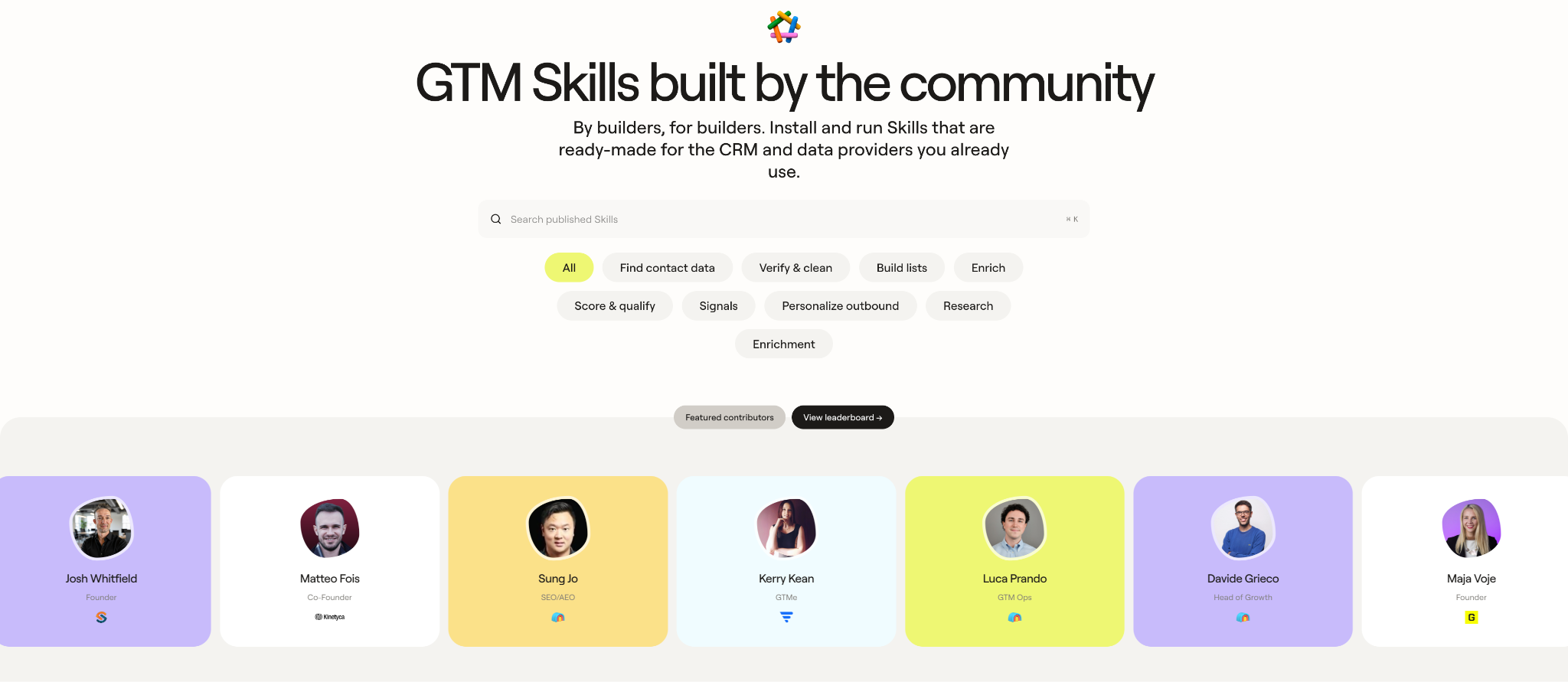
Each skill page explains when to use it (or when not to), what you need to provide, the exact steps it follows, and what it returns. Plus, you can read about the data connections it needs.
Skills run in a coding agent, like Claude Code or Codex, that can carry out tasks for you. Once you’ve picked a skill:
- Install the Clay Agent Plugin or connector in your coding agent.
- Sign up or log in to Clay so the agent can use your account.
- Copy the one-line install command from the skill’s "Add this Skill" card and run it.
- Paste the example prompt from the skill’s page and review what comes back.
You only need to complete the first two steps once, so adding another skill takes a single command.
Six skills worth adding to your agent
The marketplace includes skills from our team at Clay, but here we’re spotlighting six from builders in our broader community:
Understand an account before you pitch it
- 10k Value Prop Match: A public company’s annual 10-K spells out its business priorities. Kerry-Lee Kean, a Revenue Operations Analyst at FullFunnel, built this skill to pull the lines from the filing that match the problem you solve. It also flags whether that need is still open.
- Pricing Page Signal: Eric Nowoslawski’s agency runs cold email campaigns for B2B companies. This skill sorts a prospect list by how each company sells. It checks for self-serve pricing and records the tiers and prices; this way self-serve and sales-led accounts can go into different campaigns.
Find the right people to meet
- Alpha Radar: Josh Whitfield runs the outbound agency Content Marketing Media, and his skill works for finding people to partner with on podcast episodes. It scores each candidate on the work they’ve published, and takes your likes and dislikes into consideration to sharpen future shortlists.
- Get Top Conference Attendees: Name the conference and who you want to meet, and this skill ranks the attendees who best fit your goals. Then, it saves a dossier to your Clay Audiences for each one it finishes researching through Lanyard. Shy Rahnama, a GTM Strategist at the signal intelligence firm Redline Growth, created it.
Get a campaign ready to send
- List Clearance: Before a lead list goes into your sequencer, this skill checks every row against seven tests, like whether the email is verified and whether the contact is already a customer. Matteo Fois, co-founder of the GTM agency Kinetyca, set it up so a list is only cleared to send when it passes all seven. You get the usable rows in one file and the rejected rows in another, with a reason next to every row that was cut.
- Value First Cold Email: Maja Voje built this skill on the idea that a cold email should give the prospect something useful before asking for anything. Each draft is tied to a recent signal, like a new role, hiring, funding, or company news.
Submitting a skill starts with one line in your agent
You can also submit your own skills to the Clay Skills Marketplace. A good place to start is any Clay workflow your team relies on that other teams would find useful. Every published skill includes your name, and each install moves you and your company up the leaderboard. It’s a simple way to put your team’s best work in front of other GTM teams.
If your skill is already a finished SKILL.md file, you can upload it at marketplace.clay.com/submit and skip straight to review. Otherwise, paste this line into Claude Code, Codex, Cursor, or another coding agent:
Create a Clay GTM skill by following the steps in https://github.com/sungwanjo-clay/clay-skill-creator
After you paste it in, the process looks like this:
- The Clay skill creator interviews you, starting from a Clay table or workflow you’ve built or from a method you haven’t built in Clay yet. It looks at your table’s setup but never reads your rows or runs anything.
- Your agent drafts the SKILL.md file and checks it against our rules, so you end up with something ready to send.
- You submit it from your agent (easier) or through the same form, then save the submission ID that appears on screen.
- Someone at Clay reads every submission and checks that it’s safe for others to run. During early access, you’ll hear back within two business days, with a reason if it’s a “no.”
Take a skill, leave a skill, promote a skill
If you work on a go-to-market team and want to try a skill, start by installing the Clay Agent Plugin in your coding agent. Then install a skill from the Skills Marketplace that fits a task you have this week. Most skill pages include an example prompt to paste in for a first run.
If you’ve already built a skill or workflow you’re proud of, in addition to submitting it to the marketplace, apply to join us live on Tactical Playbooks, our new livestream series. GTM agency builders can demo a workflow they built with the Clay CLI, and enterprise GTM operators can explain how their team runs Clay at scale. Watch our first episode, where Eric Nowoslawski showed how to automate outbound with Grok Bot and Clay.















.avif)








.avif)
















.avif)














.avif)