

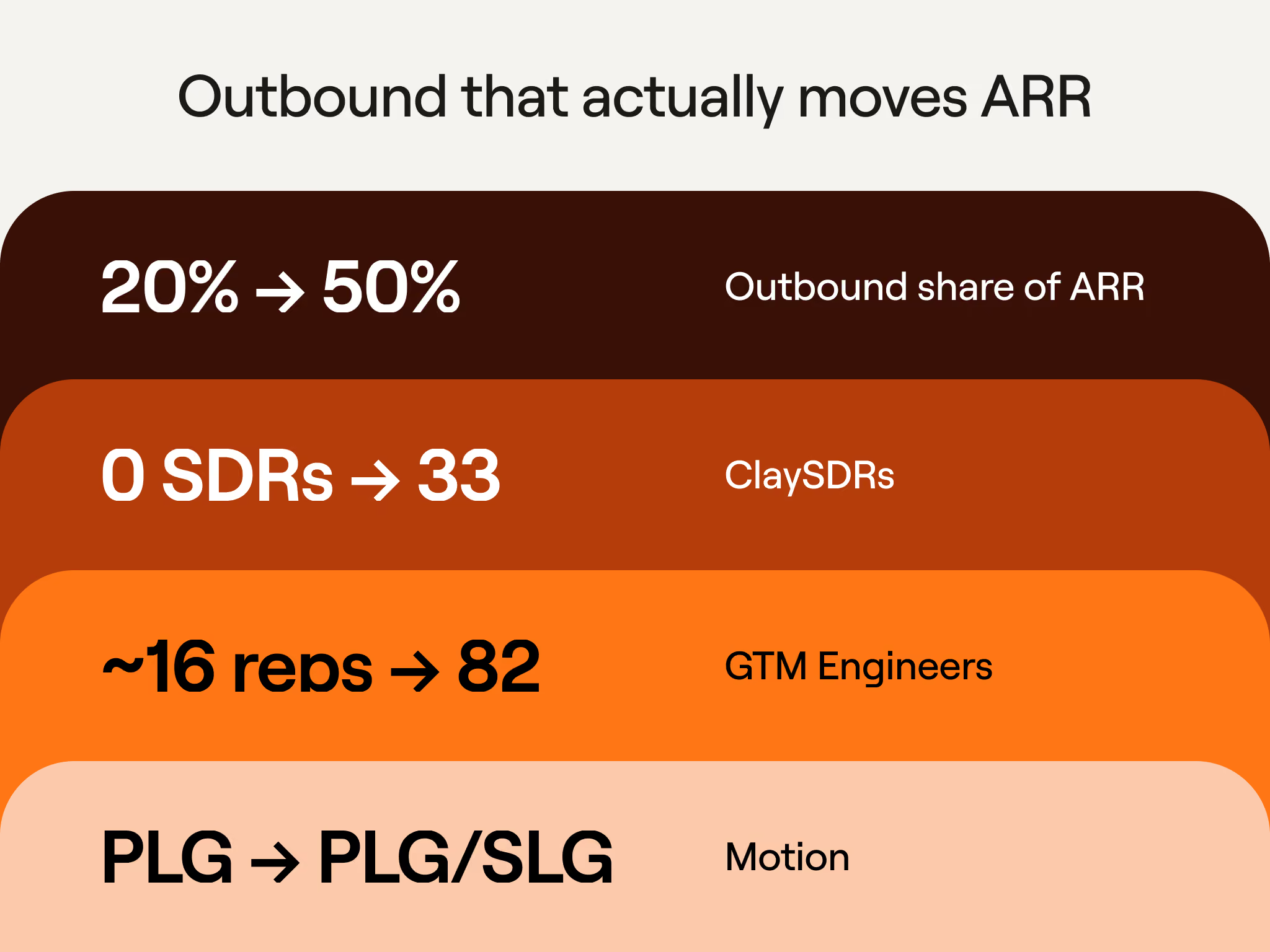
Clay didn’t really have any official outbound motion until about a year ago. We grew to $100 million in ARR mostly through self-serve, with about 16 reps and zero SDRs. But today, sales-led revenue is 50% of our ARR, up from 20%. Zero SDRs became 33 ClayDRs, and 16 reps became 82 GTM engineers. Overall, we’ve moved from a PLG-first company to one that’s a hybrid of PLG and sales-led.
Along the way, plenty of GTM plays have supported this shift as we moved upmarket to sell to enterprise customers. One of them started as a single rep's prospecting system; now it runs across our entire sales team. That rep is Sabrina Glaser. When she started prospecting, researching, and reaching out to just one account meant about 30 minutes in Salesforce, 30 in Crunchbase, 15 on LinkedIn, and 10 on Google: 85-plus minutes before writing a single email. Obviously, it was time-consuming. So she sat down with pen and paper, mapped out where her time actually went, and built four sequenced Claygents to take over the parts that consumed her calendar. Now she types in a company’s domain and has the necessary reach-out research and a drafted sequence of messages in under five minutes. She’s one of Clay’s top reps: In Q2 2026, she closed more than $1 million in pipeline through cold outbound.
But a great idea that lives with just one isn’t ideal. So Luca Prando on our GTM ops team turned her tables into a workflow the whole sales team now runs from a chat window. Building the same for your own team is just a few prompts away.
If you have about sixty minutes to spare, we walked through this whole system live on How Clay Uses Clay, the livestream where our own team opens up the real tables and workflows behind how we sell. Plus, save your seat for the next episode.
Why reps design our outbound plays and ops builds them
The four-agent prospecting system went from just Sabrina's table to the entire sales team because of how we split ownership: our reps design the GTM plays, and our ops team builds the systems that run them. We call it a “centralized system with decentralized execution,” and it’s different from the two ways that most sales orgs handle outbound:
- Fully centralized. Ops owns every play and every single line of messaging. Yes, that keeps things safe and observable. But the downside is that plays built by people who seldom talk to customers end up a bit generic.
- Fully decentralized. Reps build their own plays with whatever tools they have access to. Here, the messaging is sharper. But ops has no visibility or deliverability controls, and the knowledge stays with whoever built it, not the entire team.
Our version keeps the control of the first and the sharpness of the second.
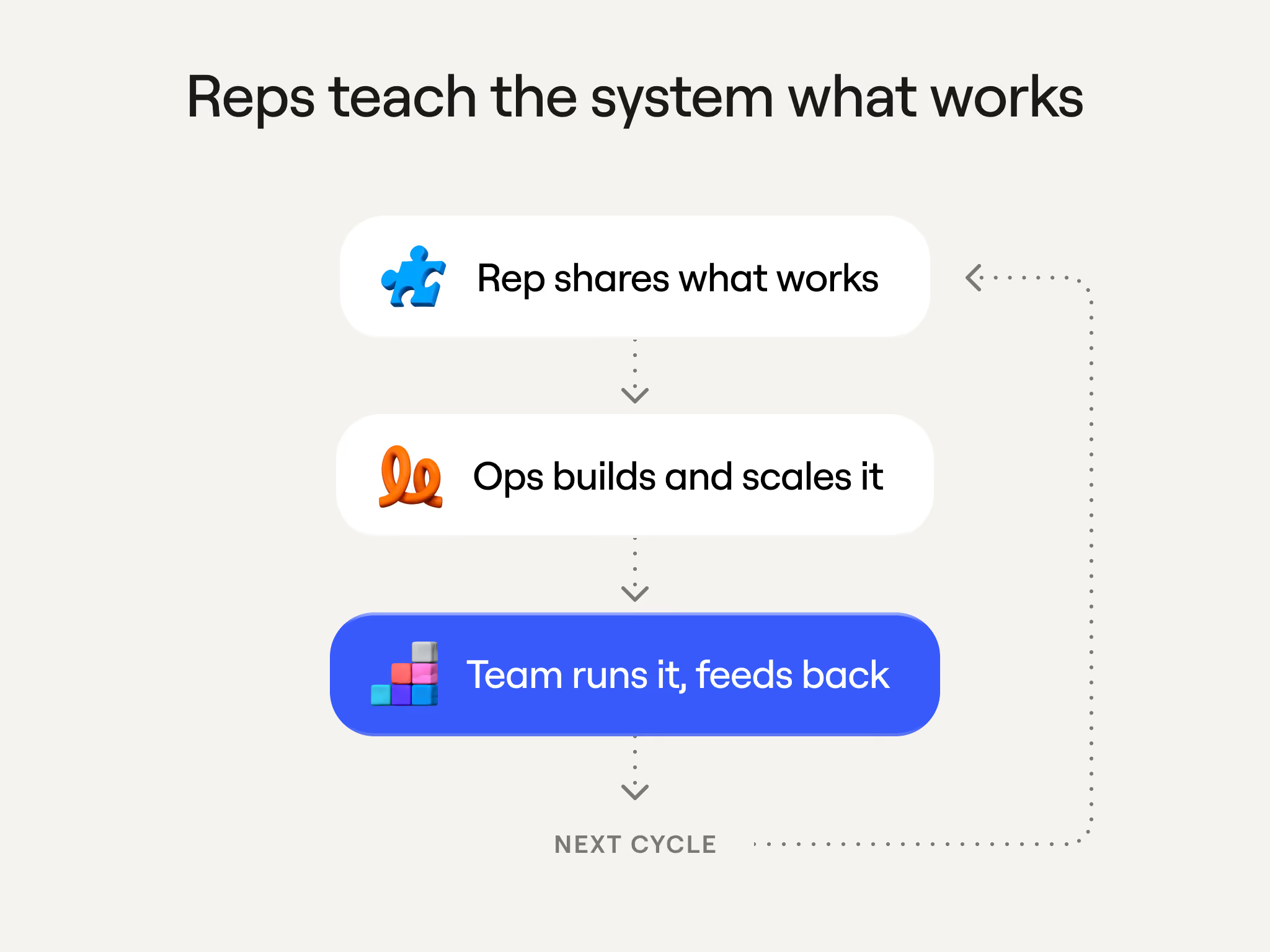
With our system, the best reps show ops exactly how they prospect, and ops turn that into one workflow for everyone with built-in guardrails. Every rep then runs it in their own voice, and feedback from 50 or 60 reps running the same play informs the next iteration.
Inside Sabrina's four-agent prospecting system
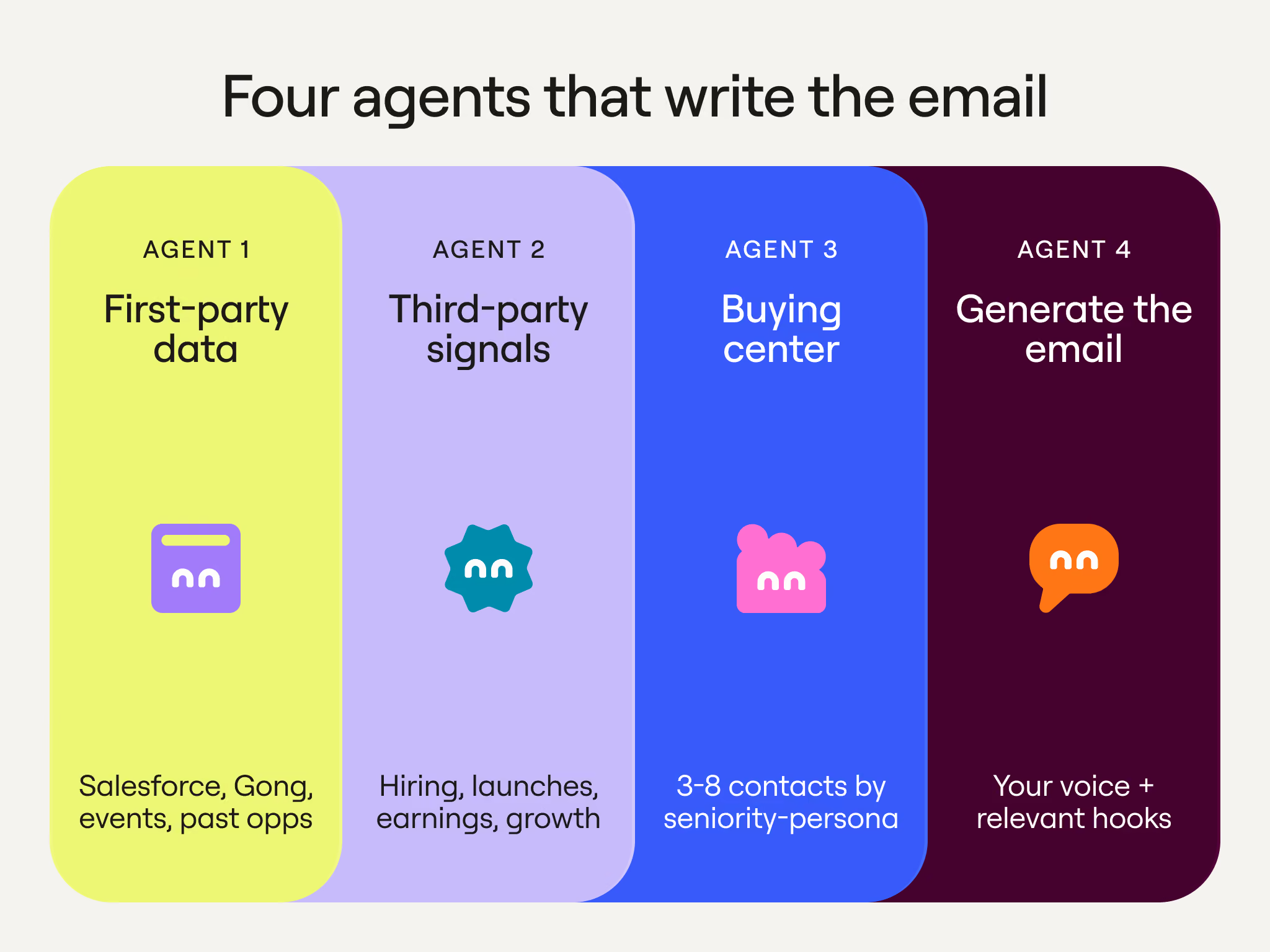
Sabrina built a Clay table that runs four agents, or Claygents, in sequence, with each one's output feeding the next. She enters a company domain, and a few minutes later she has a drafted sequence for each of the right people at that account, ready to review. This system has given her speed: she saves more than an hour of research per account.
Agents in Clay connect to other tools and documents, so she used that to make them smarter. That includes Google Docs and Notion databases for context, pitch decks so the copy matched how we position the product, and customer stories so the agent knew how we talk about our value proposition for companies. She also fed the agent a few dozen of her own emails so it would sound like her.
If you’re training an agent to write for you, start the same way, with examples of what good looks like that you wrote without help from an AI assistant. You also don't need to be an expert prompt writer to do this; Clay has a prompt generator to help you.
Here’s what each of the four agents does, in the order they run:
Agent 1: First-party data
Sabrina’s prospecting begins with what we already know about the account, so the first agent pulls our own first-party data. It also decides how warm the account is, which shapes everything downstream. Here’s what it pulls:
- CRM basics from Salesforce: the account ID, fit score, and who owns it
- Past opportunities, including why any of them were lost
- Gong transcripts and summaries from earlier conversations
- Any event attendance, email engagement, and activity in our GTM Slack community
- Firmographics and the account's current tech stack of tools
The agent then labels the account “very warm,” “lightly engaged,” or “not engaged,” and passes that label to the next step. This is also how you avoid emailing someone who just spoke to a Clay rep. Our CRM also tracks job changes, so when someone who bought or championed Clay at a former employer shows up at a target account, the agent flags them.
Agent 2: Third-party signals
The second agent looks outside the company for a reason to reach out right now. It starts from the warmth label the first agent assigned, because that decides what kind of hook the email needs. If the account already has history with Clay, the email leans into that. If it has none, the copy needs an outside reason to reach out, so this agent goes looking for one through providers in Clay's data marketplace and by researching the web. The signals it checks include:
- Job postings, especially new GTM, RevOps, or data roles, and the tools the descriptions mention
- Product launches and other major announcements
- Earnings calls, and whether leadership is talking about efficiency
- Headcount growth or recent cuts
- Funding rounds, IPOs, acquisitions, and new sales or marketing leaders
Public companies give you more to work with than private ones, because earnings calls usually supply a why now: a great quarter to build on, or several missed quarters and a new product that needs pipeline. Sabrina also leans on job postings because they reveal two things: whether a company is scaling its sales team, and which tools that team already uses. A job description that lists ZoomInfo, Apollo, and Marketo signals the company needs to consolidate tools.
Agent 3: Buying center
The third agent decides who to actually contact. It works from our ICP, but it doesn’t treat every name the same: each contact is stack-ranked, and the email that eventually goes to a C-level executive varies from the one that goes to a director or manager. Here’s what this agent does:
- Searches the account for the specific titles that match our ICP
- Weighs each person's seniority and the role they would likely play in a deal
- Returns three to eight contacts, each with name, title, LinkedIn URL, time at the company, and persona bucket
- Adds a reasoning field explaining why each person made the list and why they rank where they do
- Puts the people most likely to respond and convert at the top
That ranking, plus the warmth label from the first agent, is what the final agent uses to run a different play for each person.
Agent 4: Generate the email
The last agent writes the sequence. These messages aren’t generic AI-slop that everyone has learned to ignore. Here’s what it does:
- Takes every piece of context from those first three agents
- Builds each email around the most relevant hooks from the completed research
- Applies the rep's own writing skill so the copywriting sounds like them (not like a template)
- Produces a multi-touch sequence for each contact, ready to review and send
The small details are important here. Every email opens with something specific about the person or company, then anchors to one Clay value proposition and closes with an ask. In Sabrina’s case, she signs the first email with her full first name, but touch two is signed “Sab.” Overall, the intention is for a multi-touch sequence to feel like fewer touches overall.
Scaling Sabrina's system across the sales org
For Sabrina, the four agents did everything she wanted: the research time shrunk, and the emails still sounded like her. But a play that lives in just one person's head has a cost for the sales organization, even when it works:
- Performance variance. Top reps like Sabrina hit 160% of quota while the rest sit at 70%. This means that teams debate whether that is a people problem or a process problem.
- Compliance risk. Reps using AI tools without ops oversight means customer data in systems nobody controls, with no audit trail, no governance, and deliverability risk on top.
- Brand risk. When messaging goes out at scale without review, consistency issues can arise. Emails should sound like the rep but stay inside our guidelines.
Our intention with scaling was to let every rep sell in a way that fits the company's problems and their own style. This is where Luca and the GTM ops team stepped in.
Turning the table into a workflow the whole team can run
A play from a top performer like Sabrina is an easy win for ops. The hard part of building internal tools is getting reps to actually use them (without breaking how they already work). But reps tend to adopt a play that’s already proven successful.
Luca's first decision was to rebuild the table as a Clay Workflow instead of circulating the table. A workflow is easier for ops to observe, because every run is traceable step by step. It’s also easier to maintain. When a rep reports a problem with one part of the output, like an enrichment returning the wrong email, ops can fix that single step without touching the rest. That is much trickier in a table. The workflow also lets Luca add the guardrails that run across the rest of our systems, like deliverability limits on cold email volume and data governance.
Here’s how Luca turned the table into a workflow:
- Start with the original table. That included company enrichment and CRM lookups up front, then the four agents.
- Hand it to a coding agent. Luca opened Cursor, which plugs into the Clay CLI, pointed it at the table, and asked it to work out what the table was doing and convert it into a workflow. A domain was the input, and personalized emails were the output.
- Review the plan. The agent returned a preview of the workflow, confidence scores for each part, and a couple of clarifying questions.
- Get the finished workflow. Once the questions were answered, it produced the whole thing. The four agents carried straight over into their own nodes, prompts included.
- Inspect the runs. In the runs tab, ops can click any node and see its inputs, the agent's reasoning, its output, and how long each step took.
Reps never see any of that. Many already work in chat tools, so ops made the workflow callable from ChatGPT or Claude through Clay MCP. From a rep's side, it looks like this:
- Open a new chat and ask it to list your Clay tools.
- Pick the prospecting workflow and type in a company domain.
- Wait a few minutes while a Clay widget shows the four agents running.
- Review the emails, one sequence per contact, and send them through Gmail with the recipient already mapped.
Build and maintenance stay with ops, and reps never need to open Clay. Because the final output is email copy, it can also go anywhere else. You can add a step that sends each sequence to Gong, for example.
Self-learning loops around messaging
Clay's vision is a self-learning revenue engine, and this play is a small, working example. The prompts behind the four agents are still being trained, so we keep a human in the loop: every rep reviews and edits their emails before sending, and those edits are the training data.
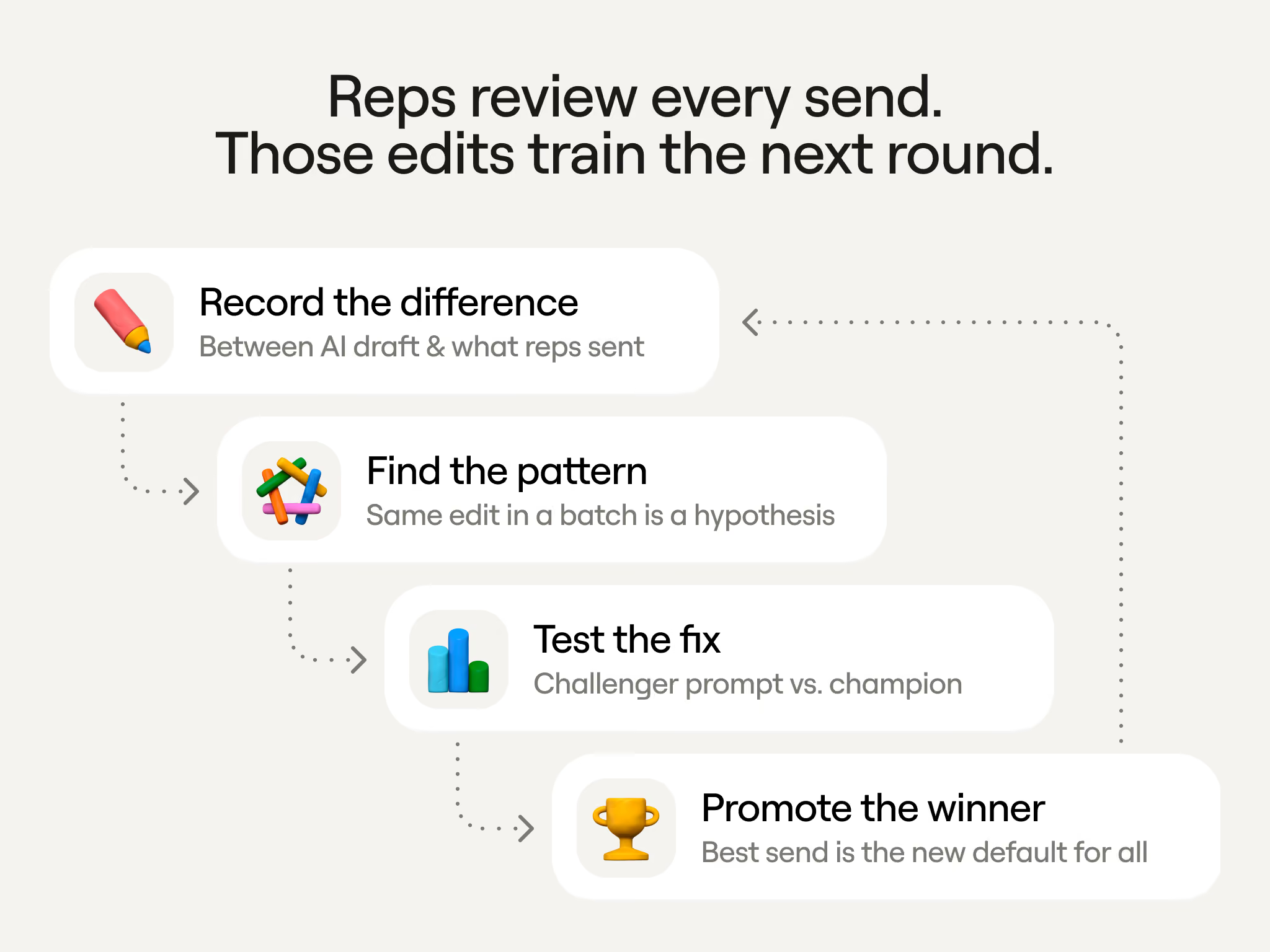
Here’s how the loop runs:
- Record the difference. Ops stores each AI-generated email next to the version the rep actually sent and logs what changed.
- Find the pattern. When the same edit shows up across a large batch, say 70 out of 100 reps rewrote the call to action, that becomes a hypothesis about what to fix in the prompt.
- Test the fix. The revised prompt runs as a challenger against the current champion, and whichever version reps adopt more is the winner.
- Promote the winner. If the challenger wins, it becomes the new default for everyone.
Ops is now building agents that spot these patterns and make the prompt changes on their own. Reps keep the final say on every email; the system just needs fewer corrections each round.
Build this yourself with Clay's agent plugin and Clay MCP
Nothing in this play needed custom engineering. The four agents are standard Clay agents, the table-to-workflow conversion ran through a coding agent, and reps call the result from the chat tool they already use. Here’s what you need:
- For ops: the Clay agent plugin. The agent plugin gives Claude Code, Cursor, or Codex the Clay CLI plus a set of skills for working in Clay. That is what Luca used to read the original table, convert it into a workflow, edit individual prompts, and inspect runs step by step. To set it up, point your coding agent at the getting started guide on GitHub and sign in with
clay login. The developer docs cover the rest. - For reps: Clay MCP. Clay MCP adds Clay as a connector in Claude or ChatGPT, with nothing to install on the rep's side. Once ops enables a workflow for MCP, or packages it as a Function the team can call by name, a rep types a domain into their chat and gets back a sequence to review and send.
Clay University also has short MCP courses for reps and for ops if you want a walkthrough before you start.
.avif)

.avif)