
An effective GTM system runs on an always-on supply of the right accounts and contacts within your TAM. Building this foundation starts with defining who your ICP is, then continuously sourcing them at scale to run enrichments, agents, and plays on top of your addressable market.
The challenge is that ICPs aren’t one dimensional. They often combine specific traits across people, company, and job data (like “B2B companies in Europe with 20+ marketers and growing headcount 10% every quarter”). RevOps needs to search these data points in one query, and get back a precise list that’s already filtered with the right data points. They also need a way to learn how their lists impact pipeline and revenue, so they can feed the learnings back to their sourcing work and continuously improve it. When that feedback loop doesn’t exist, TAM sourcing becomes a one-off, annual exercise instead of an always-on GTM motion.
We’ve released three updates that make TAM sourcing easier to run in Clay: Search, Reporting, and Lookalikes. Search lets you combine company, people, and job data in a single natural language query, and continuously source TAM. Reporting in Audiences shows you which prospects you sourced turned into pipeline and revenue. Lookalikes finds new accounts and contacts that look just like your best customers.
Building high-converting ICP lists and proving their value now happen in the same GTM system.
Search: build ICP lists in natural language, now in open beta
Clay’s search now lets you find ICPs that combine people, company and job data all in one query, and with natural language.
Find your precise ICP faster — source large lists of your ideal customers in minutes. Find ICPs that query data across companies, people, and jobs in a single search. Type queries like “Companies in APAC with 20+ software engineers or hiring for 5+ software engineering roles” or “Director+ salespeople at companies that grew headcount > 10% in the last 6 months” and get precise lists back.
Search just like you think — describe your search in natural language in our UI, or run them in AI tools like Claude and ChatGPT with our API/CLI and Agent Skill. Sculptor automatically builds your list, and you can use natural language or edit filters manually to continue to refine your searches. Query Mode, Clay's custom SQL-like query language gives you full control to edit & run complex searches both in the UI or in the API/CLI & MCP.
Continuously source your TAM — save a search as an Audience so it refreshes automatically as new people and companies match, turning your ICP into a live list instead of a one-time pull. You can now continuously generate high quality leads for your sales team to work, without manually building lists or running out of them.
Why is the new experience a better way to search in Clay?
It's faster & more expressive: Finding niche ICPs with multiple filters across company, people and jobs can now be achieved in a single natural language search. You no longer need to build a broad list and run additional enrichments to filter down & find your precise ICP.
It's more credit-efficient. Building more precise lists in a single search means you pay for the data you want. You won’t need to enrich & pay for data that you’ll eventually throw away.
It can handle millions of records: Sending your search to Audiences removes the 50K row limit, so you can build large lists at a scale of millions.
In the previous experience, a Clay customer that wanted to find “Companies with 50+ engineers in EMEA” would have to run these steps:
- Search broad to find all ~16M companies in EMEA
- Split the results into ~350 tables to work around the 50K row limit in tables
- Run an additional enrichment to find engineering department size to find out which of the ~16M companies have 50+ engineers
- Finally, they would need to filter down to narrow to results to the 4k companies in EMEA with 50+ engineers.
Clay's new search experience lets customers find the 4k results they're looking for right away, instead of starting broad and then filtering down across hundreds of tables.
Before, this would have taken a few hours, and cost ~16M credits (~1 credit per row enriched). Now, it takes less than a minute and costs 98% fewer credits than on our old search experience.
Reporting in Audiences: learn how your sourcing is working
Audiences is the GTM data layer that unifies your first- and third-party data in Clay. Reporting in Audiences lets you trace the lists you build in Clay back to the pipeline and revenue they generate, so you can learn what's converting and then scale it.
See how your TAM sourcing impacts pipeline: Measure active pipeline and revenue generated from the accounts and contacts you sourced in Clay.
Analyze signal trends across millions of records, without manual work: Monitor signals like job changes, new hires, and website intent that are actively firing across your customer and prospect records. See how they evolve over time.
Get to a fully enriched CRM, faster: Proactively track enrichment fill rates by CRM field and identify which fields have incomplete or missing data.
You can see which segments of your TAM are converting best, and feed those winners straight into Lookalikes to find more accounts like them. The same place you build your TAM is now the same place you see it paying off.
Lookalikes: find leads that look like your best customers
Once you've built lists with Search and learned what's working in Audiences, use Lookalikes to find more accounts that are similar to your top-converting customers. Input a list of up to 15,000 companies, and Clay finds Lookalike records with similar traits.
Continuously expand TAM: Run your Lookalikes as a recurring search, so you’re continuously generating high-fit leads to reach out to.
Learn what’s working: Lookalikes are organized by category (like industry) so you can see what themes your high converting prospects fall into, and learn from it.
Build the highest quality lists: Easily edit your Lookalikes so your lists always reflect your ICP.
These updates the loop on TAM sourcing in Clay: find leads in natural language, learn who your best prospects are, then scale your list building to find more just like them.
Plan availability
Search and Lookalikes are available across all Clay plans. Reporting in Audiences sits inside Audiences, which is available on enterprise and all modern self-serve plans.
Get started
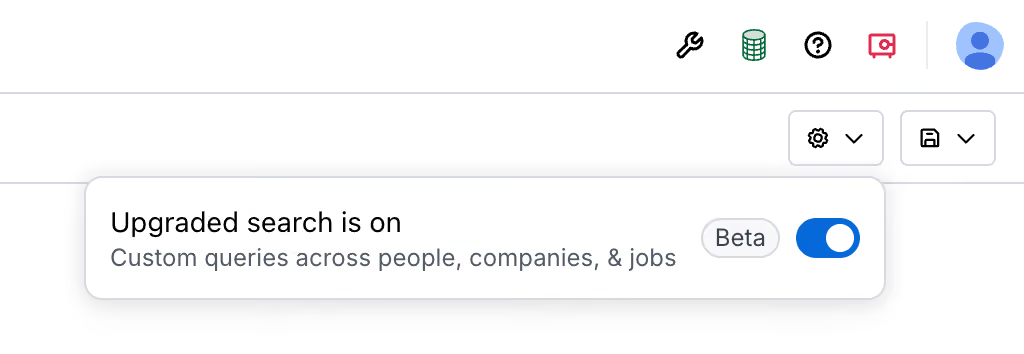
Search is opt-in only during open beta. To get started, open Find Leads from the left navigation, click on the Settings gear, and opt-in to the upgraded search experience. For Reporting, start by import data into Audiences, then navigate to the “Reporting” tab to analyze your data. Learn more in Clay University.

An effective GTM system runs on an always-on supply of the right accounts and contacts within your TAM. Building this foundation starts with defining who your ICP is, then continuously sourcing them at scale to run enrichments, agents, and plays on top of your addressable market.
The challenge is that ICPs aren’t one dimensional. They often combine specific traits across people, company, and job data (like “B2B companies in Europe with 20+ marketers and growing headcount 10% every quarter”). RevOps needs to search these data points in one query, and get back a precise list that’s already filtered with the right data points. They also need a way to learn how their lists impact pipeline and revenue, so they can feed the learnings back to their sourcing work and continuously improve it. When that feedback loop doesn’t exist, TAM sourcing becomes a one-off, annual exercise instead of an always-on GTM motion.
We’ve released three updates that make TAM sourcing easier to run in Clay: Search, Reporting, and Lookalikes. Search lets you combine company, people, and job data in a single natural language query, and continuously source TAM. Reporting in Audiences shows you which prospects you sourced turned into pipeline and revenue. Lookalikes finds new accounts and contacts that look just like your best customers.
Building high-converting ICP lists and proving their value now happen in the same GTM system.
Search: build ICP lists in natural language, now in open beta
Clay’s search now lets you find ICPs that combine people, company and job data all in one query, and with natural language.
Find your precise ICP faster — source large lists of your ideal customers in minutes. Find ICPs that query data across companies, people, and jobs in a single search. Type queries like “Companies in APAC with 20+ software engineers or hiring for 5+ software engineering roles” or “Director+ salespeople at companies that grew headcount > 10% in the last 6 months” and get precise lists back.
Search just like you think — describe your search in natural language in our UI, or run them in AI tools like Claude and ChatGPT with our API/CLI and Agent Skill. Sculptor automatically builds your list, and you can use natural language or edit filters manually to continue to refine your searches. Query Mode, Clay's custom SQL-like query language gives you full control to edit & run complex searches both in the UI or in the API/CLI & MCP.
Continuously source your TAM — save a search as an Audience so it refreshes automatically as new people and companies match, turning your ICP into a live list instead of a one-time pull. You can now continuously generate high quality leads for your sales team to work, without manually building lists or running out of them.
Why is the new experience a better way to search in Clay?
It's faster & more expressive: Finding niche ICPs with multiple filters across company, people and jobs can now be achieved in a single natural language search. You no longer need to build a broad list and run additional enrichments to filter down & find your precise ICP.
It's more credit-efficient. Building more precise lists in a single search means you pay for the data you want. You won’t need to enrich & pay for data that you’ll eventually throw away.
It can handle millions of records: Sending your search to Audiences removes the 50K row limit, so you can build large lists at a scale of millions.
In the previous experience, a Clay customer that wanted to find “Companies with 50+ engineers in EMEA” would have to run these steps:
- Search broad to find all ~16M companies in EMEA
- Split the results into ~350 tables to work around the 50K row limit in tables
- Run an additional enrichment to find engineering department size to find out which of the ~16M companies have 50+ engineers
- Finally, they would need to filter down to narrow to results to the 4k companies in EMEA with 50+ engineers.
Clay's new search experience lets customers find the 4k results they're looking for right away, instead of starting broad and then filtering down across hundreds of tables.
Before, this would have taken a few hours, and cost ~16M credits (~1 credit per row enriched). Now, it takes less than a minute and costs 98% fewer credits than on our old search experience.
Reporting in Audiences: learn how your sourcing is working
Audiences is the GTM data layer that unifies your first- and third-party data in Clay. Reporting in Audiences lets you trace the lists you build in Clay back to the pipeline and revenue they generate, so you can learn what's converting and then scale it.
See how your TAM sourcing impacts pipeline: Measure active pipeline and revenue generated from the accounts and contacts you sourced in Clay.
Analyze signal trends across millions of records, without manual work: Monitor signals like job changes, new hires, and website intent that are actively firing across your customer and prospect records. See how they evolve over time.
Get to a fully enriched CRM, faster: Proactively track enrichment fill rates by CRM field and identify which fields have incomplete or missing data.
You can see which segments of your TAM are converting best, and feed those winners straight into Lookalikes to find more accounts like them. The same place you build your TAM is now the same place you see it paying off.
Lookalikes: find leads that look like your best customers
Once you've built lists with Search and learned what's working in Audiences, use Lookalikes to find more accounts that are similar to your top-converting customers. Input a list of up to 15,000 companies, and Clay finds Lookalike records with similar traits.
Continuously expand TAM: Run your Lookalikes as a recurring search, so you’re continuously generating high-fit leads to reach out to.
Learn what’s working: Lookalikes are organized by category (like industry) so you can see what themes your high converting prospects fall into, and learn from it.
Build the highest quality lists: Easily edit your Lookalikes so your lists always reflect your ICP.
These updates the loop on TAM sourcing in Clay: find leads in natural language, learn who your best prospects are, then scale your list building to find more just like them.
Plan availability
Search and Lookalikes are available across all Clay plans. Reporting in Audiences sits inside Audiences, which is available on enterprise and all modern self-serve plans.
Get started
Search is opt-in only during open beta. To get started, open Find Leads from the left navigation, click on the Settings gear, and opt-in to the upgraded search experience. For Reporting, start by import data into Audiences, then navigate to the “Reporting” tab to analyze your data. Learn more in Clay University.







.avif)


.png)


.avif)


.avif)


.avif)


.avif)


