

If you’re a software solution with any traction, your product has leaders who depend on it. Their teams rely on your tooling, and so do their quarterly numbers. But sooner or later, these leaders bow out, take new jobs, and refresh their roles on LinkedIn.
On one hand, yes, it’s a churn risk.
Your account just lost someone who had a stake in your product, and renewal conversations tend to get trickier without them. But that departure is also a buying signal. That leader is landing somewhere new with a goal to fulfill and, potentially, an incomplete tech stack to do so. Even if the new company has half the headcount, a champion in the right seat can expand an account and grow its annual bill as the company moves from Seed to Series A.
The window to reach them gets smaller each day. So, our Growth team built a play in Clay that watches for these job changes automatically:
- When a senior leader leaves a paying Clay customer and joins an earlier-stage prospect, Clay detects the job change and records it in Salesforce.
- A workflow confirms the new company is a good fit for outreach, checks how much the person used Clay in their previous role, and drafts a personalized sequence of messages.
- The rep who owns the account gets the outreach sequence in their Gong Engage queue.
Read on for the full setup, including the signal that triggers the play and the exact rules that go into every email a sales rep sends.
We’re open-sourcing our growth plays at Clay. Built by Andrew Morris on our Growth team, you can find this entire workflow as a skill on the Clay Marketplace. Load it into a coding agent like Claude Code or Cursor, and you’ll have the fully built workflow in Clay.
Job change to same-day outreach
On Clay’s Growth team, we call this play “Paid Alumni Job Changers”; the qualifying event is someone leaving a company that paid for Clay. Whether they personally used the product isn’t that important. A sales director probably wasn’t spinning up workflows for TAM sourcing and territory planning. But their team did, helping that sales org hit its numbers.
When that sales director takes a career bet and becomes the revenue leader at a 40-person startup, they inherit a team with no system at all (or a basic one). They also have fresh memories of what their previous system accomplished. This makes our pitch simple: “Your last company ran on Clay, and your new one doesn’t. Yet!”
These are the Clay products that this play runs on:
- Signals. This tracks events like job changes, promotions, and company funding rounds. It detects who left the company, where they came from, where they went, and whether they ever personally had a seat in their company’s Clay account.
- Our Salesforce integration logs the job change in the CRM. It matches the person to the prospect account they just joined, giving sales reps the full context for each record.
- Workflows. Internally, we’ve gradually moved away from tables and toward Workflows, Clay’s product for visually building multi-step automations. This lets us qualify the account, sort the person by role and product history, and draft the outreach.
- Gong Engage. This tool integrates with Clay and is where the finished message sequence (emails, call notes, LinkedIn messages) lands and where a rep reviews and sends it.
For sales personas, we see roughly one enrollment per day. Looking back at the previous 60 days of job changes, only 62 people met all the set criteria. But every person who gets through is worth a rep’s individual attention. A play like this won’t yield hundreds of new leads; we always suggest GTM teams maintain a diverse portfolio of plays rather than relying on one or two.
Why this play works
Job-change plays are popular, but they’re not that great at getting meetings on the calendar. Why? Most of them are lazy and unstrategic. Shooting someone a “Congrats!” message on LinkedIn and immediately telling them about your tool is a non-starter.
This sequence is much more targeted:
- Timing > persona. We reach out during a leader’s first few weeks in their new role, as they’re still deciding their software toolkit. Our hypothesis is that this timing matters more than a prospect perfectly matching your ideal customer profile. A perfect-fit buyer ignores you if their stack is finalized; someone still looking is willing to chat.
- Paid-prior is a solid signal. Their old company kept paying for Clay, so it’s likely they experienced this value-add first-hand.
- Power plus context. Directors and above have the authority (and budget control) to procure a new tool, plus a perspective on what’s worked for their team before.
5 steps to implement the “Paid Alumni Job Changers” play
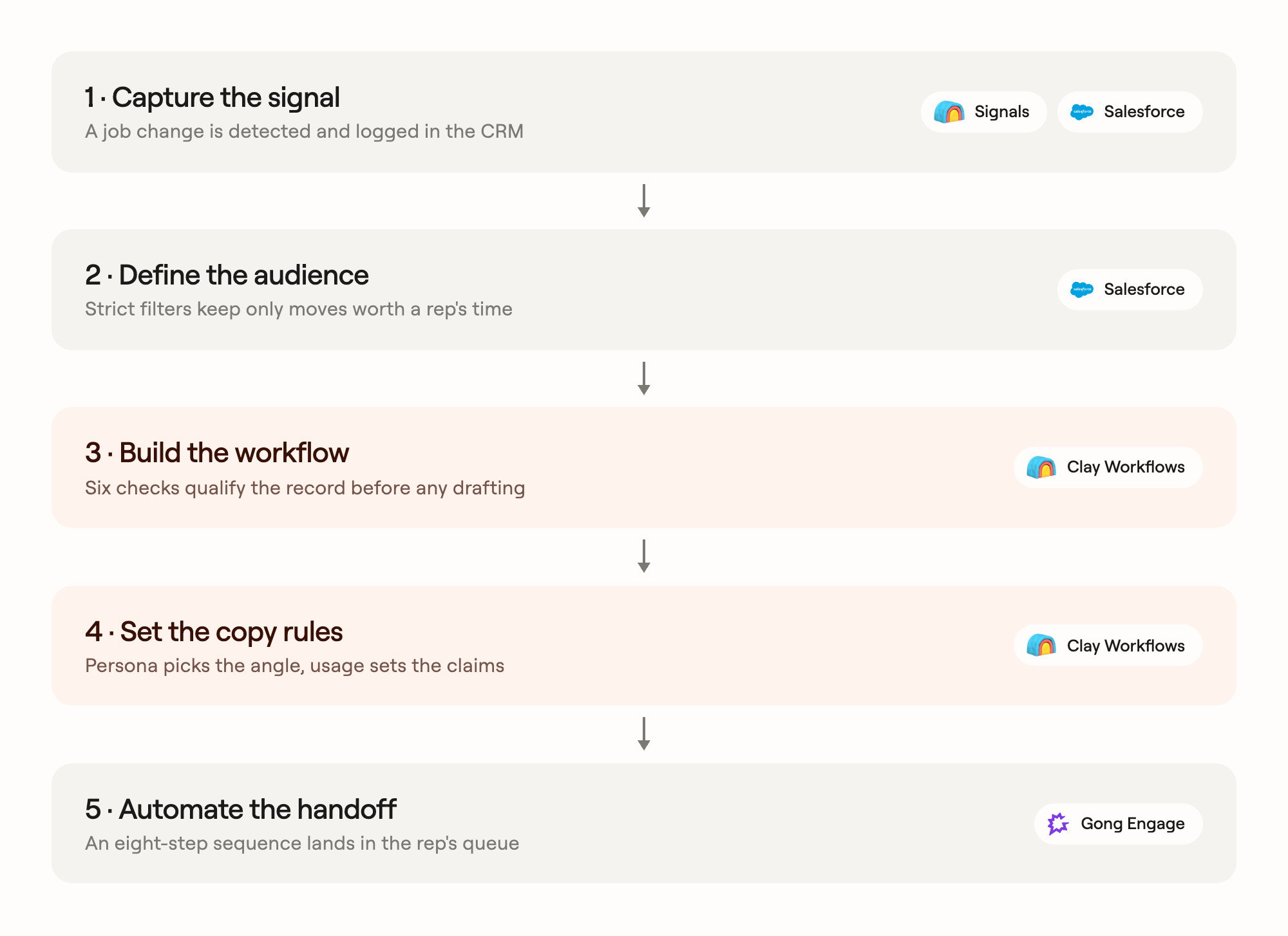
Except for the last steps, where there’s a human in the loop actually editing and sending the outbound sequence, this play is entirely automated in Clay. Here’s a look at how it happens:
- Capture the signal
- Define the audience
- Build the workflow
- Set the copy rules
- Automate the handoff
1. Capture the signal
The initial trigger for this play is a job change from Signals, which monitors career moves for contacts tied to your accounts. For example, this might be a Head of RevOps at one of your accounts resurfacing as VP of Operations at a startup on your prospect list.
Each detected job change is logged in Salesforce as a record that includes the person, the old account, the new account, and a Clay usage subtype: regular (no product history), product user (had a seat), or power user (hands-on).
If you build this yourself, we recommend tracking and storing the data like so:
- Run detection daily. Have new records flow into the workflow as they’re created, so the play runs continuously.
- Track two dates, and keep them separate. Every job-change record has two separate dates: the start date (when the person began the new job) and the created date (when your system detected the change and wrote the record). The start date comes from LinkedIn, which only records the month, so those dates all pile up on the first (e.g., November 1, December 1). The created date spreads out naturally, because detection runs daily. Trigger your outreach on the created date. If you use the start date instead, you’ll get a flood of records on the first of every month and nothing for the rest of it.
2. Define the audience
Most job changes aren’t worth a rep’s time. It’s not helpful to know that an intern at a company you’ll never sell to is now an intern somewhere else you’ll never sell to. We apply strict criteria to filter out the irrelevant moves.
A record only qualifies when:
- The old account is paid-prior. The company invoiced Clay at some point. Trials and free workspaces don’t count.
- The person is senior enough to install a system. For titles, we look at VP, Head of, Director, and above. CRO, Chief Revenue, or Chief Sales titles qualify, as does anyone tagged as a decision-maker. We exclude functions that don’t typically own the stack, like customer success, partnerships, and enablement.
- The new account is a prospect at the right stage. For us, that means sales tiers 1 through 3. We exclude enterprise accounts (they have their own motion), agencies, venture capital and private equity firms, and education. We also exclude moves or promotions within the same company.
- Each contact appears once per new account. The same job change can be detected more than once. If duplicate records show up for one person joining one company, we keep the most recent record and toss the rest.
3. Build the workflow
Qualification and copy generation happen in Workflows. Each record passes through a series of checks in a fixed order and either exits early as a skip or continues to copy generation. If any check hits an error or can’t find the data it needs, the record is skipped rather than sent.
These are the checks:
- Sanity check. Same company or malformed data skips.
- Enterprise check. If the new account is enterprise tier, it skips.
- Persona sort. Sales, ops, marketing, and executive records continue down their own copy paths. Unknown personas skip.
- Contact lookup. The person must already exist as a contact on the new account; our workflow never creates new CRM records.
- Route and score. The workflow finds the rep who owns the account. If there’s no owner or no usable booking link, the record skips.
- Cooldowns. If the contact is already in an active sequence, or the account was touched by this campaign in the last 30 days, the record skips.
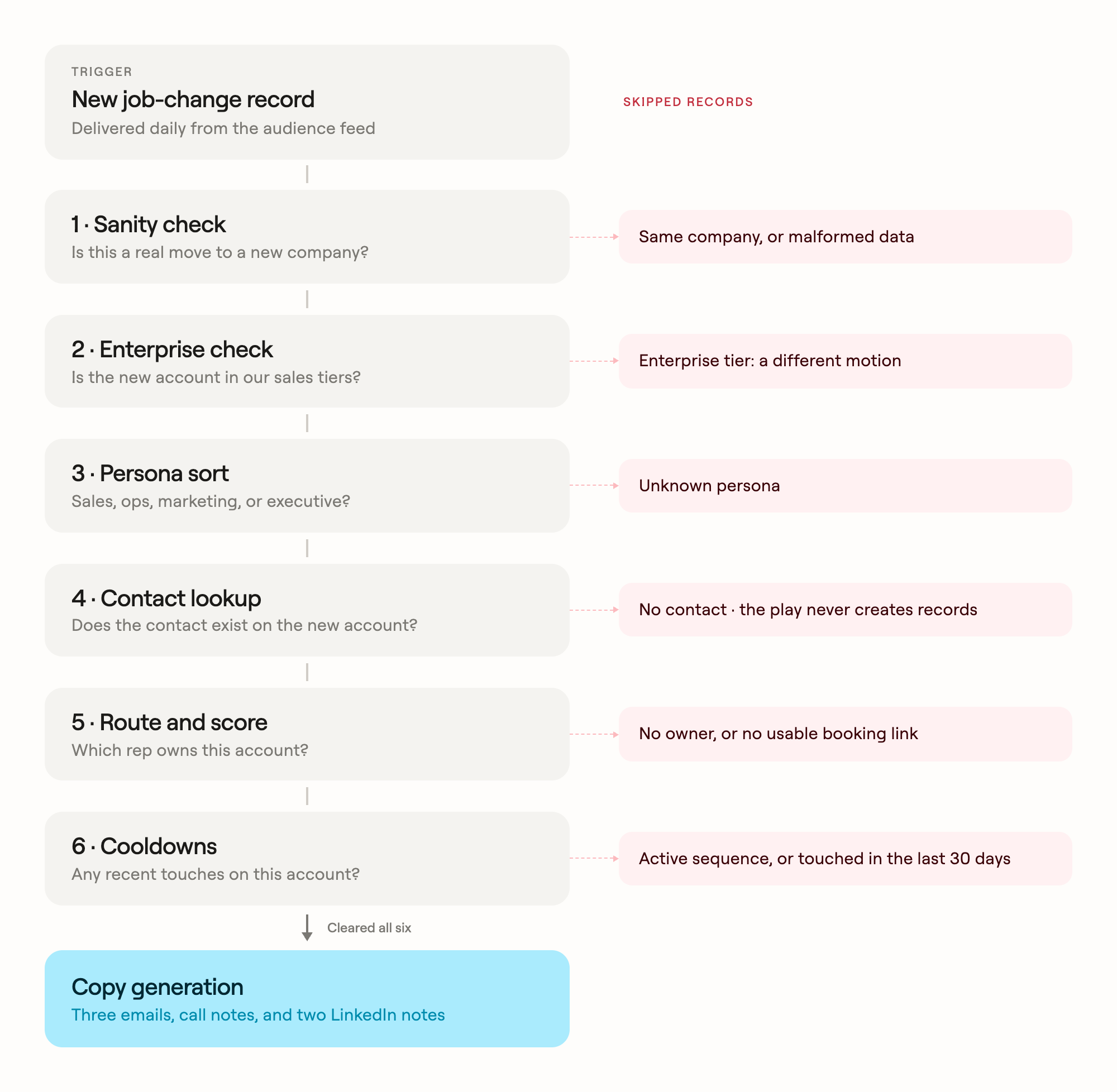
Next up, records that clear all six checks continue to copy generation. To get the messaging right, the workflow first gathers lookalike use cases. These are examples of what companies similar to the new account are building with Clay.
For example, if the new company is a 50-person fintech, the bullets might describe how other fintechs at that size enrich their inbound leads or automate account research. Then it drafts the full set of outreach materials, matched to the person’s persona and usage tier (more on these rules below).
4. Set the copy rules
AI generates the copy, but it follows strict rules to avoid dipping into slop territory. We’re especially careful about how we describe their previous usage of Clay. The usage subtype from the signal determines what each email can claim:
- Regular contacts almost certainly never used Clay themselves. Their emails talk about what the old company’s ops and growth teams ran, and never imply the recipient used the product.
- Product users had a Clay seat at the old company. Their emails can acknowledge the account without overstating how much they used it.
- Power users were hands-on builders. Their emails skip the introductory pitch and talk about specific product features (like Workflows) and getting set up again at the new company.
The persona of the job-changer determines the opening angle of an email:
- Sales: “At [old company], Clay is what ops and growth were using.”
- Ops: “At [old company], your function ran Clay.”
- Marketing: “At [old company], growth used Clay for TAM, lists, and personalization.”
- Executive: “At [old company], the GTM org already ran on Clay.”
A few other rules apply to every email: never criticize either company, never invent details about the old company’s stack, and always close with a calendar link.
5. Automate the handoff
Generated copy, no matter how personalized, is only useful if a sales rep actually sends it out. The final stage enrolls each qualified record in an eight-step flow in Gong Engage.
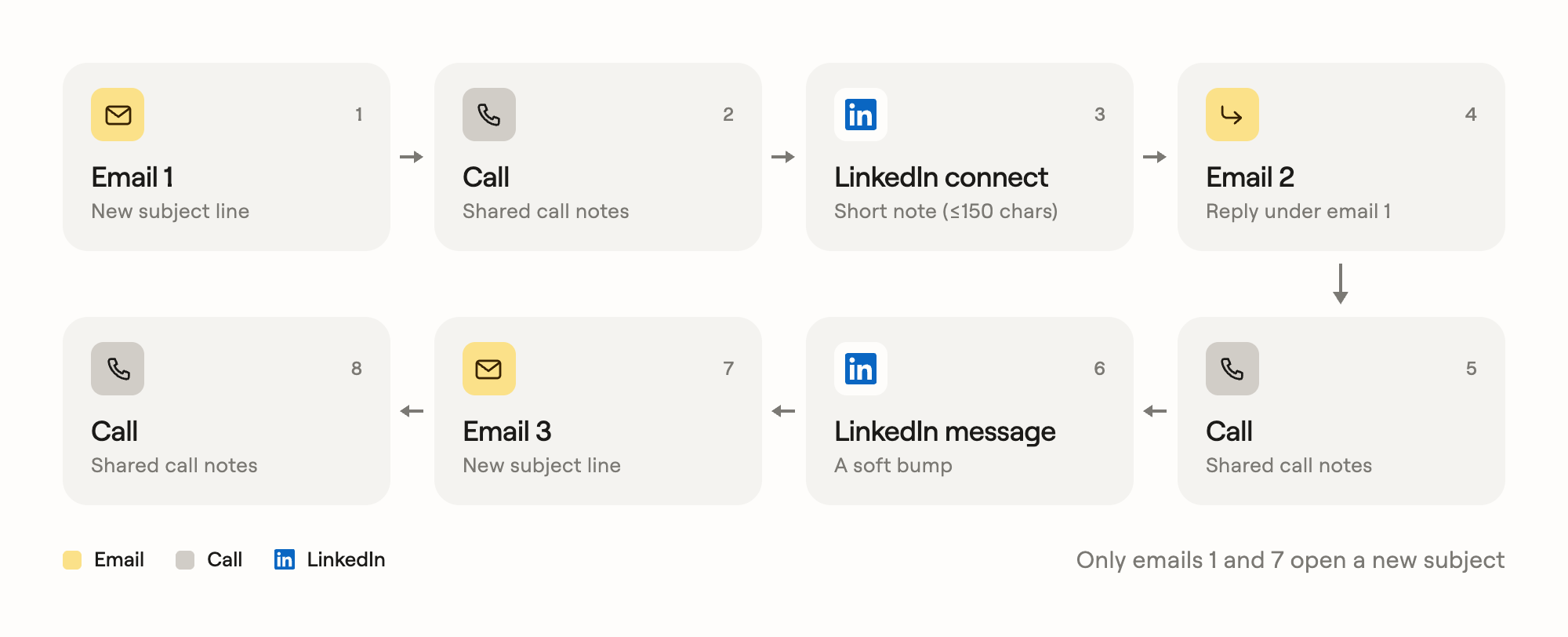
Eight seems like a lot, but our aim is for the whole exchange to feel like one ongoing conversation, not three separate campaign sends. These are the steps:
- Email 1, with a new subject line
- Call
- LinkedIn connection request
- Email 2, threaded as a reply under email 1
- Call
- LinkedIn message
- Email 3, with a new subject line
- Call
The flow’s owner is the account’s ClayDR (our deal reps). Each record arrives with the copy drafted and the context stamped; our reps just need to review, adjust, and send.
The workflow also leaves a paper trail in Salesforce. It adds the contact to the campaign and notes the job change on the account record. Anyone who opens the account later can see why the outreach happened.
Install this skill and let an agent build it for you
You don’t need a growth team to recreate this play for your own business.
- First, install the Agent plugin. You can use coding agents like Cursor and Codex to build directly on Clay through our CLI and API. You’ll get access to Clay’s integrations, enrichment logic, and permissions.
- Then, download the “Paid Alumni Job Changer Enrollment” skill from the Marketplace. The skill walks your agent through the entire build, including the signal and audience filters, plus the workflow checks and copy rules. It starts with a dry run before anything goes live.

.avif)