Picture two sales reps prepping for the same call. One has a desk buried in loose printouts of CRM exports, call transcripts, and spreadsheets from last quarter, so they need to sort the pile before even starting to make sense of the account. The other has a filing cabinet: one folder per company, everything already filed under the right label.
If you asked both of them to compile their most relevant account research before the call, you’d bet that the second one finishes faster with higher-quality info.
Generic agents are like the first sales rep: they may have a very smart, capable brain (i.e. the model), but without organized context to draw from, they spend more tokens finding what they need. As models get better and cheaper, more of your GTM alpha comes from the data infrastructure underneath.
That matters now because revenue leaders are racing to give every seller an AI agent. Those agents are only as good as the account data behind them, and many teams don’t find that out until months later when their agents fall short.
To quantify that gap, we gave two agents the same accounts and pre-call questions that reps typically ask. One was a general-purpose agent connected to Salesforce and Gong, and the other was an Account Agent built on top of Audiences, Clay’s GTM data layer. Here’s what we learned from testing them:
What an agent needs from its data layer
Both agents we tested had the same facts. What differed was what each one could actually see. Unlike the general-purpose agent, Clay’s data layer put the whole account in front its native agents with:
- One resolved record per account. The same company can live in Salesforce as two accounts and in Gong under a subsidiary's name. Having one canonical record allows the agent to start from a single source of truth instead of reconciling multiple versions of the same account on every query.
- Every account field side by side. An agent that directly (or via MCP) queries a CRM gets back only the fields it asks for – but it rarely knows to ask for custom fields like a health score or usage trend, where the early warning signs often live. When the data layer shows every field up front, the agent can spot when one field contradicts the rest of the account.
- Context organized for how agents search. An agent working from raw data will spend a lot of effort just finding the account. Every step of that search makes the answer slower and more expensive. Meanwhile, when the account is already filtered and summarized, the agent goes straight to reasoning about it.
Where a strong data infrastructure makes a difference
One resolved record per account
Duplicates build up in any CRM that's been up and running for a while. They pop up when an integration user creates a second account during a sync, or when reps start logging calls under a subsidiary’s name after a company acquisition. The CRM is a record of many people and systems writing to it over time.
To test this, we planted a deal-threatening email on a duplicate Salesforce account. In our test scenario, the buyer had just acquired a company that used a competitor. Their procurement team wanted a side-by-side comparison by November 1st, or else they’d consolidate on a competitor’s software. The related call was logged in Gong under the subsidiary's name.
We found that Clay’s Account Agent surfaced the threat in every run, as Audiences (Clay’s purpose-built data layer) had already merged the duplicate into the main account. A general-purpose agent connected to Salesforce and Gong via MCP caught it in only 60% of runs. Those were exactly the runs where it happened to open the duplicate record; since the gap came down to retrieval luck, a better prompt or a bigger model wouldn't have surfaced the threat either.
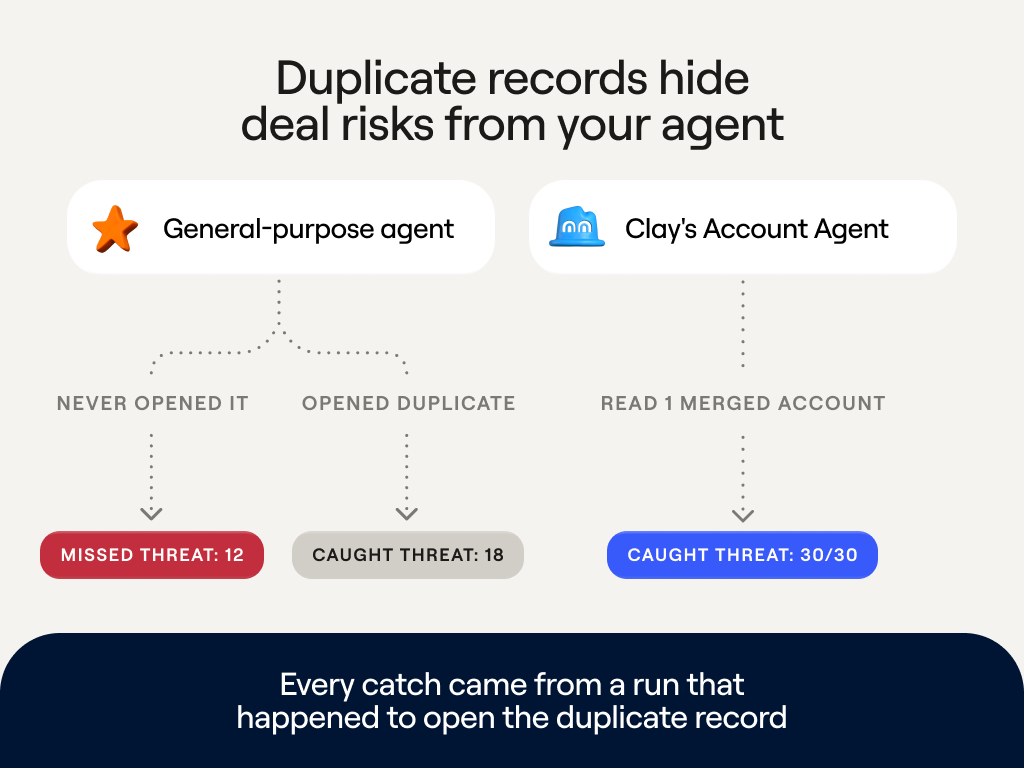
For a rep, that miss has a concrete cost. In several failed runs, the agent confidently recommended a next play without mentioning the November 1 deadline. The rep would walk into the call with a plan that ignores one of the biggest risks to the deal.
Some dedupe tools help, but they only merge records inside Salesforce and don't connect a Gong call logged under a subsidiary's name or an email thread to the right account. That means new duplicates arrive with the next sync.
When facts are scattered across systems, nothing on the main record tells an agent that the duplicate exists. Clay’s data layer, Audiences, is like a filing cabinet that resolves each source – e.g. Salesforce records, Gong transcripts, or enrichment signals – into one folder per company or person. Agents in Clay can then get a full picture of what’s going on in every account, navigating a directory of folders per account.
Every account field side by side
CRM fields often contradict each other. For example, you might have a risk rating that says an account is safe alongside a health score that says it's slipping. An agent can catch those contradictions only if it sees the fields side by side.
This is harder than it sounds. Querying a CRM normally only returns the fields you asked for, whereas important signals often sit in custom fields like a health score or a usage trend.
In our test, the general-purpose agent never asked for those fields, so it never saw them. Theoretically, you can list out the right fields in the agent’s prompt, but it would take extra maintenance to write for each org’s custom fields and update them each time someone adds one. Clay’s Account Agent sees them from the start, because Clay’s data layer hands it a summary of the whole account first.
In one test, a sync had quietly flipped an account's risk rating from Medium to Low. The same record showed a poor health score and usage down 21% over the past month. Two fields signaled trouble while the rating said everything was fine.
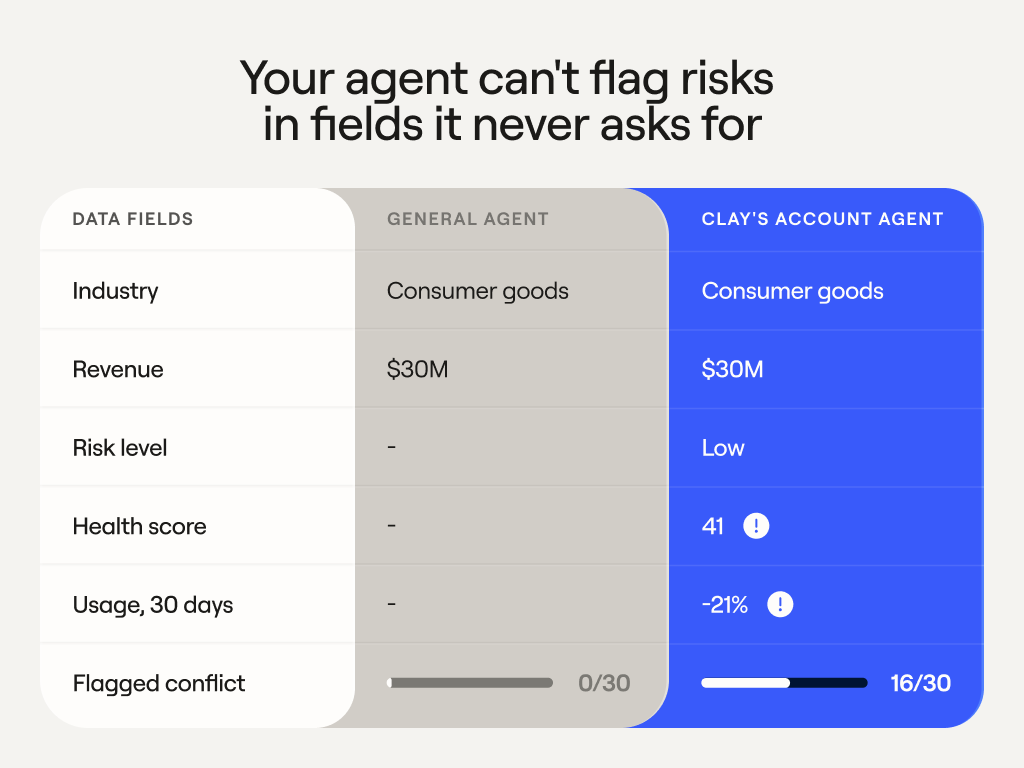
Clay’s Account Agent read all three together and caught the conflict in more than half its runs. The general-purpose agent never did, because none of its queries asked for those fields. To that agent, and to any rep relying on it, the account looked safe.
Context organized for how agents search
Every step an agent takes has a cost. The general-purpose agent connected to Salesforce and Gong had to sort the pile first; it paged through hundreds of unrelated Gong calls to locate the few tied to this account, and it hauled each of those pages into every step that followed. In comparison, Clay’s Account Agent opened a folder that was already sorted and got straight to reasoning.
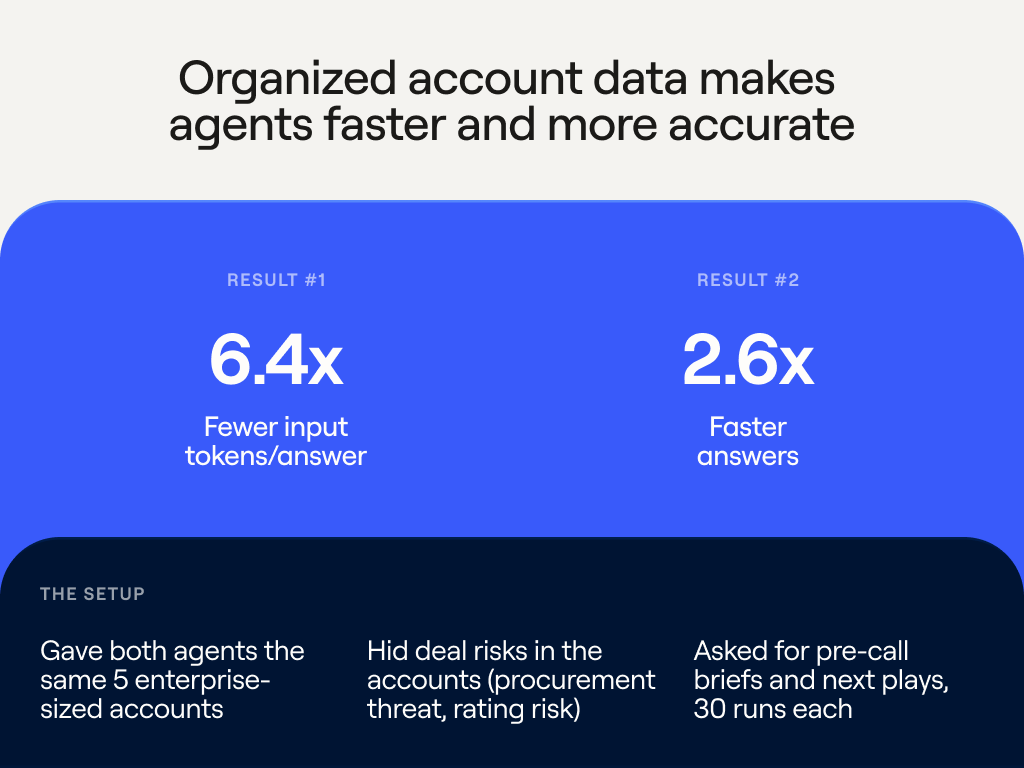
Having organized context greatly cut the work per answer. Not only did Clay’s agents use 6.4x fewer input tokens – they also answered 2.6x faster, generating pre-call briefs in 23 seconds vs. a minute from the general purpose agent. While Clay organized each account once and every question reused that work, the general-purpose agent started its search from scratch over every question. For a RevOps team running agents across tens of thousands of accounts every week, that gap compounds into real cost and wait time.
Clay’s agents didn’t give up accuracy to get there. In the duplicate-account test, the November 1 procurement deadline sat on a second Salesforce record – and Clay’s Account Agent was the one that found it every time, even while running on a smaller, cheaper model.
What this means if you're building your own agent
A general-purpose agent with Salesforce and Gong tools can reach the same raw facts as Clay’s agents. Every miss in our test came from retrieval, and that's why the usual workarounds fall short.
The usual first move is a better model. The general-purpose agent we tested already ran on the bigger, pricier one, and it still missed the threat whenever it skipped the duplicate record. No model can reason about a record it never opens.
Cleaning up the CRM is worth doing, and it solves part of the problem. Dedupe tools merge records inside Salesforce, but Gong calls and emails stay disconnected, and new duplicates arrive with the next sync. Listing the right fields in a prompt hits the same wall. It covers only the fields you know about, and someone has to keep that list current.
MCP was the exact setup we tested. It gives an agent access to your data, then leaves the agent to resolve duplicates, find custom fields, and organize the account on every question. That's where the extra tokens and time went.
The hard part is the infrastructure underneath, and that's the filing cabinet Clay's data layer is built to be. It matches records, puts every field in front of the agent, and stays current as reps log calls and integrations sync. Agents that start from a complete account catch what generic agents miss, and they spend their tokens on reasoning instead of searching. As models get better and cheaper, that foundation is where your GTM alpha comes from.
Appendix: How we tested
General-purpose agent vs. Clay's Account Agent.
We built five synthetic accounts sized like real enterprise accounts. Each had a six-person buying group, three opportunities, 31 contacts, about 10 emails, and up to 16 Gong calls with transcripts as long as 61K characters. Each account's calls sat among 416 calls from 80 other companies, as they would in a real Gong org. We asked two questions per account, "What's my next play on this opportunity?" and "Write me a pre-call brief," three times each, for 30 runs per setup.
The general-purpose agent used Salesforce and Gong tools with a standard prompt. Account Agent used its production configuration and read the account files and summary from Clay's data layer. Each account's 11 Clay signals were also logged in Salesforce as Tasks, so both setups had the same facts. We merged the duplicate account's records ahead of time to simulate Audiences matching, so the test measures the value of resolved context and doesn't measure matching accuracy.
Both setups took about nine steps per answer. The setups used different models, and the figures leave out the cost of building and maintaining the account context. A judge model graded each answer as caught, flagged, missed, or not addressed.
Filesystem approach vs. typed tools
We ran Account Agents two ways on the same accounts to see how the way it reads an account affects answer quality:
- Browsing the account (filesystem structure). The agent reads an account the way a coding agent reads a codebase. It scans the structure, searches for what matters, and opens only the files it needs.
- Typed tools. The agent uses a set of named, purpose-built tools, one for each kind of data, like contacts, opportunities, or calls.
We held the model, data, agent loop, and graders constant and changed only how the agent accessed the account. We ran 650 runs across five accounts and 65 questions in 13 task families.
Scores are composite answer-quality measures. Most other task families came out close to even.