
















As a popular platform among many generations, YouTube's comments section has valuable data you can use for sentiment analysis, market research, or even creating datasets for prospecting.
Still, collecting data from social media platforms differs slightly from public websites. You agree to terms of service that might come in the way of scraping.
To get first-hand insights, we consulted our network of sales professionals who specialize in data extraction and prospect research. With their valuable input, we break down the three methods to try and recommend a YouTube comment scraper as the most straightforward approach, especially for users looking for a no-code solution. 🧑💻
TL;DR
- You can scrape YouTube comments three ways: the official YouTube Data API, a custom Python scraper, or a no-code scraping tool.
- The API is the most ethical option but requires coding skills and caps you at 10,000 API units per day.
- Building a Python scraper from scratch is time-consuming and requires handling pagination, proxies, CAPTCHAs, and retries.
- No-code tools like Clay are the fastest path: use Claygent, the Chrome extension, or native integrations to extract comments without writing any code.
Is It Legal To Scrape YouTube?
While scraping public data, including YouTube comments, is generally legal, it also depends on a few factors:
- 📊 Type of data: Scraping private data without permission is prohibited by data protection regulations like GDPR and CCPA
- ⚖️ Terms of service: YouTube's terms of service prohibit users from scraping without explicit permission, and violations could lead to legal action. These terms are not enforceable if you scrape without logging in
- 🚫 Copyright laws: Scraping copyrighted data is not illegal if done in line with the fair use doctrine, but reproducing or distributing it without the owner's authorization can result in legal penalties
So, scraping YouTube is not illegal in itself, but the type of data you scrape, as well as how you do it and what you use it for, can influence its legality. To be safe, consult a legal professional before scraping to understand your jurisdiction's stance on scraping. 👮
💡 Bonus read: Find the best ways to scrape emails from Facebook and Instagram. Or see what scrapers work well with Mac.
How To Scrape YouTube Comments: 3 Methods

Scraping YouTube comments is possible, and you can do it in three different ways:
- Using the official YouTube API
- By building a custom scraper using Python
- Using ready-made scraping software
While each method is effective to an extent, the last option is the easiest and most resource-saving. Let's break them all down!
Scraping Using the YouTube API
If you want to scrape YouTube comments ethically without the risk of getting banned, you should use the YouTube Data API. ⛔
Using it requires at least some basic coding skills and familiarity with HTTP requests and JSON responses. Although YouTube provides comprehensive documentation and client libraries to make it accessible, non-technical users new to coding may find these concepts confusing and take a long time to master them.
Using the API to scrape generally involves the five steps below:
- Create a Google account
- Create a new project in the Google Cloud Console
- Obtain API credentials
- Install the necessary libraries
- Write code
If you need to scrape private data, you also need to implement OAuth 2.0 to request user permission. 💻
Some of these steps are highly technical and complex, so using the API can be time-consuming, even for developers with considerable coding skills.
You can use the YouTube Data API for free if you don't exceed the daily quota of 10,000 API units. While this is enough for small-scale or hobby data scraping projects, you will need to open your wallet for larger-scale scraping.
That said, the API doesn't give full access to all the data points on the platform, so you may not be able to extract all the data you need.
Building a Scraper in Python

Python is a popular choice in data scraping due to the wide range of libraries that can handle complex websites, parse text, and interact with HTML forms. If you have the time and necessary coding background, you can use it to create a YouTube comment scraper from scratch. ⌨️
To build a simple Python script, you only need to install scraping libraries like BeautifulSoup or Selenium and code a Python loop to iterate over the comments as it scrapes.
However, if you need a robust YouTube comment scraper, you'll need some additional features outlined in the table below:
| Feature | Why You Need It |
|---|---|
| Pagination handling | YouTube displays a few comments at a time, so your scraper needs to interact with the pagination controls to navigate through the comments section |
| User agent and proxy rotation | The platform implements anti-scraping measures, so your scraper needs to rotate user agents and proxies to avoid detection and circumvent them |
| CAPTCHA solving | YouTube employs a CAPTCHA system to differentiate people and bots. This means your scraper must integrate with captcha-solving services like Anti Captcha and Capsolver to solve them |
| Auto retry mechanisms | To ensure your scraper can still extract the data you need in case a request fails, you need a retry wrapper. You can use a pre-built wrapper or code one from scratch |
| Scheduling features | You'll likely want to scrape YouTube comments more than once, so you need to set your script to run in predefined intervals |
Even with considerable coding skills, implementing these features can take a lot of time and effort and may be challenging to handle effectively without help. You can avoid the hassle by paying a developer to create a custom YouTube comment scraper for you, but you still have to learn to use and manage it. 🚧
With numerous robust no-code YouTube comment scraper tools available, creating a Python scraper from scratch is not worth the trouble.
No-Code Web Scrapers
If you don't have a technical background or want to avoid creating a YouTube comment scraper from scratch, you can use a web scraper tool and collect comments without writing a single line of code. 👍
No-code web scrapers can come as ready-made solutions that don't require a lengthy setup process or as toolkits for building a custom scraper. They typically have intuitive and user-friendly interfaces that rely on the following:
- 🖱️ Pointing and clicking: Open the comments on a YouTube video and click on the data points you need to extract
- 🔗 URLs: Provide a YouTube video URL, and the tool scrapes its comments
- ⌨️ Prompts: Instruct the scraper on the comments you need and where to find them, and it extracts them for you
Many advanced web scrapers also have features like scheduling and pagination handling, which would otherwise take a long time to code. These tools could be an excellent choice if you need a powerful YouTube comment scraper without a complex setup process.
For a comprehensive solution that goes beyond scraping and gives you access to millions of data points, we recommend Clay. 🎯
How To Scrape YouTube Comments With Clay
If you need an intuitive data provider, an enrichment platform, and a no-code web data scraper in one, Clay is an excellent option. It can single-handedly carry your scraping projects or entire marketing campaigns. 🦾
.png)
Clay offers three convenient ways to scrape YouTube comments:
Use Claygent To Scrape Any Public Data
Claygent is an innovative AI web scraper that can visit any website to extract data and deliver it in the format you want. You can automate the entire scraping process, save time and effort, and minimize human error.
It works similarly to ChatGPT and uses natural language processing to receive instructions and give back results. Claygent is intuitive and easy to use. All you have to do is:
- Log into Clay and create a new table
- Add a list of videos you want to scrape comments from
- Click Enrich Data and then search for Claygent
Give Claygent prompts on the data you want to collect or ask specific questions, and it will report back in minutes and let you check the logic behind its answer to verify accuracy. 🔬
Use Clay's Chrome Extension To Scrape Live Data
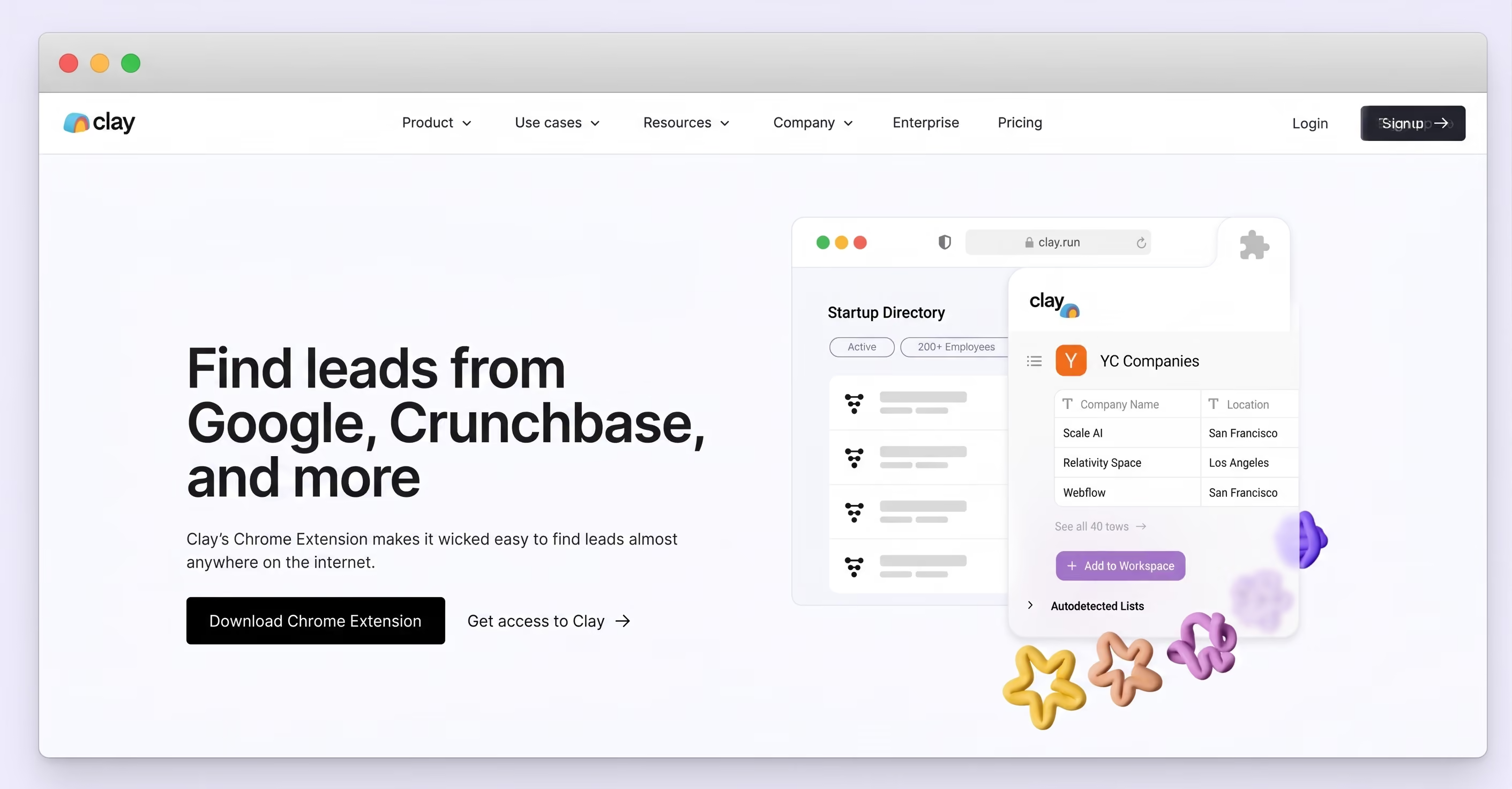
If you want to scrape as you browse, the intuitive Chrome extension is up to the task. It can pull data from any website and export it to your Clay table in a couple of clicks. 🖱️
The extension uses automatic detection or predefined recipes to collect data when you open the comments section of a YouTube video. For more customization, you can create your own recipe by selecting the specific data points you need on any page.
In addition to scraping comments, the extension can support any project and lets you:
- Pull in new leads
- Get insights into popular products
- Get data on any company
- Find relevant keywords
.png)
Take Advantage of Clay's Native Integrations
If you want a completely hands-off experience, use some of the many web scraping integrations that Clay natively offers. The table below highlights a few that you'll love:
| Integration | Explanation |
|---|---|
| 🧹 Scrape Website | Provide the URL of the webpage you want to scrape and the data you need and get ready results |
| 📃 Parse Data from URL | Parse data from a URL using ScrapeMagic API |
| 📌 Scrape Profile with Pinterest | Scrape key data from a user's Pinterest profile |
| 💙 Get Account Details with Twitter | Get key data about an account on Twitter given a username or profile URL |
| 🎁 Get Products with Woocommerce | Get product listings from Woocommerce-hosted websites |
| 🏦 Find Business Info | Find information about a business from the Company's Yelp Page given a location and search query |
If you still need more options, Clay also offers web scraping templates that come with automations and pre-built Clay tables for various use cases, such as:
Clay's Enrichment Features You'll Love

The advanced scraping capabilities are only a part of Clay's diverse feature set. Here's an overview of other fantastic features:
- 📊 50+ data providers: Clay integrates with dozens of data providers to give you exceptional data access without purchasing separate subscriptions
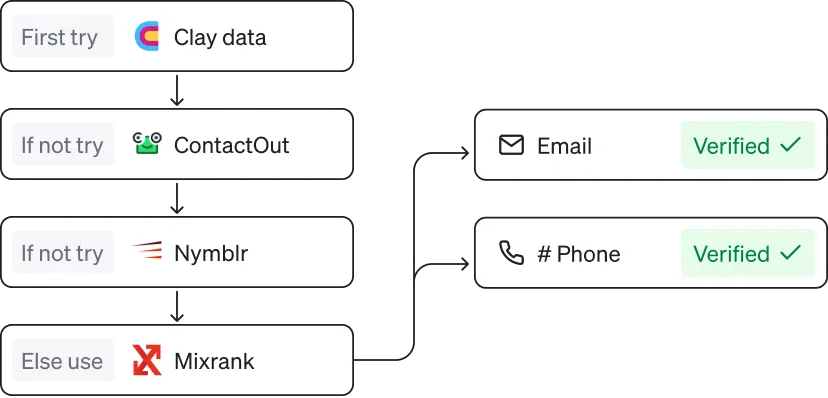
- 🌊 Waterfall enrichment: The platform searches the data providers one by one until it finds the data you asked for
- 🗃️ Data formatting: Clay automatically cleans and formats messy data to make your results ready for use
- 📧 Email personalization: The AI messaging lets you use the enriched data to craft hyper-personalized messages for each prospect
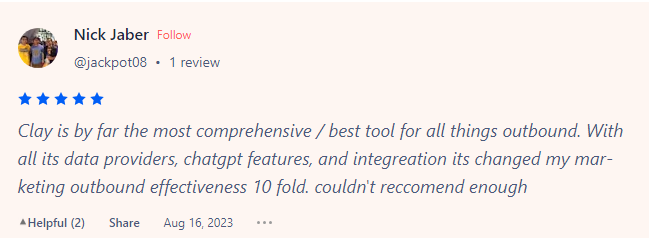
Clay's multifunctionality is one of its greatest strengths. Here's what one user had to say about it:

Create Your Clay Account
To access all of these features, create a free Clay account in three quick steps:
- Go to the signup page 👈
- Provide your name, email, and password
- Explore Clay's scraping and enrichment capabilities
Clay's free forever plan and 14-day free trial are perfect for testing out all features. Once you get a feel for the platform, you can opt for one of the following paid plans:
| Plan | Price | Number of Data Credits |
|---|---|---|
| 🚀 Launch | $185/month | 2,500–10,000 |
| 📈 Growth | $495/month | 6,000–100,000 |
| 🏢 Enterprise | Custom | Custom |
Frequently Asked Questions
What is a YouTube comment scraper?
A YouTube comment scraper is a tool or script that automatically extracts comments from YouTube videos at scale. Depending on the method, it can use the official YouTube Data API, a custom Python script, or a no-code tool like Clay to collect and export comment data for analysis or research.
What can you do with YouTube comment data?
YouTube comment data is useful for sentiment analysis, market research, audience reaction analysis, product mention tracking, and building prospect datasets. Marketers and researchers use it to understand how audiences respond to content, products, or topics at scale.
How do I scrape YouTube comments without coding?
Use a no-code scraping tool. Clay offers three options: Claygent (an AI scraping assistant you prompt in plain language), a Chrome extension that pulls comments as you browse, and native integrations like Scrape Website and Parse Data from URL. None of these require writing any code.
What data fields can a YouTube comment scraper extract?
The specific fields depend on the tool and method used. The YouTube Data API exposes comment text, author name, publish date, like count, and reply counts. No-code tools and custom scrapers can often capture additional metadata visible on the page, depending on how they are configured.
Does Clay offer a free plan for scraping?
Yes. Clay has a free forever plan that includes 500 actions per month, 100 data credits per month, and access to Claygent and multi-provider waterfalls. A 14-day free trial with 1,000 data credits is also available to test paid features before committing to a plan.
For more interesting Clayformation, visit Clay University, join the Slack community, or sign up for the newsletter. 💌
💡 Bonus read: Check out these articles and find the fastest way to scrape platforms like:
As a popular platform among many generations, YouTube's comments section has valuable data you can use for sentiment analysis, market research, or even creating datasets for prospecting.
Still, collecting data from social media platforms differs slightly from public websites. You agree to terms of service that might come in the way of scraping.
To get first-hand insights, we consulted our network of sales professionals who specialize in data extraction and prospect research. With their valuable input, we break down the three methods to try and recommend a YouTube comment scraper as the most straightforward approach, especially for users looking for a no-code solution. 🧑💻
TL;DR
- You can scrape YouTube comments three ways: the official YouTube Data API, a custom Python scraper, or a no-code scraping tool.
- The API is the most ethical option but requires coding skills and caps you at 10,000 API units per day.
- Building a Python scraper from scratch is time-consuming and requires handling pagination, proxies, CAPTCHAs, and retries.
- No-code tools like Clay are the fastest path: use Claygent, the Chrome extension, or native integrations to extract comments without writing any code.
Is It Legal To Scrape YouTube?
While scraping public data, including YouTube comments, is generally legal, it also depends on a few factors:
- 📊 Type of data: Scraping private data without permission is prohibited by data protection regulations like GDPR and CCPA
- ⚖️ Terms of service: YouTube's terms of service prohibit users from scraping without explicit permission, and violations could lead to legal action. These terms are not enforceable if you scrape without logging in
- 🚫 Copyright laws: Scraping copyrighted data is not illegal if done in line with the fair use doctrine, but reproducing or distributing it without the owner's authorization can result in legal penalties
So, scraping YouTube is not illegal in itself, but the type of data you scrape, as well as how you do it and what you use it for, can influence its legality. To be safe, consult a legal professional before scraping to understand your jurisdiction's stance on scraping. 👮
💡 Bonus read: Find the best ways to scrape emails from Facebook and Instagram. Or see what scrapers work well with Mac.
How To Scrape YouTube Comments: 3 Methods

Scraping YouTube comments is possible, and you can do it in three different ways:
- Using the official YouTube API
- By building a custom scraper using Python
- Using ready-made scraping software
While each method is effective to an extent, the last option is the easiest and most resource-saving. Let's break them all down!
Scraping Using the YouTube API
If you want to scrape YouTube comments ethically without the risk of getting banned, you should use the YouTube Data API. ⛔
Using it requires at least some basic coding skills and familiarity with HTTP requests and JSON responses. Although YouTube provides comprehensive documentation and client libraries to make it accessible, non-technical users new to coding may find these concepts confusing and take a long time to master them.
Using the API to scrape generally involves the five steps below:
- Create a Google account
- Create a new project in the Google Cloud Console
- Obtain API credentials
- Install the necessary libraries
- Write code
If you need to scrape private data, you also need to implement OAuth 2.0 to request user permission. 💻
Some of these steps are highly technical and complex, so using the API can be time-consuming, even for developers with considerable coding skills.
You can use the YouTube Data API for free if you don't exceed the daily quota of 10,000 API units. While this is enough for small-scale or hobby data scraping projects, you will need to open your wallet for larger-scale scraping.
That said, the API doesn't give full access to all the data points on the platform, so you may not be able to extract all the data you need.
Building a Scraper in Python

Python is a popular choice in data scraping due to the wide range of libraries that can handle complex websites, parse text, and interact with HTML forms. If you have the time and necessary coding background, you can use it to create a YouTube comment scraper from scratch. ⌨️
To build a simple Python script, you only need to install scraping libraries like BeautifulSoup or Selenium and code a Python loop to iterate over the comments as it scrapes.
However, if you need a robust YouTube comment scraper, you'll need some additional features outlined in the table below:
| Feature | Why You Need It |
|---|---|
| Pagination handling | YouTube displays a few comments at a time, so your scraper needs to interact with the pagination controls to navigate through the comments section |
| User agent and proxy rotation | The platform implements anti-scraping measures, so your scraper needs to rotate user agents and proxies to avoid detection and circumvent them |
| CAPTCHA solving | YouTube employs a CAPTCHA system to differentiate people and bots. This means your scraper must integrate with captcha-solving services like Anti Captcha and Capsolver to solve them |
| Auto retry mechanisms | To ensure your scraper can still extract the data you need in case a request fails, you need a retry wrapper. You can use a pre-built wrapper or code one from scratch |
| Scheduling features | You'll likely want to scrape YouTube comments more than once, so you need to set your script to run in predefined intervals |
Even with considerable coding skills, implementing these features can take a lot of time and effort and may be challenging to handle effectively without help. You can avoid the hassle by paying a developer to create a custom YouTube comment scraper for you, but you still have to learn to use and manage it. 🚧
With numerous robust no-code YouTube comment scraper tools available, creating a Python scraper from scratch is not worth the trouble.
No-Code Web Scrapers
If you don't have a technical background or want to avoid creating a YouTube comment scraper from scratch, you can use a web scraper tool and collect comments without writing a single line of code. 👍
No-code web scrapers can come as ready-made solutions that don't require a lengthy setup process or as toolkits for building a custom scraper. They typically have intuitive and user-friendly interfaces that rely on the following:
- 🖱️ Pointing and clicking: Open the comments on a YouTube video and click on the data points you need to extract
- 🔗 URLs: Provide a YouTube video URL, and the tool scrapes its comments
- ⌨️ Prompts: Instruct the scraper on the comments you need and where to find them, and it extracts them for you
Many advanced web scrapers also have features like scheduling and pagination handling, which would otherwise take a long time to code. These tools could be an excellent choice if you need a powerful YouTube comment scraper without a complex setup process.
For a comprehensive solution that goes beyond scraping and gives you access to millions of data points, we recommend Clay. 🎯
How To Scrape YouTube Comments With Clay
If you need an intuitive data provider, an enrichment platform, and a no-code web data scraper in one, Clay is an excellent option. It can single-handedly carry your scraping projects or entire marketing campaigns. 🦾
.png)
Clay offers three convenient ways to scrape YouTube comments:
Use Claygent To Scrape Any Public Data
Claygent is an innovative AI web scraper that can visit any website to extract data and deliver it in the format you want. You can automate the entire scraping process, save time and effort, and minimize human error.
It works similarly to ChatGPT and uses natural language processing to receive instructions and give back results. Claygent is intuitive and easy to use. All you have to do is:
- Log into Clay and create a new table
- Add a list of videos you want to scrape comments from
- Click Enrich Data and then search for Claygent
Give Claygent prompts on the data you want to collect or ask specific questions, and it will report back in minutes and let you check the logic behind its answer to verify accuracy. 🔬
Use Clay's Chrome Extension To Scrape Live Data
If you want to scrape as you browse, the intuitive Chrome extension is up to the task. It can pull data from any website and export it to your Clay table in a couple of clicks. 🖱️
The extension uses automatic detection or predefined recipes to collect data when you open the comments section of a YouTube video. For more customization, you can create your own recipe by selecting the specific data points you need on any page.
In addition to scraping comments, the extension can support any project and lets you:
- Pull in new leads
- Get insights into popular products
- Get data on any company
- Find relevant keywords
.png)
Take Advantage of Clay's Native Integrations
If you want a completely hands-off experience, use some of the many web scraping integrations that Clay natively offers. The table below highlights a few that you'll love:
| Integration | Explanation |
|---|---|
| 🧹 Scrape Website | Provide the URL of the webpage you want to scrape and the data you need and get ready results |
| 📃 Parse Data from URL | Parse data from a URL using ScrapeMagic API |
| 📌 Scrape Profile with Pinterest | Scrape key data from a user's Pinterest profile |
| 💙 Get Account Details with Twitter | Get key data about an account on Twitter given a username or profile URL |
| 🎁 Get Products with Woocommerce | Get product listings from Woocommerce-hosted websites |
| 🏦 Find Business Info | Find information about a business from the Company's Yelp Page given a location and search query |
If you still need more options, Clay also offers web scraping templates that come with automations and pre-built Clay tables for various use cases, such as:
Clay's Enrichment Features You'll Love

The advanced scraping capabilities are only a part of Clay's diverse feature set. Here's an overview of other fantastic features:
- 📊 50+ data providers: Clay integrates with dozens of data providers to give you exceptional data access without purchasing separate subscriptions
- 🌊 Waterfall enrichment: The platform searches the data providers one by one until it finds the data you asked for
- 🗃️ Data formatting: Clay automatically cleans and formats messy data to make your results ready for use
- 📧 Email personalization: The AI messaging lets you use the enriched data to craft hyper-personalized messages for each prospect
Clay's multifunctionality is one of its greatest strengths. Here's what one user had to say about it:

Create Your Clay Account
To access all of these features, create a free Clay account in three quick steps:
- Go to the signup page 👈
- Provide your name, email, and password
- Explore Clay's scraping and enrichment capabilities
Clay's free forever plan and 14-day free trial are perfect for testing out all features. Once you get a feel for the platform, you can opt for one of the following paid plans:
| Plan | Price | Number of Data Credits |
|---|---|---|
| 🚀 Launch | $185/month | 2,500–10,000 |
| 📈 Growth | $495/month | 6,000–100,000 |
| 🏢 Enterprise | Custom | Custom |
Frequently Asked Questions
What is a YouTube comment scraper?
A YouTube comment scraper is a tool or script that automatically extracts comments from YouTube videos at scale. Depending on the method, it can use the official YouTube Data API, a custom Python script, or a no-code tool like Clay to collect and export comment data for analysis or research.
What can you do with YouTube comment data?
YouTube comment data is useful for sentiment analysis, market research, audience reaction analysis, product mention tracking, and building prospect datasets. Marketers and researchers use it to understand how audiences respond to content, products, or topics at scale.
How do I scrape YouTube comments without coding?
Use a no-code scraping tool. Clay offers three options: Claygent (an AI scraping assistant you prompt in plain language), a Chrome extension that pulls comments as you browse, and native integrations like Scrape Website and Parse Data from URL. None of these require writing any code.
What data fields can a YouTube comment scraper extract?
The specific fields depend on the tool and method used. The YouTube Data API exposes comment text, author name, publish date, like count, and reply counts. No-code tools and custom scrapers can often capture additional metadata visible on the page, depending on how they are configured.
Does Clay offer a free plan for scraping?
Yes. Clay has a free forever plan that includes 500 actions per month, 100 data credits per month, and access to Claygent and multi-provider waterfalls. A 14-day free trial with 1,000 data credits is also available to test paid features before committing to a plan.
For more interesting Clayformation, visit Clay University, join the Slack community, or sign up for the newsletter. 💌
💡 Bonus read: Check out these articles and find the fastest way to scrape platforms like:


.png)
.png)


.png)


.avif)


.avif)



.webp)


.avif)